
What's new
What changed, and when.
A dated list of what we added. Live means you can use it on this website today. Development build means it works in our internal build and is not released yet.
16 October 2026
- LiveOnline course: Reinforced Concrete Design 1Lessons 1 to 3 of an eight-lesson course to SANS 10100-1: beams in bending, doubly reinforced and flanged beams, and shear and links. The theory is open to all; the worked examples, exercises and quiz open with a university or college email, or with a calculator pack or paid plan. See the course
- On sale soonCalculator packsPacks unlock calc sheets and PDF, bending schedules, detail drawing sheets (PDF/DXF), saved work and the project board: Concrete, Steel (with connections), Foundations & Geo, or all calculators. They replace Calculators Pro.
- LiveFree result, 3 full designs a monthThe result (pass/fail and utilisation) stays free for everyone. Signed-in free accounts get 3 designs a month with every check, the calc sheet and the bending schedule.
- LiveNew: Strip FootingWall footing per metre run: bearing pressure, overturning and sliding, bending and shear at the wall face, with the section drawn and a bending schedule. Open it
- LiveNew: Raft FoundationConcrete plate on soil springs: bearing pressure, settlement, steel each way and punching at every column. Open it
- LiveNew: Slab on GradeGround-bearing concrete slab on the subgrade: point, line and area loads, mesh or bars, crack control and joint spacing, to SANS 51992-1-1 and Eurocode 2. Open it
- LiveNew: Combined & Strap FootingTwo columns on one footing, or two pads joined by a strap beam: soil pressure, bending and shear along the footing and punching at both columns. Open it
- LiveNew: Flat SlabA slab on columns with no beams: column and middle strips, top and bottom steel, punching at the columns and deflection. Open it
- LiveNew: Pile Capacity, and pile group checksPile Capacity gives shaft friction, end bearing and uplift for a single pile in layered soil. The Pile Cap page now checks the pile group: each pile against its soil capacity, group efficiency, block failure and the share of horizontal load. Open it
- LiveSANS 51992-1-1 as a design codeThe South African annex to Eurocode 2 is an option on RC beam, RC column, two-way slab, pad footing, punching, RC wall, crack and deflection, corbel, staircase, pile cap, strip footing and raft, next to SANS 10100, BS 8110 and EC2.
- LiveProject boardIn every pack: elements on drawing sheets, the bending schedule, column, footing and beam schedules, a quantities table (concrete m³, formwork m², steel kg) and setting-out plans. Columns, pads, walls and grids found in the architect's DXF plan become elements. Loads flow down from beams to columns to footings and from walls to strip footings, with unlink. Strip footings and rafts sit on the board, and a calculator opens in a second window.
- LiveSteel connection drawingsThe fin plate and end plate pages draw the connection to scale for everyone: real sections, bolts and holes, dimensions, the weld symbol and a section view. Base plate and haunches follow.
- LiveTables on phonesOn a phone, wide tables show as a list with one card per row.
12 October 2026
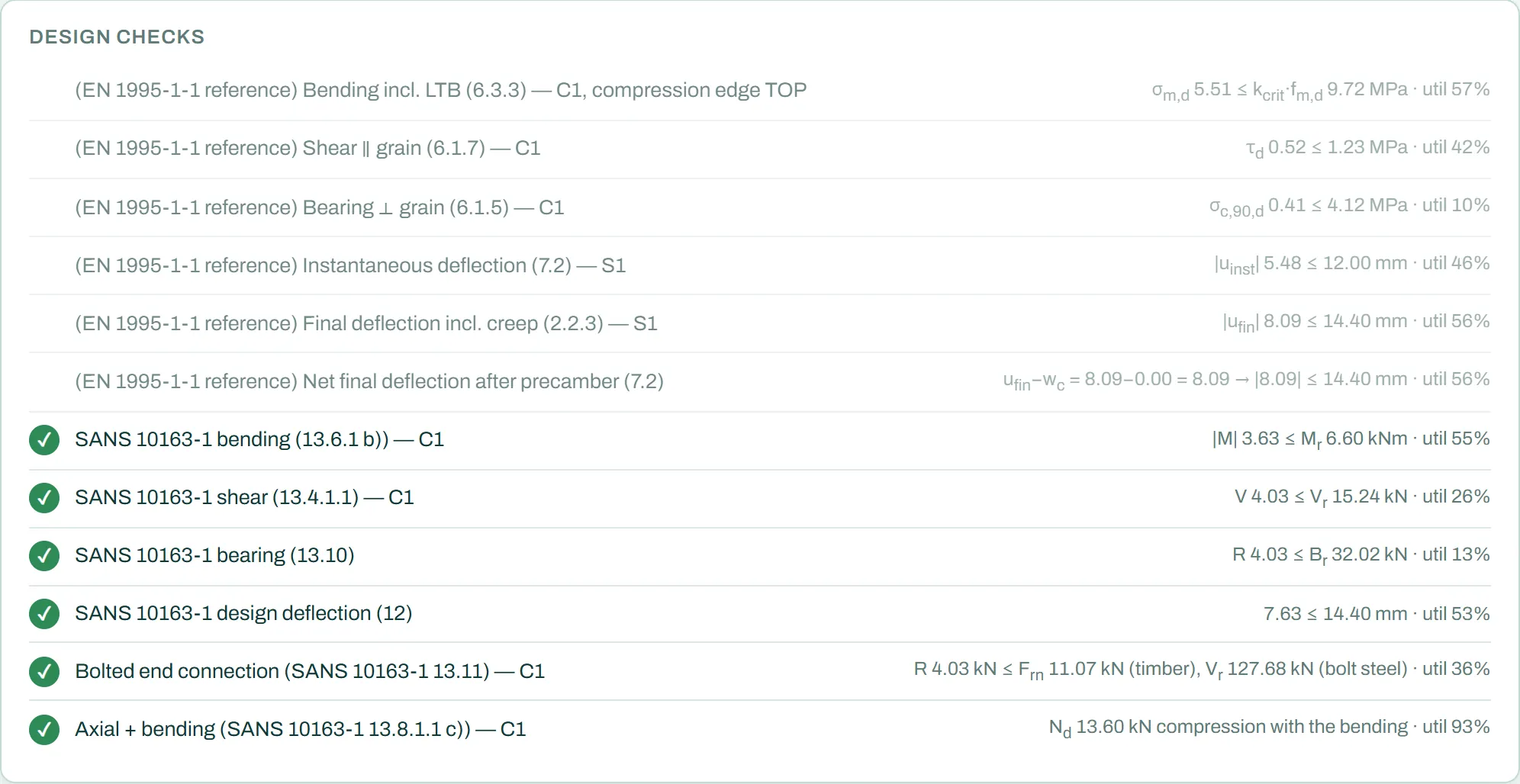
- LiveRC beam: draw the beam with its supportsChoose "Free: place the supports", give each support its position and type (pinned or fixed) and add more to make it continuous. Overhangs and fixed supports anywhere along the beam work. Point loads go in a table (x, G and Q). The inputs sit in a table on the left; the beam, the forces and the checks on the right.
- LiveRC beam: practical bar layoutBar layout "Practical (buildable)": fewer bar marks, one bar size per face, full-length groups instead of staggered bars, checked in full by the STATIX beam engine. The page shows the extra steel against the least-steel layout.
- LiveForces on the sketchesThe RC beam sketch shows the support reactions (and the moment at a fixed support); the pad footing section shows the column loads N, M and H.
- LiveBending schedules to the SANS 282 standard formA drawing-style title block, the standard notes, one mass summary, larger bar sketches with the dimension letters, on every concrete calculator. Schedules print again for paid accounts.
- LiveProject calc packPaid accounts collect calculations into a pack and print one document: cover, contents with each result, then every full calc sheet.
- LiveEvery calculator checkedAbout 8 000 test cases over all calculators: extreme or impossible inputs now get a clear message instead of a result, and the faults found were fixed.
- LiveRC column: links that pass, and the column in elevationThe links are now "Auto" by default: the simplest arrangement that holds every bar (a single tie, or with cross-ties), so a normal 400 × 600 column passes on the first view. A new Elevation view shows the column over its height with the axial load, the end moments (single or double curvature), the shear and the reactions at the base.
- LiveFree supports on the timber beam and the purlinLike the RC beam: place pinned or fixed supports anywhere, with overhangs and point loads, and see the reaction at every support. The RC beam now always works this way; a beam saved with the old support list opens with the same supports.
- LivePractical bars for slabs, and column links in whole 25 mmThe slab calculator gets the "Practical (buildable)" bar layout: one bar size both ways and spacings in 50 mm steps, with the extra steel shown. Column link spacings are rounded down to a whole 25 mm (125 mm, not 144 mm).
- LiveInputs on the left, forces on the sketchesThe inputs sit in a table on the left and the drawing and checks on the right on 16 calculators so far (among them the pad footing, RC column, steel member, retaining wall, pile cap, base plate, timber beam, lintel, purlin, staircase, hollow core, post-tensioned slab, pile capacity and crack and deflection), with the loads and reactions drawn on the sketches.
- LiveThe calculators at the width of the websiteThe dashboard and every calculator now sit in the same 1 200 px column as the rest of the site, easier to read on a wide screen.
- LiveSTATIX 2D 1.0.9 and 1.0.10Slab steel contours from the STATIX analysis as colour bands, and Bars from contours to cover a zone with the right bars. The column window now opens a column file with the right cover and the bars clear of the links. See the tutorial.
- LiveCompany accountsOne plan for the whole office: invite engineers, give them seats, and share project packs. The company details print on every member's calc sheets.
- LiveYour data, your regionDownload all your data or delete your account from the dashboard. Pick your region at the foot of any page; a new calculator opens on that region's design code.
- ChangedTry STATIX withdrawnThe online demo is off. A 30-day trial of the installed STATIX product will take its place.
11 October 2026
- LiveTry STATIX: a building you can changeA steel portal frame with a concrete mezzanine in the STATIX window, solved on the STATIX server as you move the sliders: the deformed shape with deflection labels and Animate, member force diagrams, support reactions, slab moments and steel area as colour bands, and the buckling factor αcr for each ULS combination. (withdrawn on 12 October 2026: a 30-day trial of the installed product follows).
- LiveHow the STATIX suite works togetherOne page with the whole workflow: model, analysis, design, connections, documents and fabrication, and what moves between STATIX 3D, Revit, Advance Steel, STATIX 2D and the calculators. How it works.
- LiveSTATIX 2D 1.0.7 and 1.0.8Add bar can stay open for bar after bar; direct commands for each bar placement; Excel schedules with your company name and logo; Check for update; the column window opens a saved column design and Slab from file draws a saved slab outline.
- LiveSTATIX 2D: one PC, one licenceSigning in on a new PC moves the licence there, and the old PC says so.
- Development buildColumns to BS 8110 and Eurocode 2 on the serverThe column checks in the STATIX app now run to SANS 10100-1, BS 8110-1 and EN 1992-1-1. Small columns no longer fail a lap check wrongly, and beam bars are bent into the columns.
10 October 2026
- Development buildSecond-order analysis and bucklingThe STATIX solver runs P-Delta analysis and finds the buckling factor αcr of real frames, with releases, springs, offsets, slabs and tension-only braces. Checked against textbook answers to within 0,2 %.
- LiveSTATIX 2D 1.0.5 and 1.0.6, and the tutorialA Tutorial button on the ribbon opens a step-by-step guide with large pictures of every window. Read the tutorial.
- LiveFour new worked examplesBase plate and fin plate to SANS 10162-1, imposed and dead loads to SANS 10160-2, and a bolted end plate to EN 1993-1-8, each with the numbers from the free calculators. Learn.
- LiveQuick toolsBar areas with SANS 10100-1 anchorage and laps, a simple beam, a dead load build-up and SANS 10160-2 imposed loads. Open the quick tools.
9 October 2026
- LiveBase plate and fin plate calculators on SANS 10162-1Both now check to SANS 10162-1 by default: holding-down bolts, bearing on the concrete (0,6 fcu, SANS 10100-1) and the base moment to clause 25; fin plate bolts, bearing, block failure, plate bending and welds to clause 13. Rows where SANS has no clause keep the EN method and say so. EN 1993-1-8 stays selectable.
- LiveSTATIX 2D 1.0.3Strip footing bars inside the wizard window, live plan previews in the Opening and Corner wizards, the stair preview with its main bars, and the next free bar mark suggested in the column wizards.
- LiveReinforcement drawings: the smooth bar dragOn the RC beam, lintel, column, pile cap and the other concrete calculators the bar now follows the mouse, snaps to supports and bar ends with a guide line, and stays where it is dropped. The RC beam page has one reinforcement panel instead of three.
- LiveEnd plate, eaves haunch and apex haunch: the real utilisationA joint now shows its own utilisation (a minimum detailing rule no longer sets it). A wrong input, such as a bolt row outside the plate, reads NOT CHECKED with the reason.
- Development buildShowcase: one portal frame from model to Advance SteelAn 18 m portal frame through analysis, member design and 14 joint types, exported to Advance Steel. See the showcase.
6 October 2026
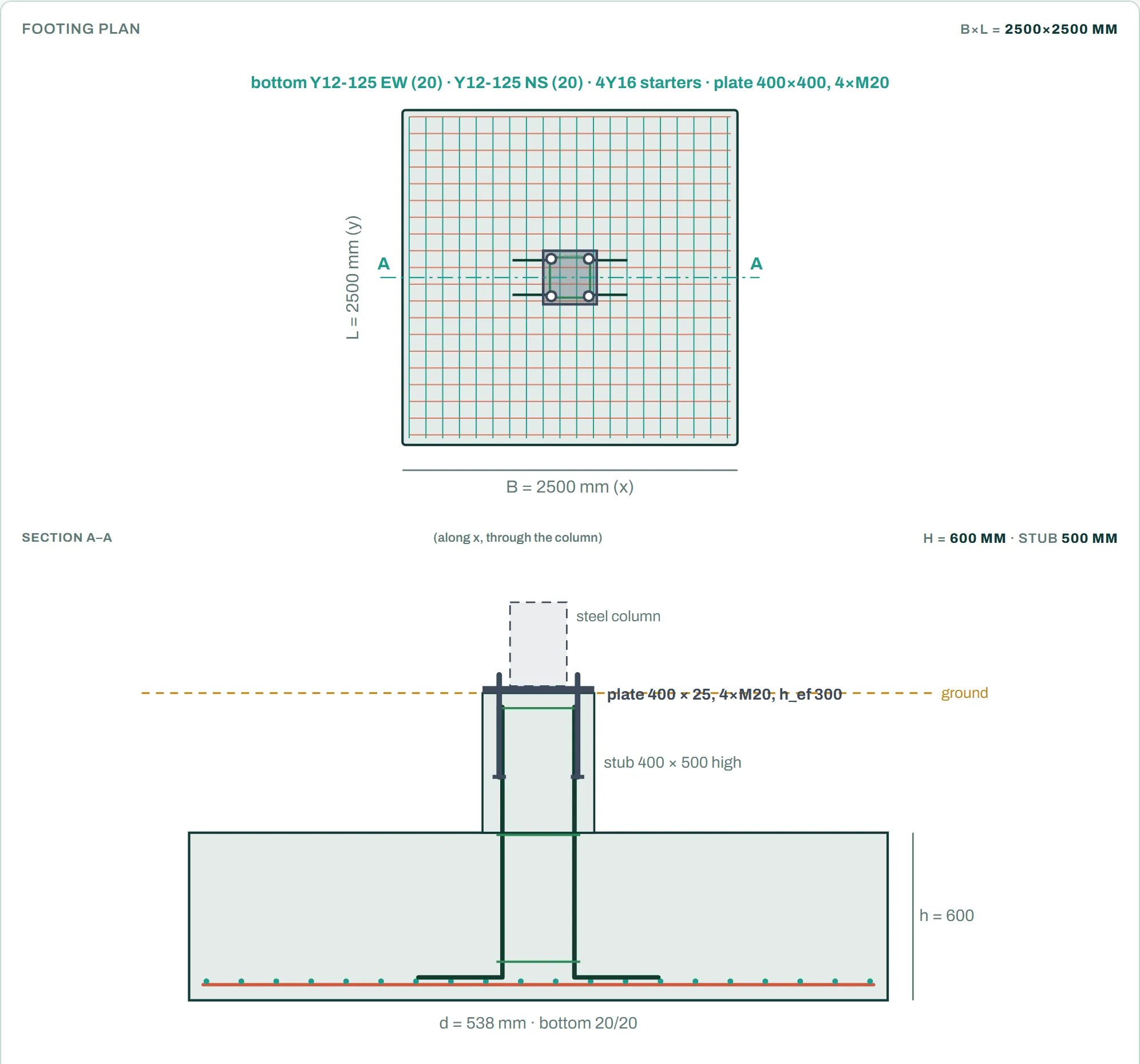
- LivePad footing calculator: detailingA stub under the column, bottom bars as shape 20 or 38, a top mat when the footing lifts off, and starter bars into an RC column or into a stub for a steel base plate, with the holding-down bolts designed by the base plate calculator.
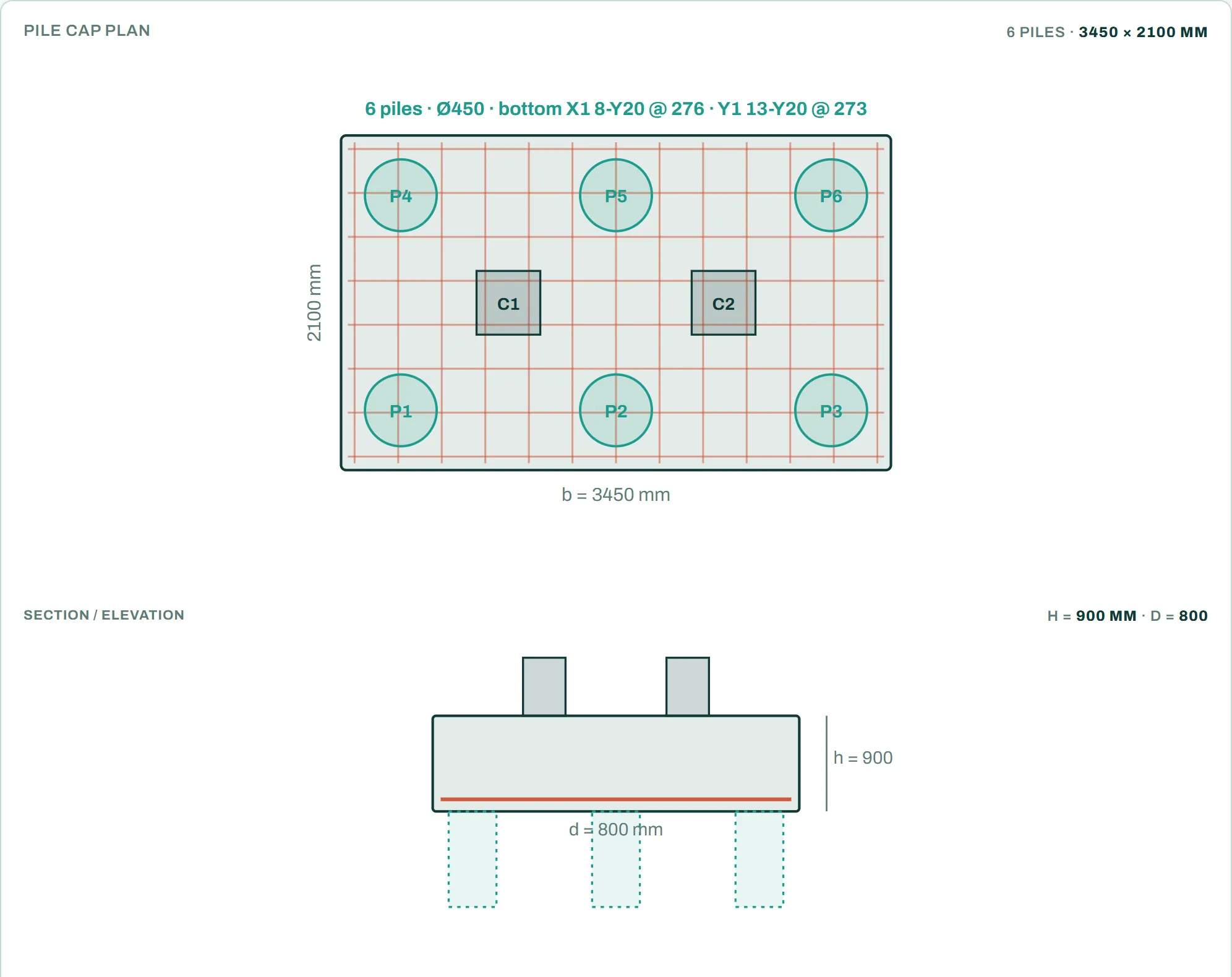
- LivePile cap calculator: several columns on one capGive a pile grid or pile coordinates and the columns on the cap. A cap with more than one column is designed by bending theory. Bars that are short of straight anchorage get bobbed ends, and the bend is checked.
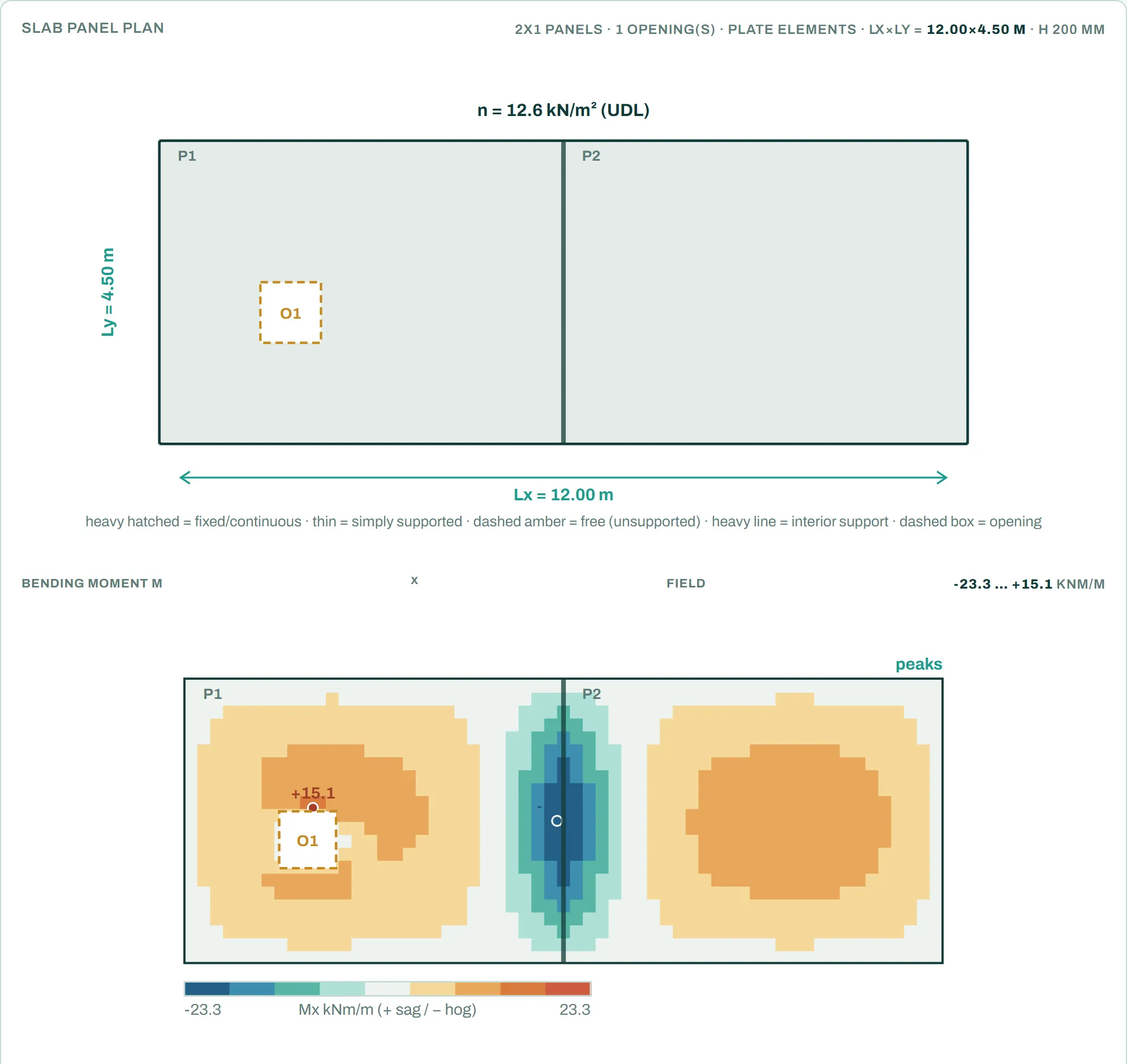
- LiveTwo-way slab calculator: openings and more panelsUp to three openings, and two or three panels in a row or 2 × 2, solved with plate elements.
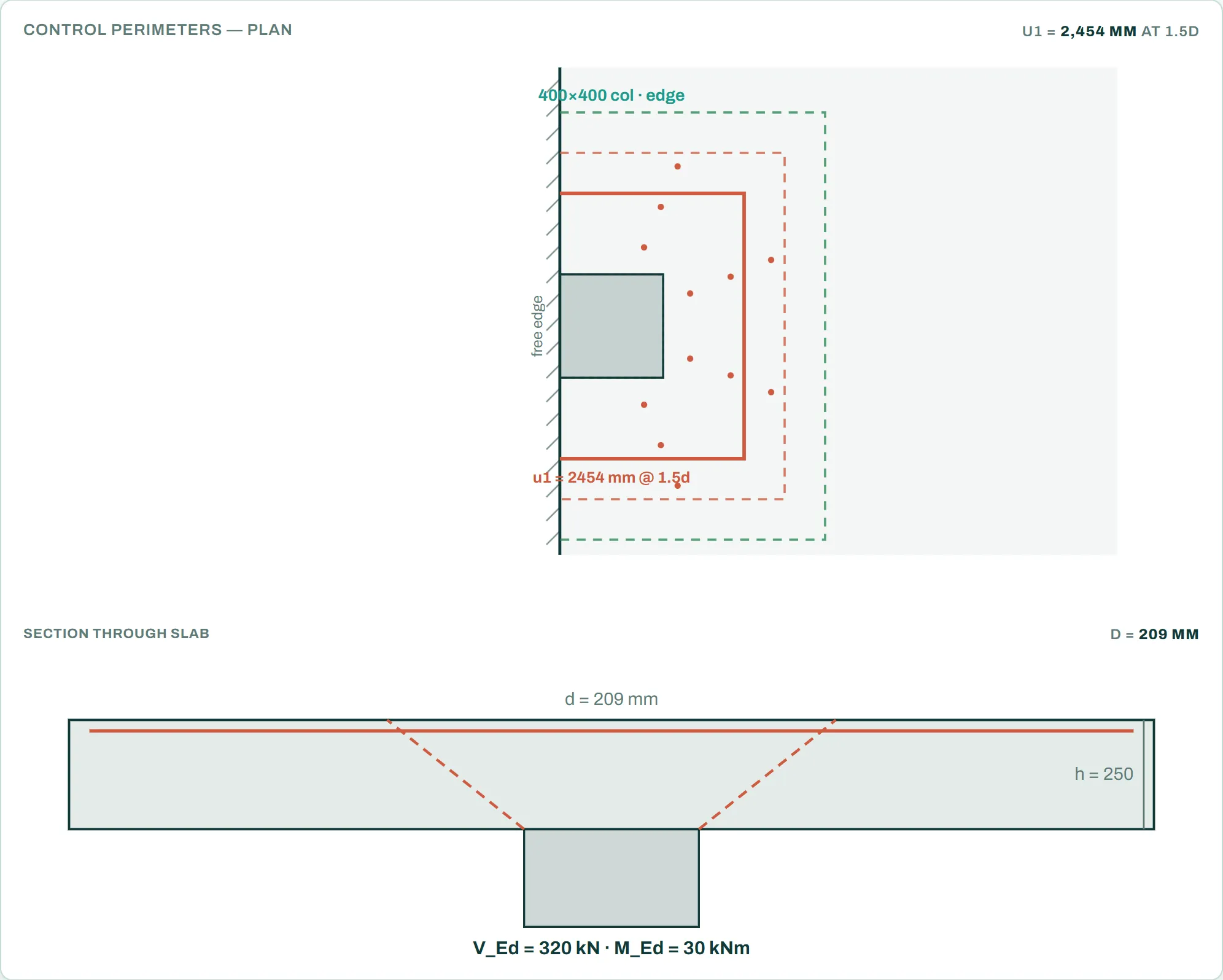
- LivePunching shear calculator: edge and corner columnsControl perimeters at a free edge or a corner, with the shear link layout.
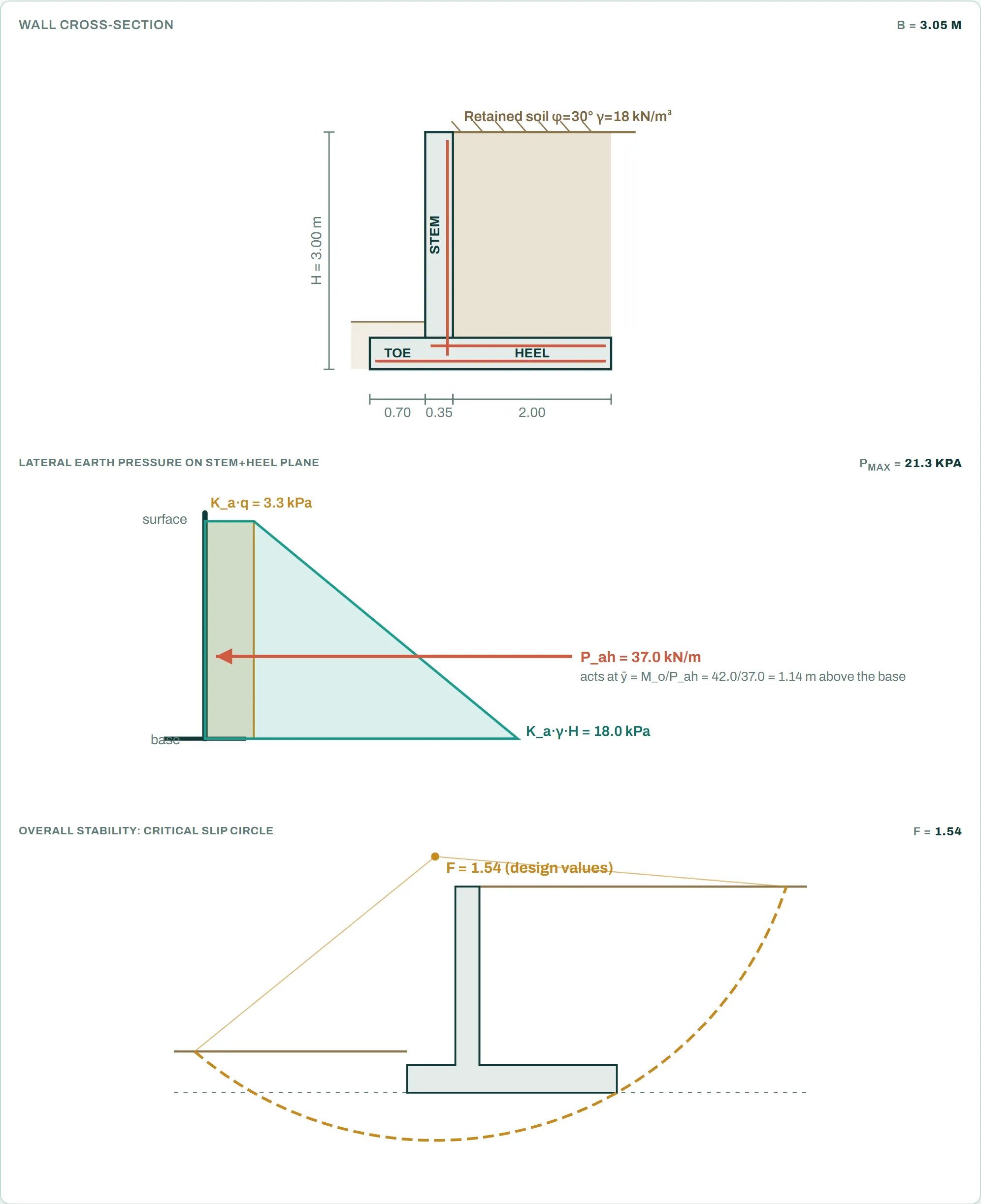
- LiveRetaining wall calculator: overall stabilityThe critical slip circle under the wall (Bishop), with design values.
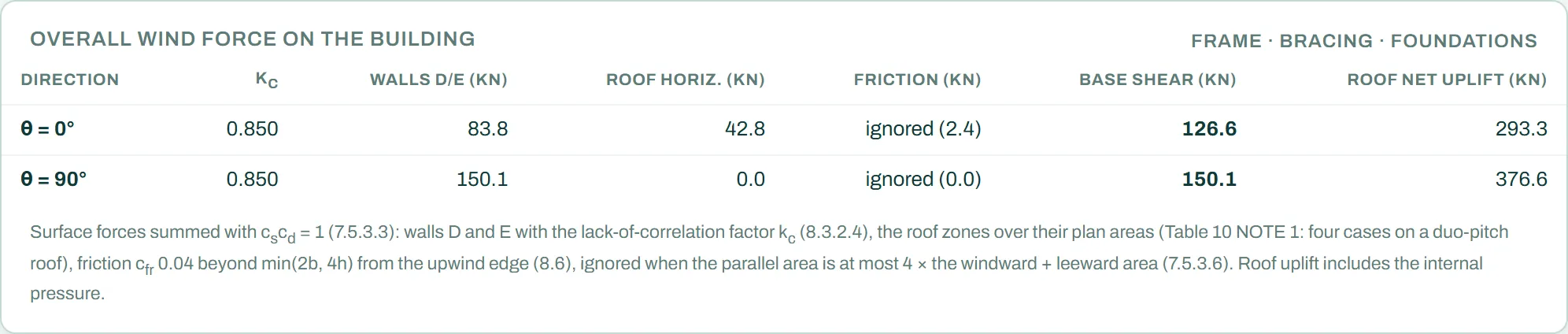
- LiveWind load calculator: more roofs and the overall forceMono-pitch and hipped roof zone tables, free-standing canopy roofs, and the overall wind force on the building with friction.
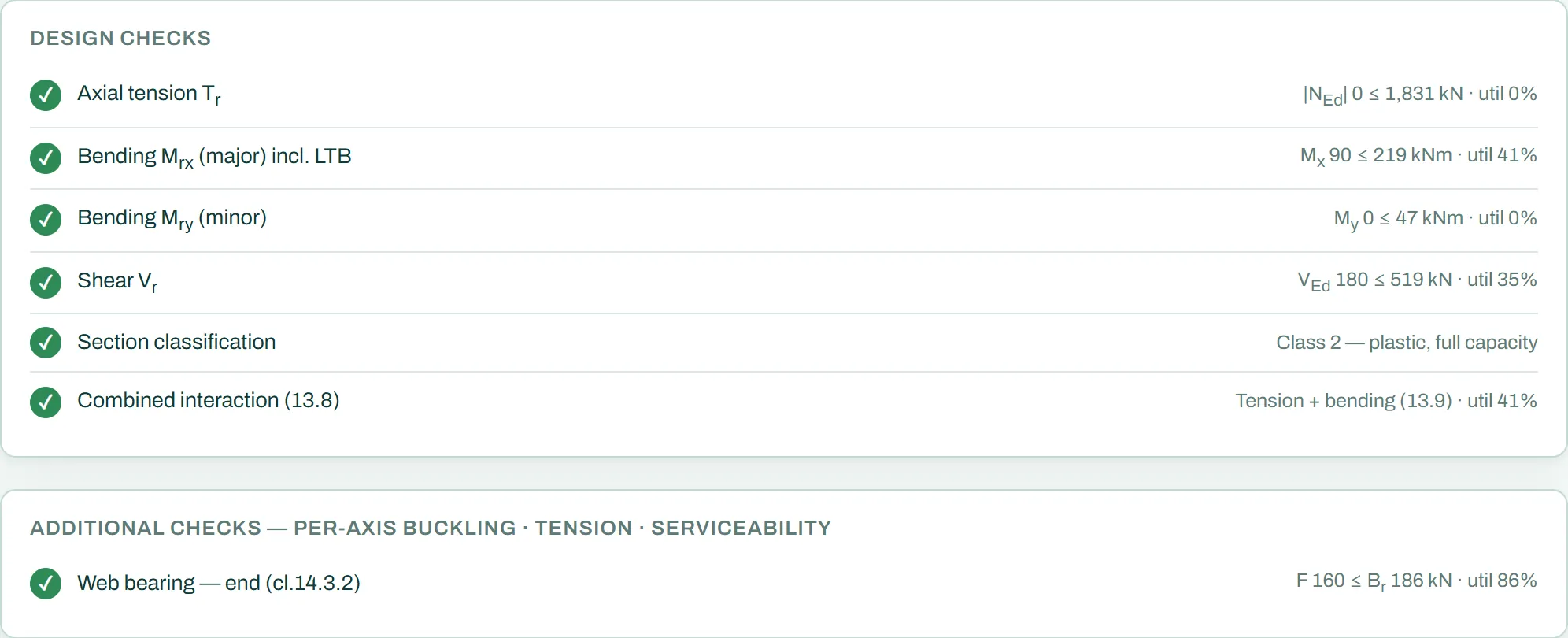
- LiveSteel member calculator: web bearingWeb bearing under a concentrated load, at the end or away from it.
- LiveTimber calculator: axial force and a bolted jointAxial force with bending, and a bolted end joint to SANS 10163-1.
- LiveRC corbel calculator: double-sided corbels and nibsA corbel on each side of a column, and continuous nibs along a beam.
- LiveRC staircase calculator: cantilever flights and stringersFlights that cantilever from a wall, and flights that span between stringers.
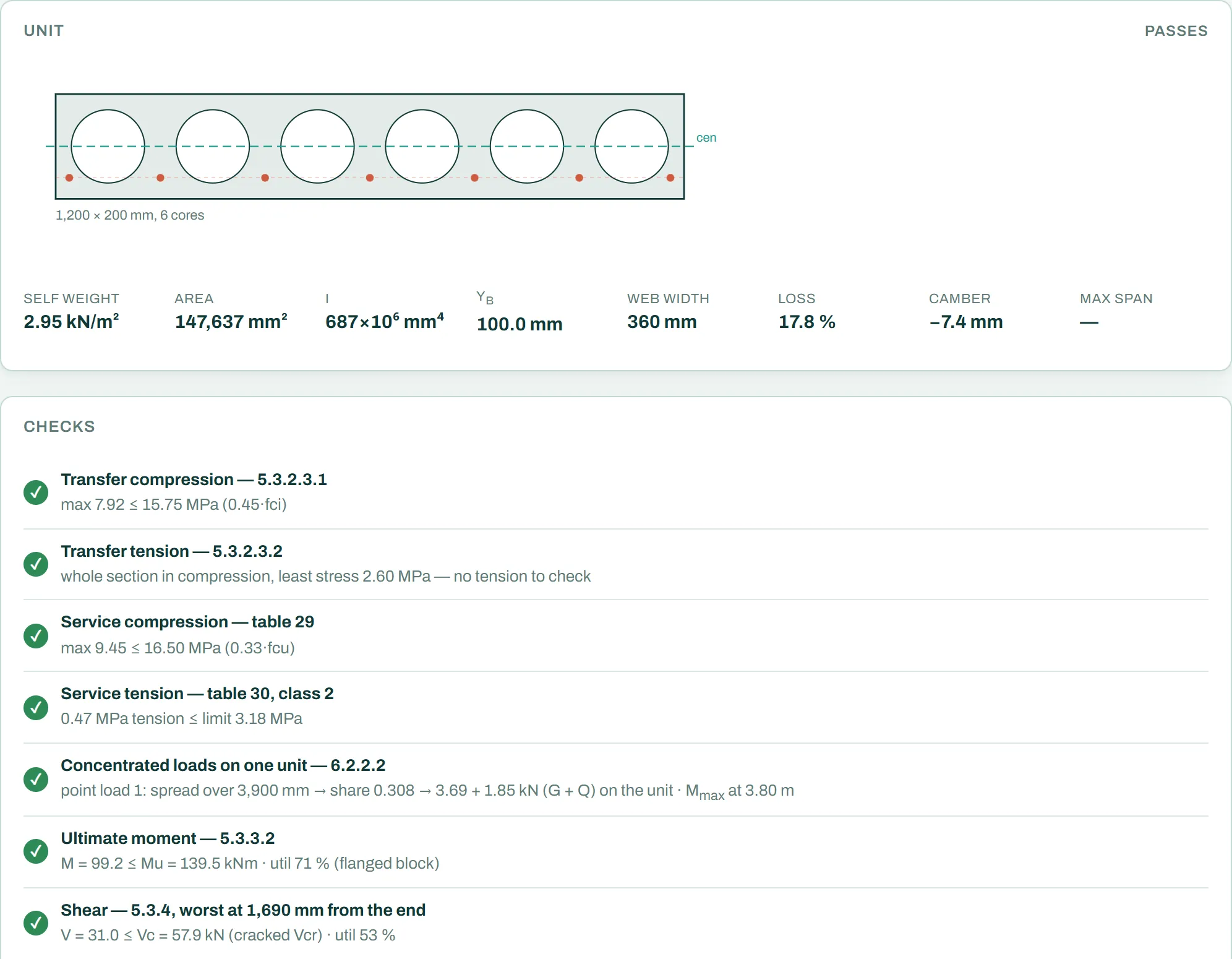
- LiveHollow core calculator: point and line loadsPoint loads, partitions and line loads across the units, spread to the next units as SANS 10100-1 allows.
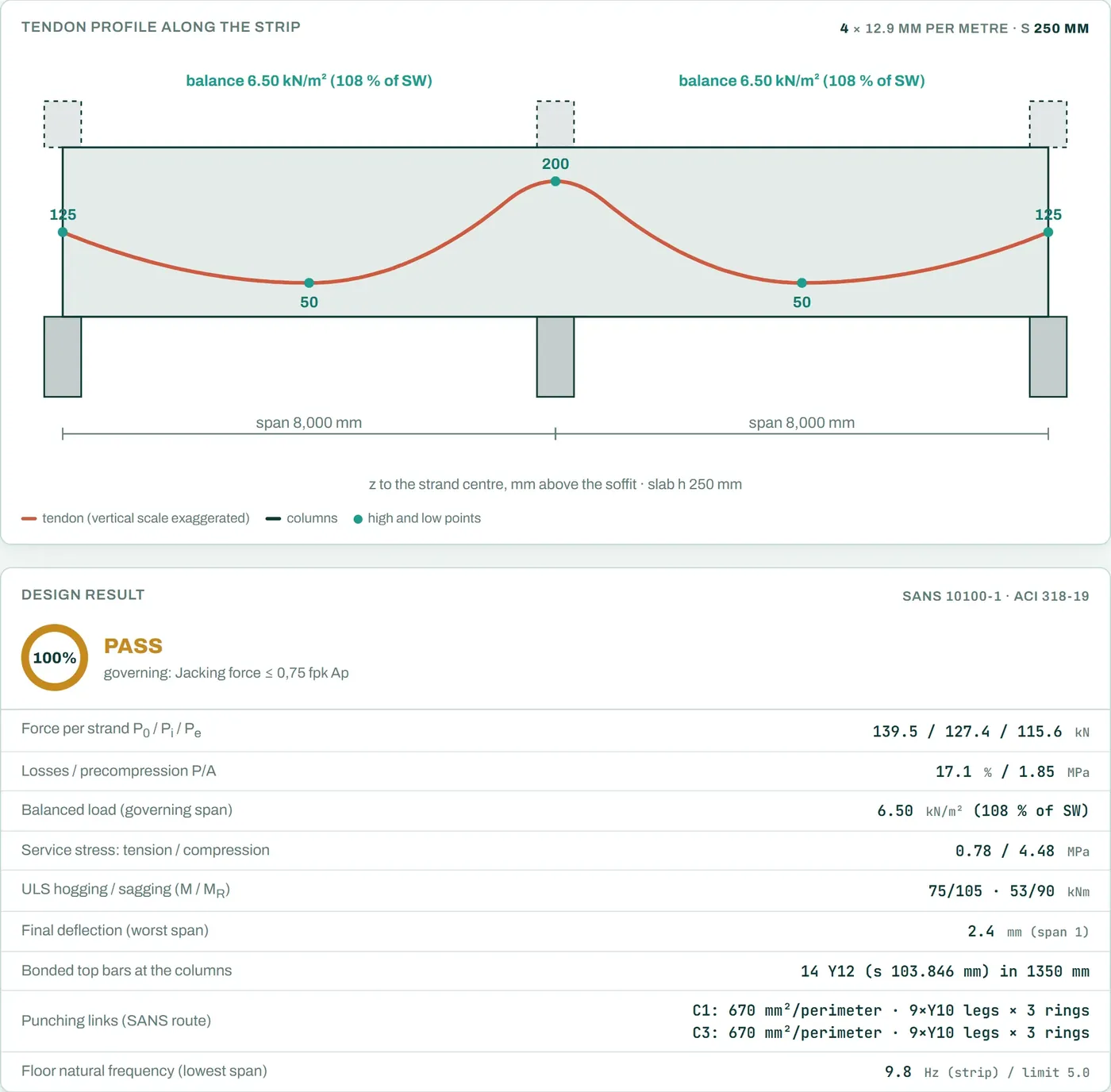
- LivePost-tensioned slab calculator: floor frequencyThe natural frequency of the strip, checked against the limit you give.
- Development buildConnection Studio: checks and calc sheetA portal frame eaves haunch designed in the Connection Studio from the forces in the 3D model, with every check, its clause and a calc sheet. See the new pictures on the connections page.
5 October 2026
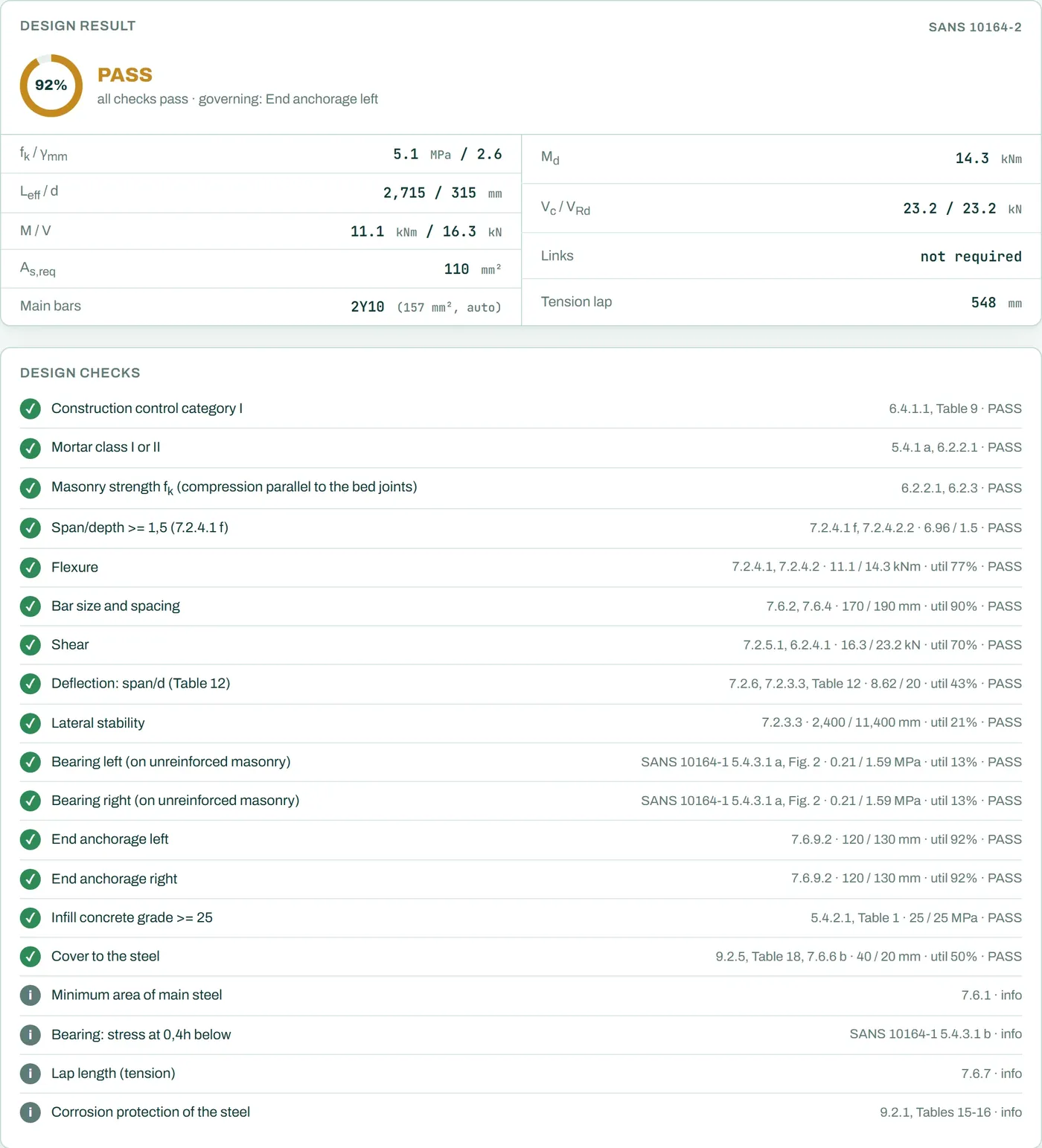
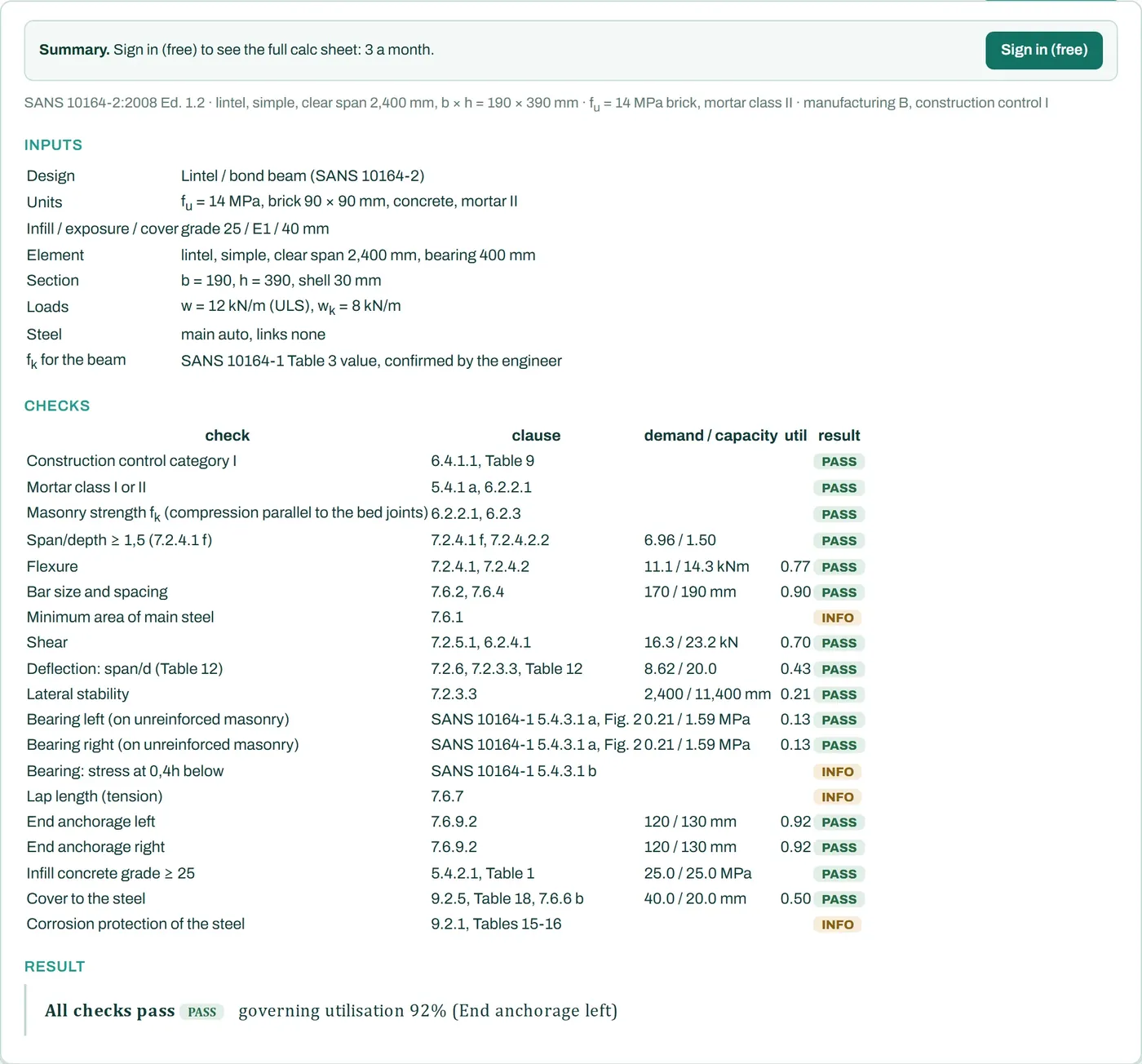
- LiveNew free lintel calculatorLintels over wall openings, loaded by the SANS 10400-K Annex B arching rule: reinforced masonry lintels and bond beams to SANS 10164-2, cast-in-situ RC lintels to SANS 10100-1, and the loads and end bearing for precast lintels.
- LiveFree accounts with Google sign-inMake a free STATIX account with your email or with Google, from the sign-in button on any page.
- LiveClause-by-clause calc sheets and bending schedulesThe full calc sheet and the SANS 282 bending schedule are now built on the STATIX server. Without an account every check still shows on the page with a calc sheet summary. A free account gets 3 full calc sheets and 3 bending schedules a month. Paid plans, coming soon, will add unlimited sheets, CSV export of the bending schedule and your company header.
- LiveYour dashboardEvery calculator in one place, with the ones you used most recently at the top.
- LiveCompany detailsAdd your company name, logo and professional registration on the dashboard. Paid plans print them on the calc sheet with a sign-off block.
- LiveMasonry wall calculator: reinforced walls, lintels and bond beamsUnreinforced walls take the characteristic strength from SANS 10164-1 Table 8. Reinforced walls, lintels and bond beams are designed to SANS 10164-2: flexure, shear, deflection, lateral stability, bearing, anchorage and cover.
- LiveRC beam calculator: torsion, and bars you can editTorsion design to SANS 10100, with the flanges of T and L beams. Drag, curtail or add bars on the drawing and the beam engine checks the edited bars again.
- LivePad footing calculator: soil bearing capacityAn optional check of the bearing capacity of the soil from φ′, c′ or cu, with the groundwater level, on the effective area of the footing.
- LivePile cap calculator: piles in tensionUp to six piles. A moment that lifts a pile is checked against the pile tension capacity, and the full calc sheet sizes a top mat when piles pull.
- LiveRC corbel calculator: Eurocode 2The corbel calculator now designs to SANS 10100-1 or Eurocode 2.
- LiveConnection calc sheets with the full workingThe full calc sheets of the end plate, eaves haunch and apex haunch calculators show the EN 1993-1-8 working clause by clause.
- LiveFour new free calculatorsRC corbel, RC staircase, RC shear wall and post-tensioned slab strip, each to SANS 10100-1 with clause references on every check, a drawing, a phone layout and a printable calc sheet. The post-tensioned slab strip also uses the ACI 318-19 flat-slab rules where SANS 10100-1 refers to specialist literature.
- LiveEaves and apex haunch calculators: a full verdict on their ownThe free eaves haunch and apex haunch calculators now reach a pass or fail without a frame model, and have inputs for the haunch weld legs.
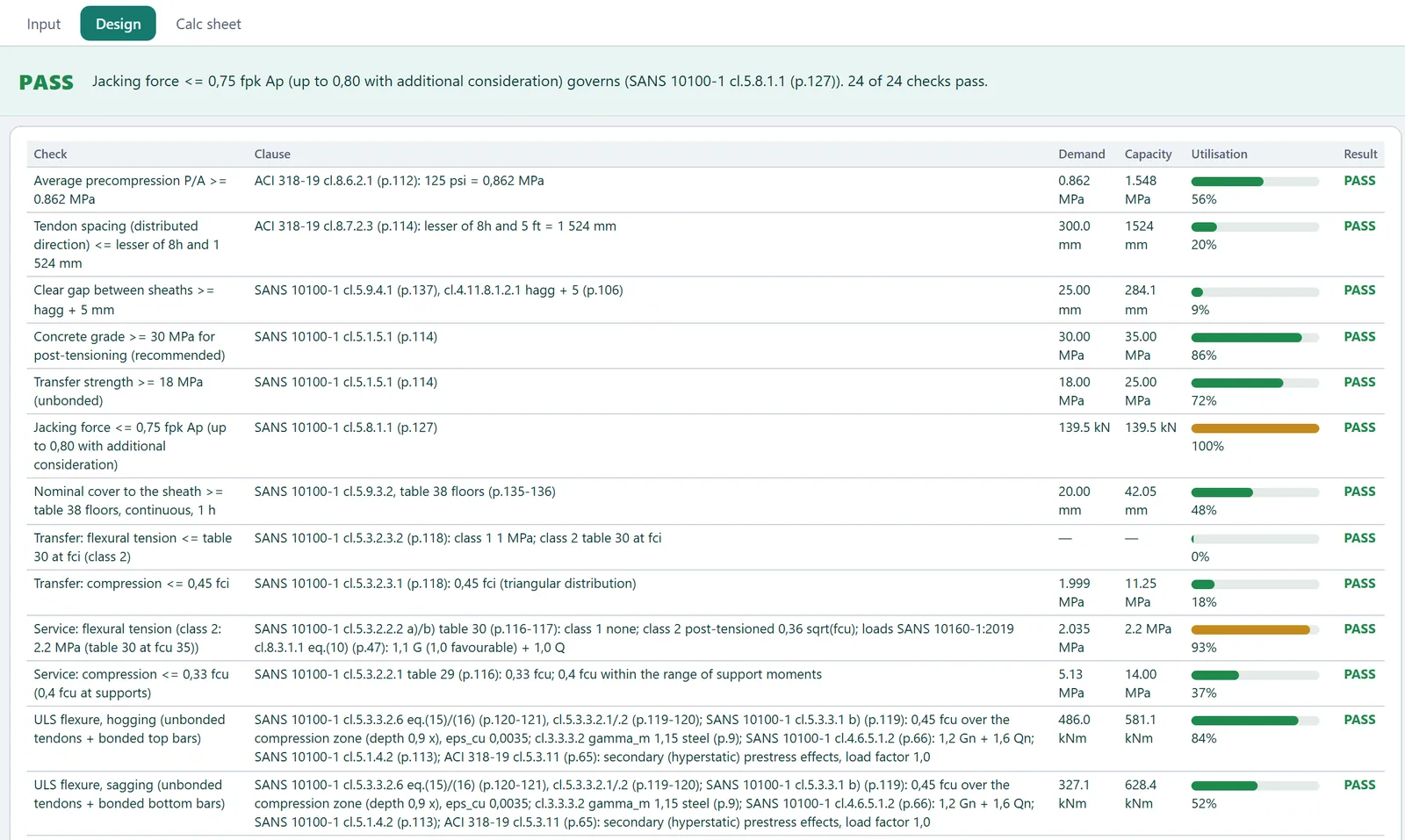
- Development buildPost-tensioned flat slabsTendon layout, losses, balanced loads into the 3-D model, stresses at transfer and in service, ultimate flexure, punching and deflection.
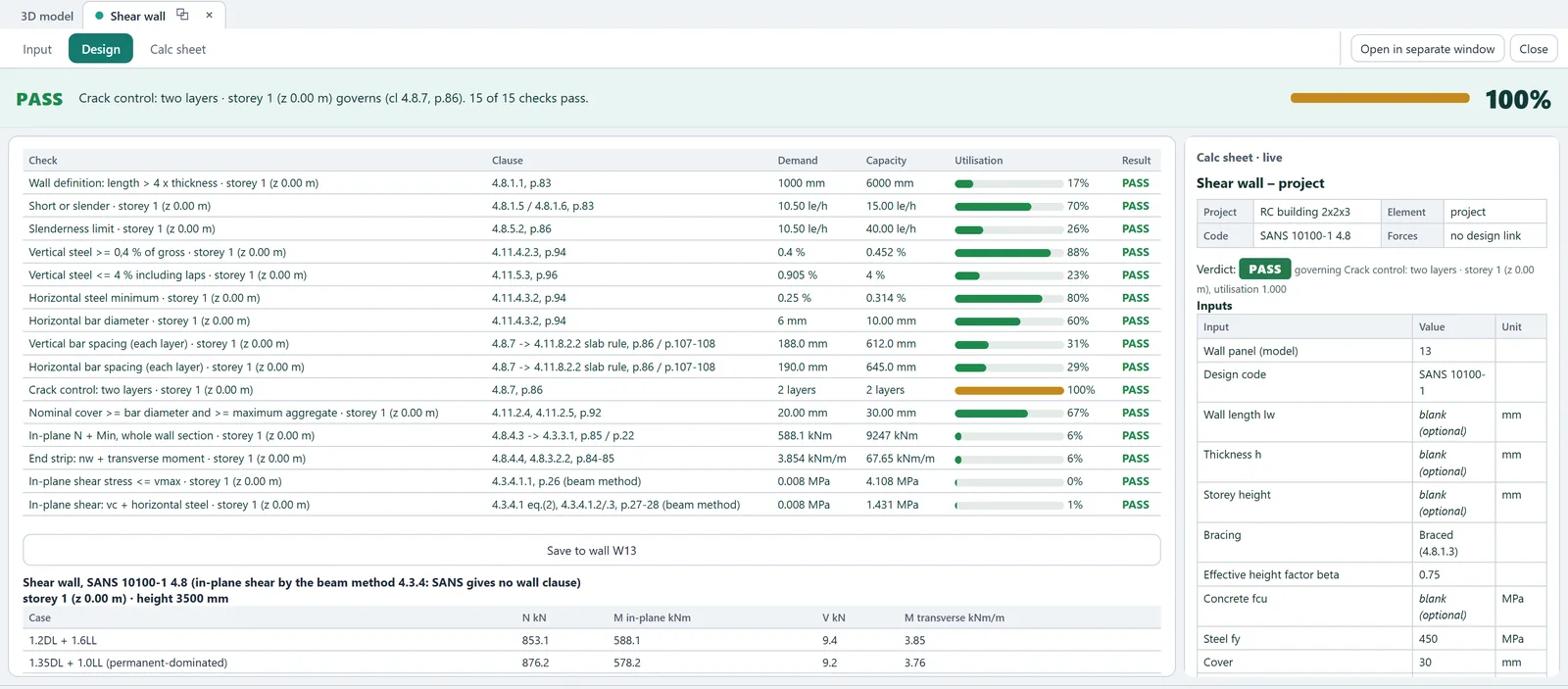
- Development buildRC shear wallsIncluding walls that are partly in tension, designed on a cracked section.
- Development buildStairs and corbels reach a full verdictDurability cover, fire resistance and, for stairs, the landings that span across are now checked, so a stair or a corbel can reach a full pass.
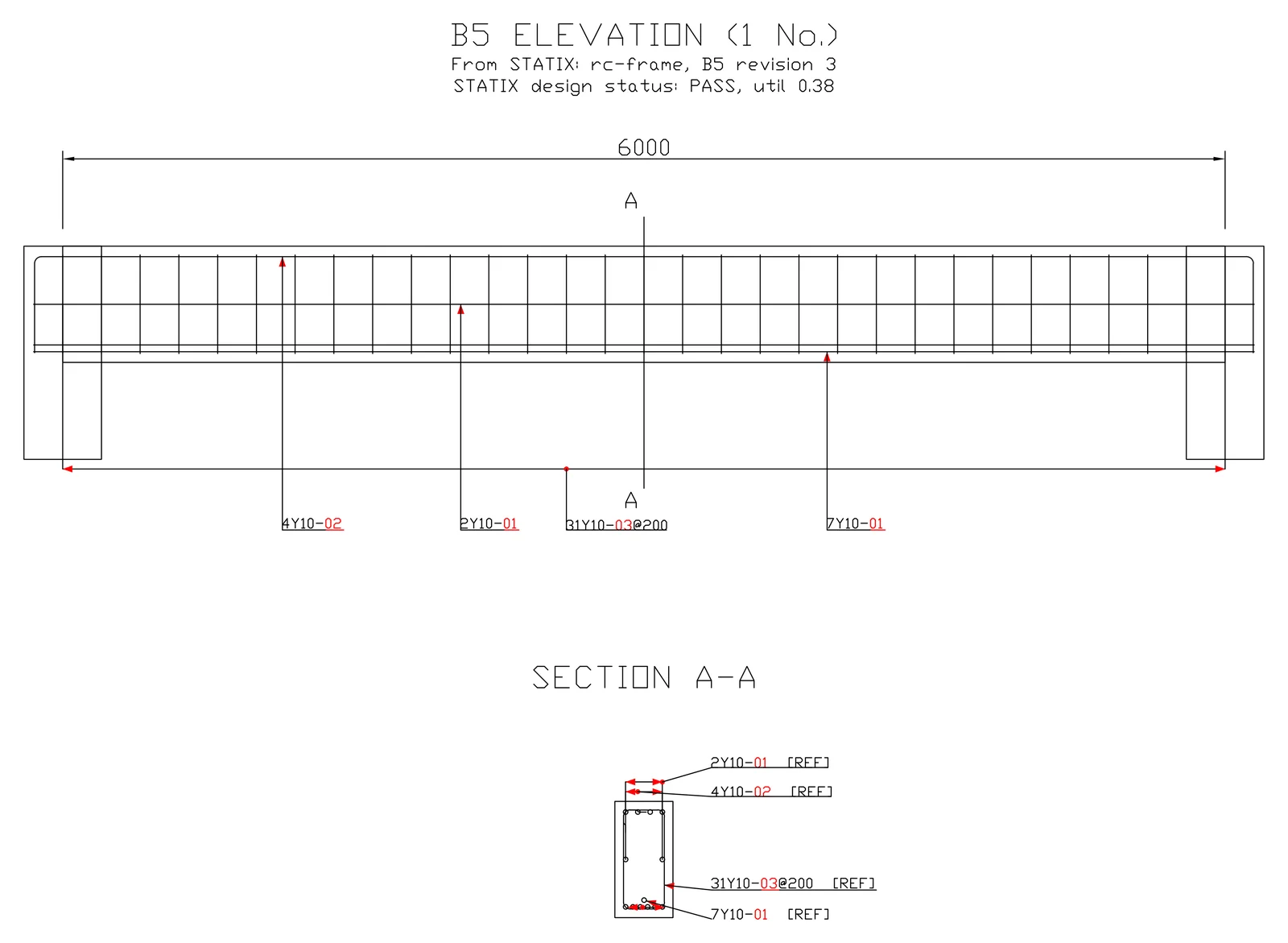
- Development buildSTATIX 2D drawings from the 3D modelBeams with their sections, stairs, pad footings with column starters and the SANS 282 bending schedule, drawn in AutoCAD by STATIX 2D from a STATIX 3D model. See the STATIX 2D page.
- Development buildMasonry walls in the 3D modelA masonry wall carries the floor as a line support, or acts as a shell in the analysis, and is designed to SANS 10164.
- Development buildPile caps in the 3D modelPreset, grid and custom pile layouts, piles in tension, and the cap bars in the bending schedule and in 3D.
- Development buildMore wind casesCanopy roofs, multi-span roofs, friction, and free-standing walls, parapets and signboards to SANS 10160-3.
- Development buildSend to STATIX 2D: more elementsCombined footings, slab trimmers at openings, and beam side bars now go to AutoCAD with the rest of the bars.
4 October 2026
- LiveFree calculators on your phoneAll 21 free calculators have a phone layout: Inputs, Results and Calc sheet tabs, the result always in view, input groups that fold away, and a number keypad for number fields.
- LiveRC beam calculator on the STATIX beam engineRectangular, T and L beams to SANS 10100, BS 8110 and Eurocode 2, from a simple span to eight continuous spans, are checked on the same beam engine as the STATIX app. The bars, the bending schedule and the checks come from one bar set, with anchorage into the columns, laps, crack-control bar spacing and deflection.
- LiveRC beam: beam ends, redistribution and lapsA "Beam ends" choice sets the SANS span/depth ratio for simply supported beams (Table 10). Moment redistribution is capped as SANS 10100-1 4.2.4 requires. Laps follow SANS 10100-1 Table 24, with the lower bond for top bars.
- LiveConnection calculators on the STATIX connection engineThe end plate, eaves haunch and apex haunch calculators run on the connection engine of the STATIX app: the EN 1993-1-8 component method with bolt-row groups, welds and the reduced resistance under high shear.
- Development buildNew beam design engineT and L beams, moment redistribution, SANS 10100, BS 8110 and Eurocode 2, bars in more than one layer, compression steel and anchorage into the columns.
- Development buildRC shear wallsTo SANS 10100 4.8: slenderness, in-plane bending with cracked-section end strips, shear and detailing.
- Development buildHollowcore, rib-and-block, stairs and corbelsNew elements in the 3D model. Hollowcore to SANS and Eurocode 2. Stair and corbel loads go into the frame.
- Development buildSend to STATIX 2DOne file from the 3D model to AutoCAD (STATIX 2D) with the bars of every saved element, using the same bar marks as in Revit.
- Development buildNew app layoutA start screen, a status board and a report builder.
- Coming nextPost-tensioned slabs and a full wind moduleWhat we are working on next.
1 October 2026
- LiveFour more worked examplesRC column, flat slab punching shear and cantilever retaining wall to SANS 10100, and a steel beam-column to SANS 10162-1. Each matches its free calculator, and each calculator links to its example.
- LiveMore code checks in the free calculatorsAmong them: the KL/r slenderness limit and Eurocode Table 5.2 section classes for steel members, prying force on base plate anchors, links in drop panels for punching shear, biaxial and slender column rules, and the true maximum deflection for timber beams.
- LiveEasier to read check listsA long result no longer squeezes the name of the check into a narrow column.
- LiveA page for each free calculatorShort pages for the eight most-used calculators, with a picture of each and what it checks.
- LiveSTATIX 2D drawings on the sitePad footing, column, continuous beam and the bending schedule, drawn by the add-in in AutoCAD.
- Development buildRevit linkBring a Revit model into STATIX, see exactly what changed in Revit, send changes back, and send columns, beams, footings and slabs to Revit as native Revit rebar.
- Development buildConnection typesMany more steel connection types in the Connection Hub, from base plates and haunches to bracing and cleats.
30 September 2026
- LiveLearn: worked examplesStep-by-step worked examples for a SANS 10100 pad footing, a SANS 10100 RC beam and SANS 10160-3 wind load, each matching a free calculator.
- LiveProof pagePublished worked examples next to the STATIX answers, only where an automated test passes.
- LiveScreen recordings of STATIX 3DTwo short real recordings on the STATIX 3D page: from the gallery to solved results.
- LiveHollow core slab calculator: print buttonThe hollow core slab calculator now has a Print / PDF button like the others.
- LiveA page for each productSTATIX 3D, RC design, connections and STATIX 2D each have their own page, with real screenshots.
- LiveShare previews for the calculatorsA calculator link shared on WhatsApp, LinkedIn or Telegram now shows a picture of that calculator.
- LiveWhat this site keeps in your browserA short note: no cookies and no advertising trackers, and you can turn off anonymous visit timing.
- Development buildColumn links with inward 135 degree hooksThe column module draws each link hook where it sits, in 3D and in the bending schedule, from the same saved bars.
- Development buildBeam long-term deflection in the calc sheetA calculated long-term deflection is saved with the beam and carried into the calc sheet and the project report. It is marked out of date when the inputs change.
29 September 2026
- LiveFree calculators with no accountEvery calculator is free to use without an account. A free account is needed only to print.
- LiveNew home pageThe home page now shows the whole suite with real screenshots.
- Development build13 gallery structuresOffice tower, twisting diagrid tower, stadium bowl, dome, bridges, hangar and more: each generated from a few settings, loaded and solved. Concrete beams under slabs act as T- and L-beams.
28 September 2026
- Development buildPad footing moduleFooting plan, sections both ways and every bar in 3D, including the top mat and the column stub.
25 September 2026
- Development buildNew beam and column design screensDesign screens, fed by the forces from the 3D model.
- Development buildSTATIX 2D: bend angle in the bending scheduleFor bars bent at an angle, the angle now prints next to the bar sketch in the bending schedule.
Development-build items are not released. We list them so you can see the work moving. Nothing here is a design approval.
Early access
Be first to use STATIX 3D.
Leave your email and we will tell you when each part is ready for testing. One confirmation now, one message then. A short monthly update only if you tick the box.