
How to use the wind load calculator
From the basic wind speed to the pressure on every wall and roof zone: what each input means, which table to use for the frame and which for the cladding.
1. What the calculator does
The wind load calculator works out the wind pressures on a rectangular building with a duo-pitch, mono-pitch or hipped roof. From the basic wind speed, the terrain and the height it finds the peak velocity pressure qp; then it applies the pressure coefficients for each wall and roof zone, for both wind directions, with the internal pressure. It gives the overall wind force for the frame and bracing, the local peak pressures for cladding and fixings, and a pressure schedule for all buildings in the project.
The code routes are SANS 10160-3 and EN 1991-1-4. The roof options name the code tables they use.

2. The inputs, group by group
| Input | What it means | Typical value |
|---|---|---|
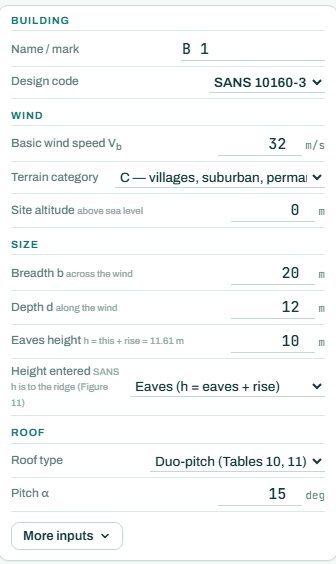
| Building | A name and the design code. | B1, SANS 10160-3 |
| Wind | Basic wind speed vb for the site, terrain category (A sea / open water, B open flat country, C suburban / woodland, D urban / dense) and site altitude above sea level. | vb 32 to 44 m/s, terrain C |
| Size | Breadth b across the wind, depth d along the wind, eaves height and which height the code uses (eaves, or eaves + rise). | 28 × 12 m, eaves 10 m |
| Roof | Duo-pitch, mono-pitch or hipped, and the pitch α. | Duo-pitch, 15° |
| More inputs | Internal pressure from openings, canopies, the dominant face and other options. | default cpi +0.2 / −0.3 |
3. How to read the result
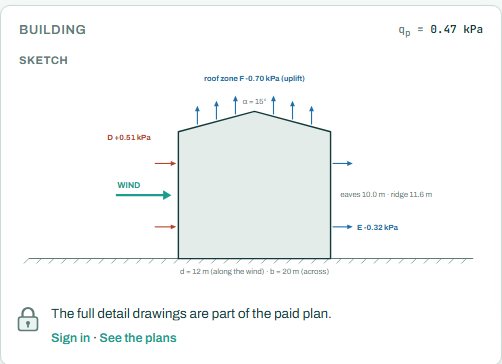
The building sketch shows the net pressures on each face for the governing case. The loads card gives qp, the method checks and the overall wind force on the building for each direction, split into walls, roof and friction: these are the forces for the frame, bracing and foundations.
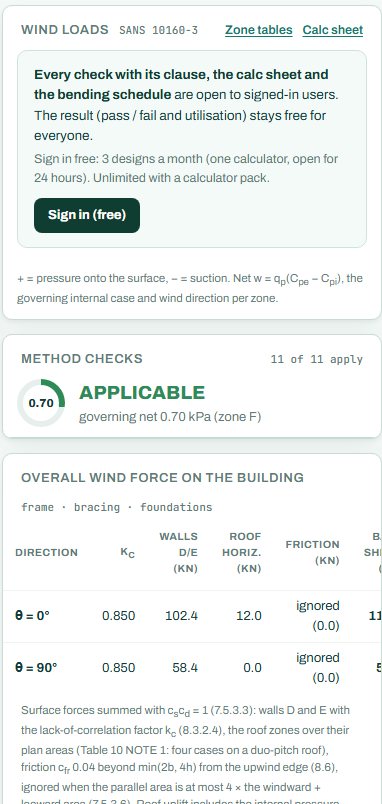
The zone table lists every wall and roof zone with its pressure for wind at 0° and 90°, and the governing value. Use these for the purlins, girts and rafters. The local peak table gives the pressures on a small loaded area (1 m²) for cladding and fixings: higher than the zone values, especially at the roof edges and corners.
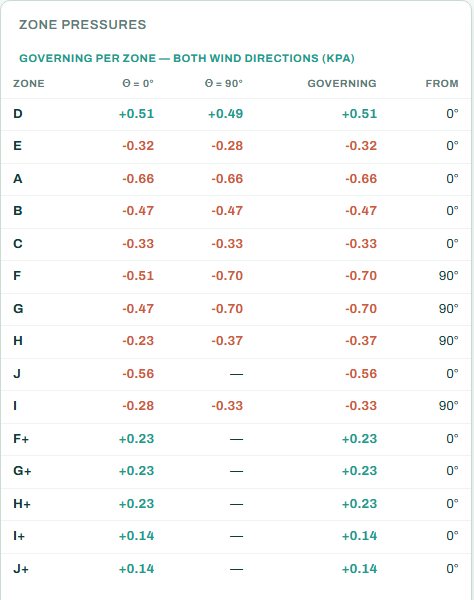
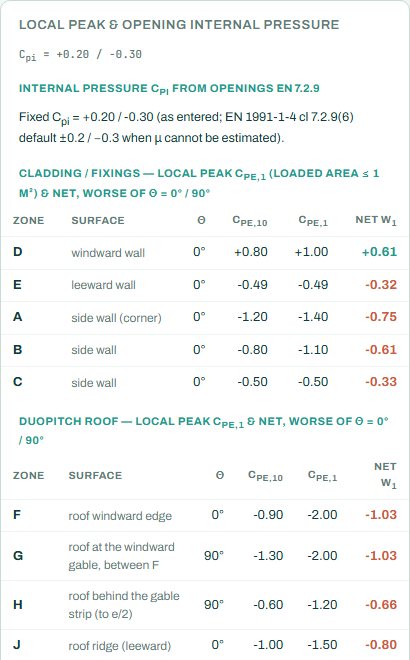
The governing line is the largest net pressure, here −0.70 kPa (suction) in roof zone F with the wind at 90°. Anything the engine cannot work out for your building shows as NOT CHECKED: check it by hand or with the code tables.
4. Calc sheet and schedule
The result (pass / fail and utilisation) stays free for everyone. Every check with its clause, the calc sheet and the bending schedule are open to signed-in users. Sign in free: 3 designs a month (one calculator, open for 24 hours). Unlimited with a calculator pack.
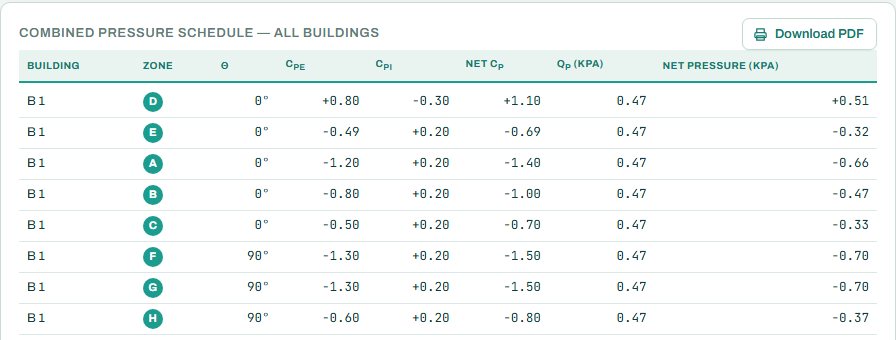
The full detail drawings are part of the paid plan. The combined pressure schedule collects the zone pressures of all buildings in the project in one table.
5. A 2-minute walk-through
- Open the calculator: a 28 × 12 m building, eaves 10 m, duo-pitch 15°, vb 32 m/s, terrain C.
- Read qp (0.47 kPa) and the governing net pressure (−0.70 kPa, zone F).
- Change the terrain to B (open country) and watch qp and every zone pressure go up.
- Change the roof pitch and see how the roof zone pressures change.
- Copy the overall force to your frame design and the zone pressures to the purlins.
6. Common mistakes
- The wrong basic wind speed. Take vb from the map for the site, not a round number.
- Terrain too rough. Terrain D lowers the pressure; use it only where dense buildings surround the site on all sides and will stay there.
- Zone pressures for cladding. Cladding and fixings take the local peak (1 m²) values, not the zone values.
- Internal pressure left at the default for a building with a large dominant opening, such as a roller door that can stay open in a storm.
- Characteristic and design mixed up. The pressures are characteristic; the load factor comes in the combination.
7. Where it fits
The pressures go to the portal frame, purlin and girt, and masonry wall calculators.
8. Learn more
- Loads 1, lesson 4: wind pressure and lesson 5: wind coefficients
- Worked example: wind load to SANS 10160-3
Open the wind load calculator
A guide to using the calculator, not a design. Check every value against the current code and your own project, and have the design checked and signed by a registered professional engineer.
Be first to use STATIX 3D and STATIX 2D.
Leave your email and we will tell you when each part is ready for testing. One confirmation now, one message then. A short monthly update only if you tick the box.