
How to use the steel member calculator
Pick a section, give its length and the factored actions, and read the governing check: compression, bending with lateral-torsional buckling, shear and their interaction.
1. What the calculator does
The steel member calculator checks a hot-rolled steel member under axial load, bending about both axes and shear. It classifies the section, works out the compressive resistance, the bending resistance with lateral-torsional buckling, the shear resistance and the interaction of axial load and bending, and gives a material take-off for the project.
The code routes are SANS 10162-1 (limit states design of hot-rolled steelwork) and Eurocode 3 (EN 1993-1-1). The sections come from the tables on the page, including the South African range (SAISC / SANS).

2. The inputs, group by group
| Input | What it means | Typical value |
|---|---|---|
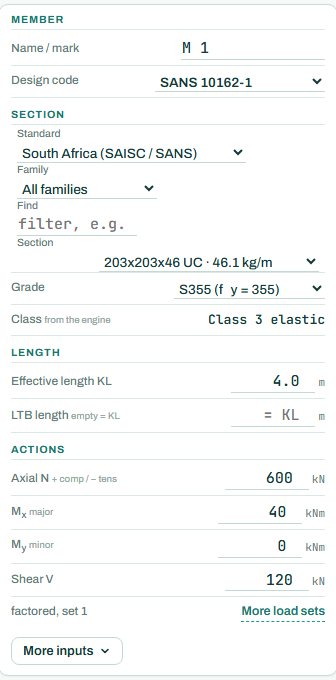
| Member | A mark (M1...) and the design code. | M1, SANS 10162-1 |
| Section | Standard, family and section from the tables. Type in Find to filter the list. | 203×203×46 UC |
| Grade | Steel grade; it sets fy. The class comes from the engine. | S355 or 350WA |
| Length | Effective length KL for buckling, and the LTB length (empty = KL). | KL = storey height |
| Actions | Factored axial N (+ compression, − tension), Mx major, My minor and shear V. “More load sets” adds further combinations. | N 600 kN, Mx 40 kNm, V 120 kN |
3. How to read the result
“Section and resistances” lists the slenderness KL/rmin, the compressive resistance Cr, the bending resistances Mrx and Mry, the shear resistance Vr, the section class and the governing check with its clause. The last line is the interaction utilisation: here 89 %.
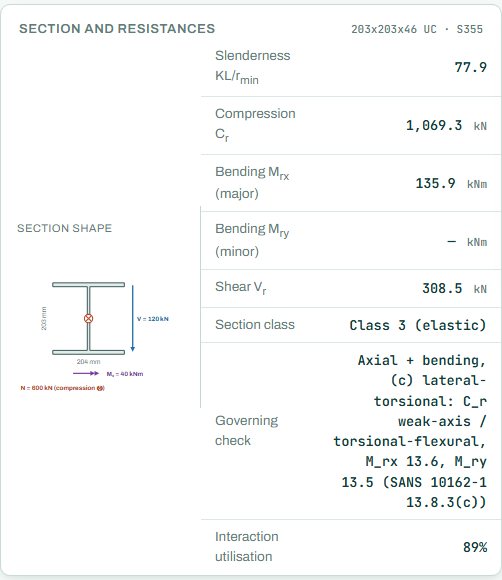
Read the governing line before changing the section. If lateral-torsional buckling governs, a restraint that shortens the LTB length can do more than a heavier section. If the class is 4 (slender), the engine reduces the resistance; a stockier section is usually the cheaper fix. Anything the engine could not check shows as NOT CHECKED; it is not a pass.
4. Calc sheet and take-off
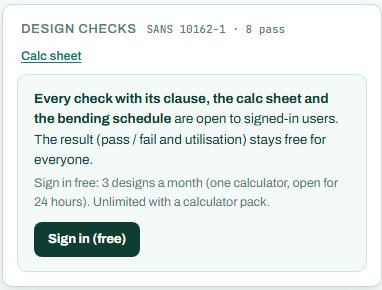
The result (pass / fail and utilisation) stays free for everyone. Every check with its clause, the calc sheet and the bending schedule are open to signed-in users. Sign in free: 3 designs a month (one calculator, open for 24 hours). Unlimited with a calculator pack.
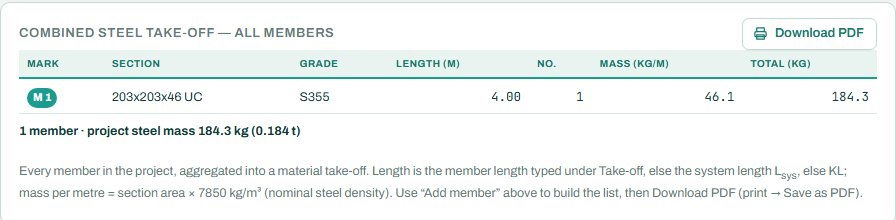
The N–M interaction diagram and the full detail drawings are part of the paid plan. The take-off at the bottom of the page adds each member to one material list for the project: section, grade, length, number and mass.
5. A 2-minute walk-through
- Open the calculator. It starts with a 203×203×46 UC in S355, KL 4.0 m, N 600 kN, Mx 40 kNm and V 120 kN.
- Read the badge: PASS 89 %, axial and bending with lateral-torsional buckling.
- Type a shorter LTB length (say 2 m, for a restraint at mid-height) and watch the utilisation drop.
- Pick a lighter section from the list and see where it fails, and on which check.
- Add a second load set for the wind case with “More load sets”.
- Sign in for the clause-by-clause checks and the calc sheet.
6. Common mistakes
- Characteristic actions. This calculator takes factored actions; multiply by the load factors first, or use the frame results.
- KL for both axes. A column braced about one axis only buckles about the other; check KL for each axis and the LTB length separately.
- Wrong sign on N. Compression is positive; a tension member typed as compression is checked for buckling it will never see.
- One load set only. The worst case for a column is often not the highest axial load; add the wind set.
7. Where it fits
For connections, go on to the base plate, fin plate and end plate calculators. For a whole portal frame, see Steel Design 2.
8. Learn more
- Steel Design 1, lesson 2: compression, lesson 3: beams and lesson 4: combined actions
- Worked example: steel beam-column to SANS 10162-1 and steel beam to SANS 10162-1
Open the steel member calculator
A guide to using the calculator, not a design. Check every value against the current code and your own project, and have the design checked and signed by a registered professional engineer.
Be first to use STATIX 3D and STATIX 2D.
Leave your email and we will tell you when each part is ready for testing. One confirmation now, one message then. A short monthly update only if you tick the box.