
How to use the RC column calculator
Axial load and moments in, bars and links out: what each input means, how to read the N–M curve, and how the lighter options save you a few runs.
1. What the calculator does
The RC column calculator designs a reinforced concrete column for an axial load with moments about one or both axes. It works out the slenderness from the effective height, adds the extra moments a slender column picks up, designs the longitudinal bars and the links, and checks the section against its own N–M interaction curve. Rectangular and circular columns are covered, braced or unbraced, with tied or spiral links for circular columns.
The code routes are SANS 10100, BS 8110, Eurocode 2 (EN 1992-1-1) and SANS 51992-1-1 (SA Eurocode, 2023 draft annex). The badge under the title says which engine runs the checks.

2. The inputs, group by group
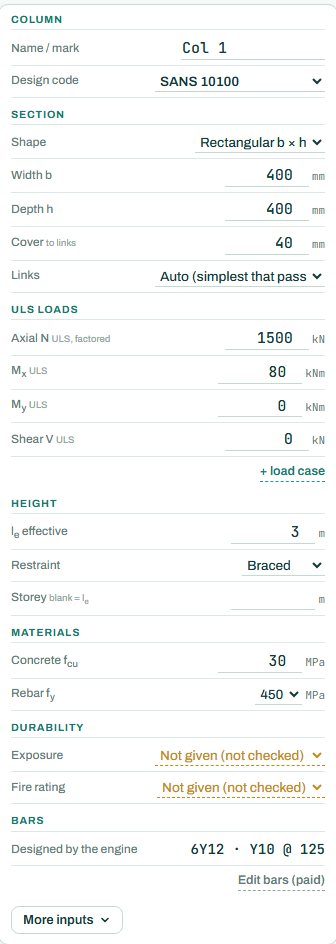
| Input | What it means | Typical value |
|---|---|---|
| Column | A mark (Col 1...) and the design code. | Col 1, SANS 10100 |
| Section | Rectangular b × h or circular D, cover to the links, and the link arrangement (auto picks the simplest that passes). | 400 × 400, cover 40 |
| ULS loads | Factored axial N and the design moments Mx, My and shear V. “+ load case” adds another combination. | N 1500 kN, Mx 80 kNm |
| Height | Effective height le, braced or unbraced, and the storey height (blank = le). More inputs sets the bracing per axis. | le 3 m, braced |
| Materials | Concrete fcu and rebar fy. | 30 MPa, 450 MPa |
| Durability | Exposure and fire rating. “Not given” leaves those checks NOT CHECKED. | Moderate, R60 |
| Bars | The engine designs the bars and links. Editing the bars yourself is part of the paid plan. | 6Y12, Y10 @ 125 |
3. How to read the result
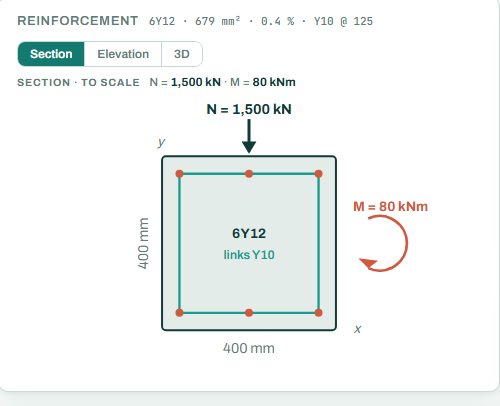
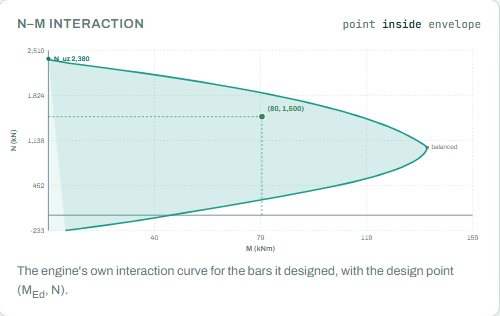
The reinforcement panel draws the section to scale with the bars, the axial load and the moment. The N–M interaction panel draws the engine’s own curve for the bars it designed, with your design point on it: inside the curve passes, outside fails. The distance to the curve is your reserve.
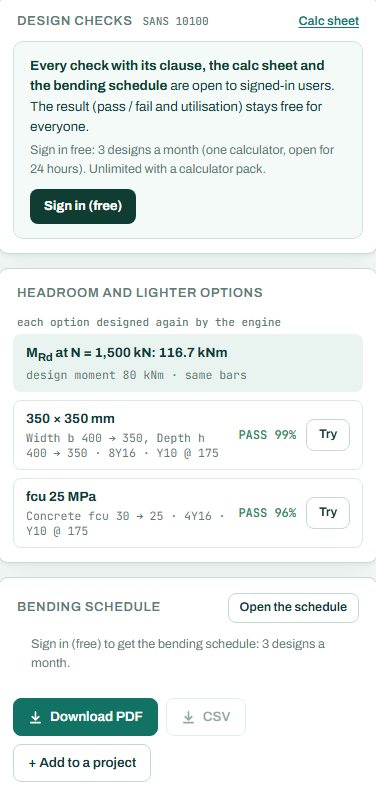
The badge names the governing check; here the N–M capacity at 69 %. “Headroom and lighter options” is the most useful card on the page: it gives MRd at your axial load (116.7 kNm with the same bars), and the engine designs lighter options again, such as 350 × 350 (PASS 99 %) or fcu 25 MPa (PASS 96 %). Press Try to load one. Checks the engine could not run show as NOT CHECKED; they are not passes.
4. Calc sheet, drawing and schedule
The result (pass / fail and utilisation) stays free for everyone. Every check with its clause, the calc sheet and the bending schedule are open to signed-in users. Sign in free: 3 designs a month (one calculator, open for 24 hours). Unlimited with a calculator pack.
The bending schedule card reads: “Sign in (free): 3 schedules a month. CSV with a paid plan.” The full reinforcement detail drawing, sections and bar editing are part of the paid plan. Add more columns with “+ Add column” and the schedule collects all of them, with the starter bars.
5. A 2-minute walk-through
- Open the calculator: a braced 400 × 400 column, le 3 m, N 1500 kN and Mx 80 kNm, fcu 30.
- Read the badge: PASS 69 %, N–M capacity, with 6Y12 and Y10 links.
- Press Try on the 350 × 350 option and see the bars go up to 8Y16 at 99 %.
- Set the restraint to unbraced and the effective height to 6 m: the slenderness moments grow and the bars change.
- Add My for a corner column with biaxial bending.
- Sign in for the calc sheet and schedule, or add the column to a project.
6. Common mistakes
- Characteristic loads in the ULS boxes. This calculator takes factored N and M; the beam calculator takes characteristic loads. Factor them first.
- Effective height equal to the floor height without thinking about the end restraint. Braced columns with stiff beams have le below the clear height; unbraced columns above it.
- No minimum moment. A column with “no moment” still gets the code’s minimum eccentricity; let the engine apply it rather than typing 0 and stopping.
- Braced when the frame is not. A column is braced only if walls or bracing take the sway; otherwise pick unbraced.
7. Where it fits
The column loads come from the beam reactions or a load take-down; the column goes on to the pad footing calculator.
8. Learn more
- RC Design 1, lesson 5: columns and Loads 1, lesson 6: the load take-down
- Worked example: RC column design to SANS 10100
- Guide: the pad footing calculator
Open the RC column calculator
A guide to using the calculator, not a design. Check every value against the current code and your own project, and have the design checked and signed by a registered professional engineer.
Be first to use STATIX 3D and STATIX 2D.
Leave your email and we will tell you when each part is ready for testing. One confirmation now, one message then. A short monthly update only if you tick the box.