
How to use the pad footing calculator
Column loads in, a base and a bar mat out: what each input means, how to read the bearing pressure and the governing check, and when to press Optimise size.
1. What the calculator does
The pad footing calculator sizes and reinforces an isolated pad under a column. It checks the soil bearing pressure for the column loads and moments, then designs the base as reinforced concrete: bending each way, one-way (beam) shear, punching shear at the column face and at the critical perimeter, minimum steel, cover and bar spacing. It can also find the smallest base that passes.
The code routes are SANS 10100, BS 8110, Eurocode 2 / EC7 (EN 1992-1-1) and SANS 51992-1-1 (SA Eurocode, 2023 draft annex) / EC7. The bearing check uses an allowable bearing pressure on the SANS and BS routes; on the EN route the soil check follows EC7.

2. The inputs, group by group
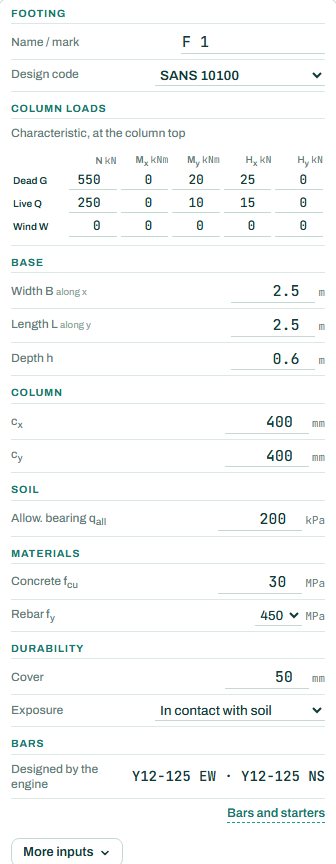
| Input | What it means | Typical value |
|---|---|---|
| Footing | A mark (F1...) and the design code. | F1, SANS 10100 |
| Column loads | Characteristic loads at the column top: N, Mx, My, Hx, Hy for dead, live and wind. Take them from the column or beam reactions. | Dead N 550, live N 250 kN |
| Base | Width B along x, length L along y and depth h. | 2.5 × 2.5 × 0.6 m |
| Column | Column size cx × cy; it sets the punching perimeter. | 400 × 400 |
| Soil | Allowable bearing pressure qall from the geotechnical report. | 150 to 300 kPa |
| Materials | Concrete fcu and rebar fy. | 30 MPa, 450 MPa |
| Durability | Cover and exposure. A footing cast against the soil needs more cover than one cast on blinding. | 50 mm, in contact with soil |
| Bars | The engine picks a mat each way. “Bars and starters” lets you set them and the column starters. | Y12 @ 125 each way |
3. How to read the result
The plan shows the base, the column and the bars each way; section A–A shows the column, the loads with their arrows, the base depth and the stub. Under it the soil bearing pressure diagram gives qmax and qmin. With a moment or a horizontal load the pressure is not uniform: qmax must stay under the allowable pressure, and qmin should stay above zero (no uplift under the base).
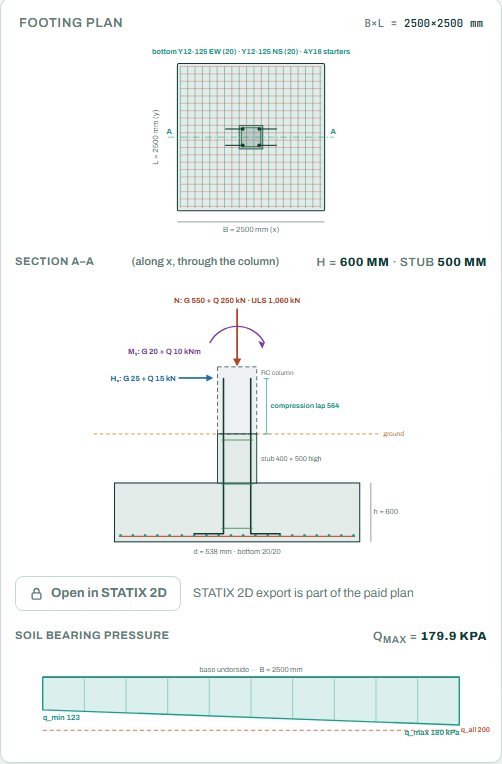
The badge names the governing check. In the default example it is durability (nominal cover) at 90 %, not bearing or punching: worth knowing before you make the base bigger. Any check the engine could not run shows as NOT CHECKED; it is not a pass.
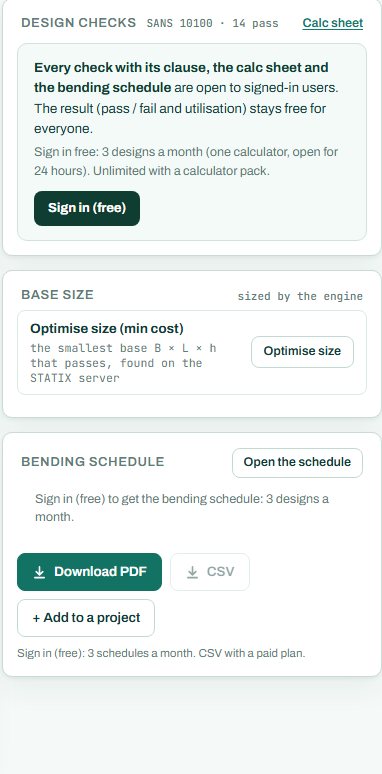
“Optimise size” searches for the smallest base B × L × h that passes, on the STATIX server. Use it for a first size, then round to sizes you can set out.
4. Calc sheet, drawing and schedule
The result (pass / fail and utilisation) stays free for everyone. Every check with its clause, the calc sheet and the bending schedule are open to signed-in users. Sign in free: 3 designs a month (one calculator, open for 24 hours). Unlimited with a calculator pack.
The bending schedule card reads: “Sign in (free): 3 schedules a month. CSV with a paid plan.” The reinforcement detail drawing and the export to STATIX 2D are part of the paid plan.

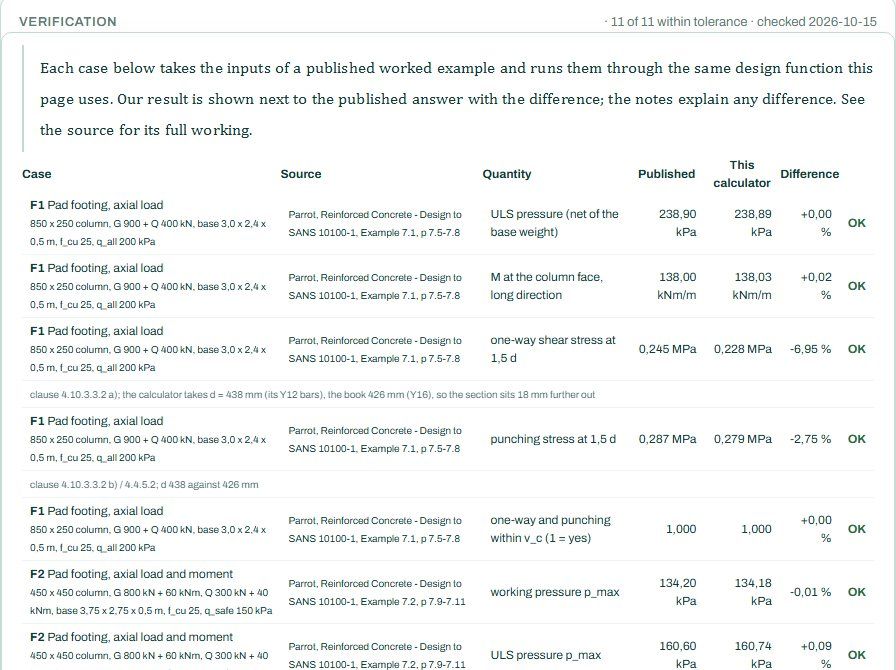
Lower down, the verification table runs published pad footing examples through the same engine and shows the published value, the calculator value and the difference.
5. A 2-minute walk-through
- Open the calculator. It starts with a 400 × 400 column carrying dead 550 kN and live 250 kN with small moments and shears, on a 2.5 × 2.5 × 0.6 m base and 200 kPa soil.
- Read the badge: PASS 90 %, governed by the nominal cover. qmax is 179.9 kPa.
- Press “Optimise size” and see how small the base can go. Look at what governs now: often bearing or punching.
- Add a wind moment in the wind row and watch qmax and qmin spread apart.
- Sign in for the calc sheet and the schedule, or press “+ Add to a project”.
6. Common mistakes
- Ultimate loads in the loads table. The table takes characteristic loads; the engine builds the combinations.
- An ultimate bearing value as the allowable pressure. Use the allowable (working) value from the geotechnical report on the SANS and BS routes.
- Ignoring qmin. A negative value means part of the base lifts off the soil; make the base bigger in the direction of the moment.
- Too little cover. Concrete cast against the soil needs more cover than concrete cast on blinding; set the exposure to match.
- Adding the base weight twice. The engine adds the weight of the base itself (“Auto self-weight” in the results); the loads table takes the column loads only.
7. Where it fits
The column loads come from the RC column calculator or the beam reactions. On the project board a column drawn over a footing passes its load down when you save.
8. Learn more
- RC Design 1, lesson 7: footings and punching and Foundations 1, lesson 2: pad moments and uplift
- Worked example: pad footing design to SANS 10100
- Guide: the project board and schedule
Open the pad footing calculator
A guide to using the calculator, not a design. Check every value against the current code and your own project, and have the design checked and signed by a registered professional engineer.
Be first to use STATIX 3D and STATIX 2D.
Leave your email and we will tell you when each part is ready for testing. One confirmation now, one message then. A short monthly update only if you tick the box.