
How to use the masonry wall calculator
A brick or block wall under vertical load and wind: what each input means, how to read fk, β and the lateral check, and when the modular factor applies.
1. What the calculator does
The masonry wall calculator checks a brick or block wall for vertical load and for wind on its face. It works out the characteristic strength fk from the unit and the mortar, the slenderness and the eccentricity, the capacity reduction β and the vertical resistance per metre, then checks the panel under wind with the flexural strengths and the moment coefficients. Single leaf, cavity and collar-jointed walls are covered, and reinforced walls, lintels and bond beams, columns and shear walls to SANS 10164-2.
The code routes are SANS 10164-1, BS 5628-1 and Eurocode 6 (EN 1996-1-1). The badge says it plainly: every strength is an input with a cited default, to confirm before sign-off.

2. The inputs, group by group
| Input | What it means | Typical value |
|---|---|---|
| Wall | Design code and design type: unreinforced, or one of the reinforced options. | SANS 10164-1, unreinforced |
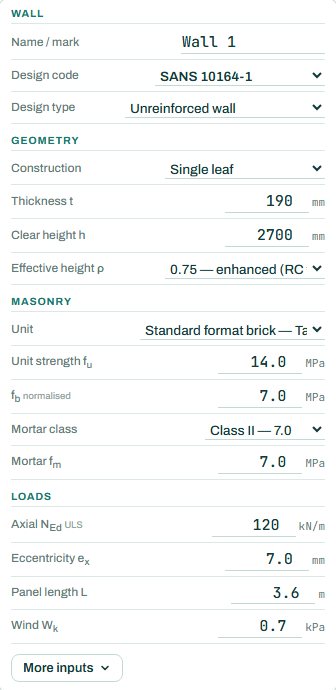
| Geometry | Construction (single leaf, cavity with one or both leaves loaded, collar-jointed), thickness, clear height and the effective height factor ρ. | single leaf, 190 mm, 2700 mm, ρ 0.75 |
| Masonry | The unit (standard brick, hollow or solid block), unit strength, mortar class and strength. | brick, fu 14, class II |
| Unit size | Under More inputs: the unit height and width (the page opens at a standard brick, 73 × 106) and the 90 × 90 modular brick choice, No by default. | 73 × 106, modular No |
| Loads | Factored axial load NEd per metre and its eccentricity, the panel length and the wind pressure on the face. | 120 kN/m, ex 7, L 3.6 m, 0.7 kPa |
3. How to read the result
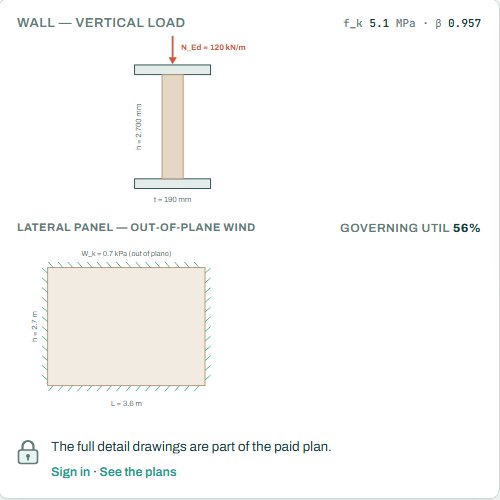
The wall sketch shows the vertical load with its eccentricity on the wall section, and the panel under wind with its support edges.
The design values card is the calculation in order. On the left the vertical check: fk, the material factor, hef and the slenderness ratio, the eccentricities, β, NRd against NEd. On the right the lateral check: the section modulus, the moments applied in each direction against the resistances, and the lateral utilisation. The EN 1996 row is an alternative value for comparison.
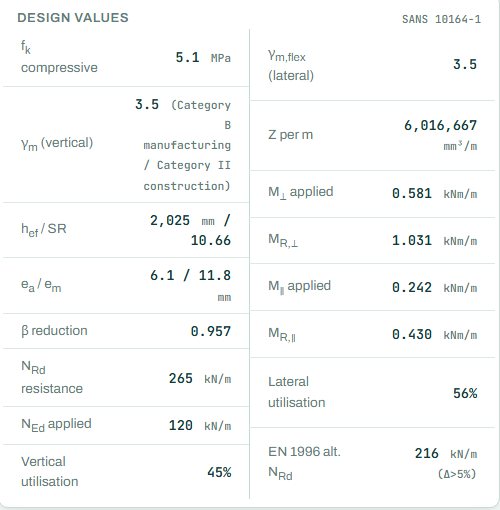
The badge names the governing check; here the lateral moment parallel to the bed joints. Walls with light vertical load often fail under wind first, because the load that would help hold them straight is small. Anything the engine could not run shows as NOT CHECKED.
4. Calc sheet and summary
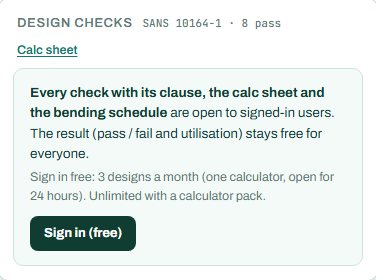
The result (pass / fail and utilisation) stays free for everyone. Every check with its clause, the calc sheet and the bending schedule are open to signed-in users. Sign in free: 3 designs a month (one calculator, open for 24 hours). Unlimited with a calculator pack.
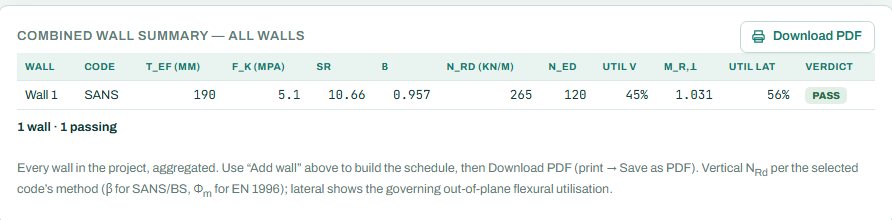
The full detail drawings are part of the paid plan. The combined wall summary lists every wall in the project with its code, thickness, fk, SR, β, NRd, utilisations and verdict.
5. A 2-minute walk-through
- Open the calculator: a 190 mm brick wall, 2.7 m clear height, ρ 0.75, fu 14 with class II mortar, NEd 120 kN/m, wind 0.7 kPa on a 3.6 m panel.
- Read the badge: PASS 56 %, lateral.
- Change ρ to 1.0 (simple resistance) and see the slenderness and β change.
- Change the unit to a hollow block, fu 7, and set the unit size to 190 × 140 under More inputs.
- Make it a cavity wall with one leaf loaded and compare.
6. Common mistakes
- The modular factor for bricks that are not modular. Choose “Yes — 90 × 90 modular units” only for real 90 × 90 modular bricks; standard bricks do not get it.
- The unit size left at the page default for a block. fk of a block depends on its height over width; set the real size.
- ρ 0.75 without a concrete floor bearing on the wall. Use 1.0 for a timber floor or a roof that does not restrain the top.
- Characteristic load as NEd. The vertical load is the factored ULS value.
- Defaults as data. The flexural strengths and other values are cited defaults; confirm them for your units.
8. Learn more
- Timber and Masonry 1, lesson 4: masonry under vertical load and lesson 5: masonry under wind
- Worked example: masonry wall to SANS 10164
- Guide: the lintel calculator
Open the masonry wall calculator
A guide to using the calculator, not a design. Check every value against the current code and your own project, and have the design checked and signed by a registered professional engineer.
Be first to use STATIX 3D and STATIX 2D.
Leave your email and we will tell you when each part is ready for testing. One confirmation now, one message then. A short monthly update only if you tick the box.