
How to use the lintel calculator
The beam over an opening in a masonry wall: what each input means, how the load triangle and arching work, and why the anchorage governs short lintels.
1. What the calculator does
The lintel calculator designs the beam over a door or window in a masonry wall: a reinforced masonry lintel, a cast-in-situ RC lintel, or a precast prestressed lintel (for which it works out the loads and the bearing). It finds the load on the lintel from the masonry above, using the load triangle and arching where the wall above is tall enough, adds the floor or roof load if it bears within reach, and checks bending, shear, the anchorage of the bars, the end bearing and deflection.
The page badge lists what it uses: the SANS 10400-K Annex B load triangle, SANS 10160-1 combinations, SANS 10164-2 for reinforced masonry, SANS 10100-1 for RC, and SANS 10164-1 5.4.3 for bearing.

2. The inputs, group by group
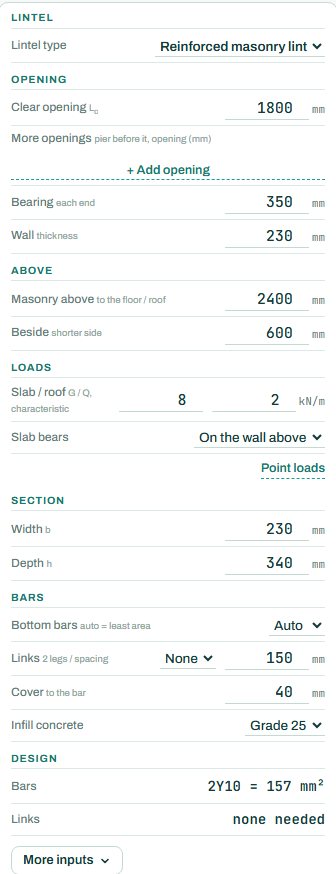
| Input | What it means | Typical value |
|---|---|---|
| Lintel | The lintel type: reinforced masonry, cast-in-situ RC or precast prestressed. | reinforced masonry |
| Opening | Clear opening, more openings in the same wall, bearing at each end and the wall thickness. | 1800 mm, bearing 350, wall 230 |
| Above | Height of masonry above to the floor or roof, and the wall beside the opening on the shorter side. | 2400 mm above, 600 beside |
| Loads | Characteristic G and Q from the slab or roof, and where it bears. Point loads under the link. | 8 / 2 kN/m on the wall above |
| Section | Width and depth of the lintel. | 230 × 340 |
| Bars | Bottom bars (auto = least area), links, cover and the infill concrete. | auto, no links, cover 40, grade 25 |
3. How to read the result
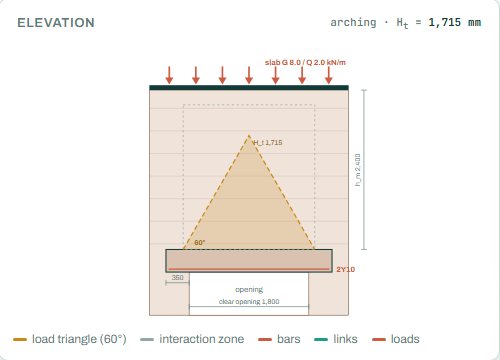
The elevation draws the opening, the lintel and the masonry above, with the 60° load triangle and the zone where the slab load is picked up. When the wall above is tall enough, only the triangle loads the lintel (arching); a short wall or a load inside the zone adds more.
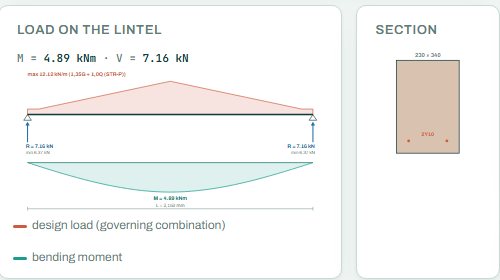
The design result gives the analysis span and whether the wall arches, the design moment and shear, the end reaction, the bars against the area required, the links, the end bearing and the deflection.
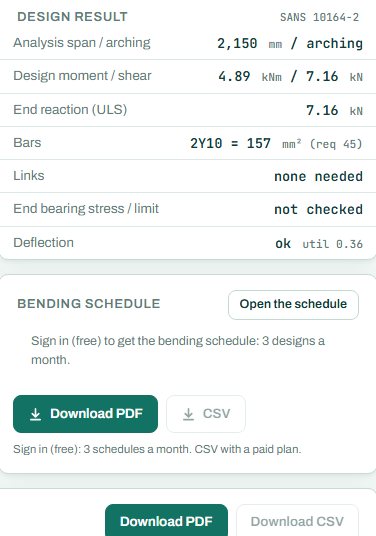
The badge names the governing check; here the anchorage of the bars at the left end. Short lintels with small bars are usually governed by the anchorage over the bearing, not by bending. Note the “not checked” on the end bearing row of this example: a NOT CHECKED item is not a pass, so check that bearing yourself or give the input it needs.
4. Calc sheet and schedule
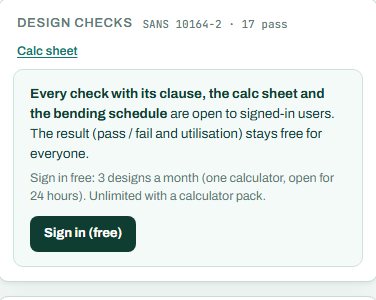
The result (pass / fail and utilisation) stays free for everyone. Every check with its clause, the calc sheet and the bending schedule are open to signed-in users. Sign in free: 3 designs a month (one calculator, open for 24 hours). Unlimited with a calculator pack.
The bending schedule card reads: “Sign in (free): 3 schedules a month. CSV with a paid plan.”
5. A 2-minute walk-through
- Open the calculator: an 1800 mm opening in a 230 mm wall, 2400 mm of masonry above, slab G 8 and Q 2 kN/m on the wall above.
- Read the badge: PASS 89 %, end anchorage.
- Cut the masonry above to 600 mm and see arching lost and the load jump.
- Widen the opening to 2400 mm and see the bars change.
- Switch to a precast prestressed lintel and compare.
6. Common mistakes
- Counting on arching without the masonry to arch. It needs enough wall above and beside the opening, and no opening in the triangle.
- Short bearings. The bars need room to anchor, and the masonry under the end needs area to carry the reaction.
- Floor or roof loads ignored. A slab or a truss bearing within the zone above loads the lintel directly.
- Ultimate loads in the load boxes. They take characteristic G and Q.
7. Where it fits
The wall itself is checked in the masonry wall calculator; the slab or roof loads come from the load take-down.
8. Learn more
- Timber and Masonry 1, lesson 6: lintels
- Worked example: lintel to SANS 10164
- Guide: the masonry wall calculator
Open the lintel calculator
A guide to using the calculator, not a design. Check every value against the current code and your own project, and have the design checked and signed by a registered professional engineer.
Be first to use STATIX 3D and STATIX 2D.
Leave your email and we will tell you when each part is ready for testing. One confirmation now, one message then. A short monthly update only if you tick the box.