
How to use the crack and deflection calculator
Serviceability by calculation: what each input means, how to read the crack width and the long-term deflection, and why the limit after partitions is the one that fails.
1. What the calculator does
The crack width and deflection calculator checks a reinforced concrete beam or slab strip at the serviceability limit state by calculation, instead of the span/depth rule. It works out the cracked section, the crack width at the soffit and the long-term deflection with creep and shrinkage, and compares them with the limits, including the deflection after the partitions are built.
The code routes are SANS 10100 (see the note), BS 8110-2, Eurocode 2 (EN 1992-1-1) and SANS 51992-1-1 (SA Eurocode, 2023 draft annex). The note says it plainly: on the SANS route the methods are those of SANS 10100-1 Annex A (informative) and BS 8110-2; the crack width follows BS 8110-2 and EN 1992-1-1 cl. 7.3, and the deflection the curvature method of BS 8110-2 and EN 7.4.

2. The inputs, group by group
| Input | What it means | Typical value |
|---|---|---|
| Element | A name and the design code. | Beam 1, SANS 10100 |
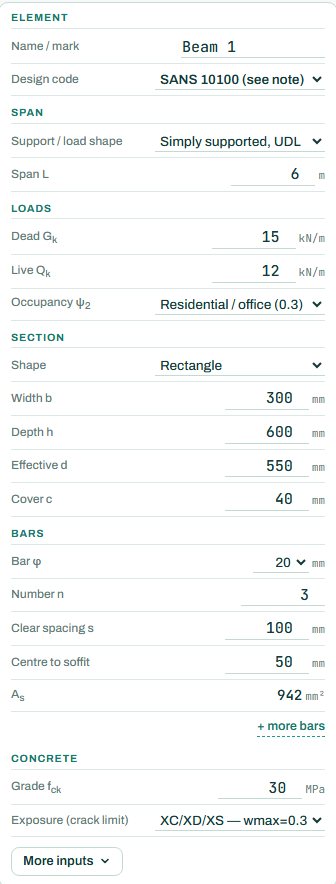
| Span | Support and load shape (simply supported, cantilever, one or both ends continuous; UDL or point load) and the span. | simply supported UDL, 6 m |
| Loads | Characteristic dead and live load, and the occupancy, which sets ψ2 for the quasi-permanent load. | Gk 15, Qk 12 kN/m, residential 0.3 |
| Section | Rectangle or T, width, depth, effective depth and cover. | 300 × 600, d 550, cover 40 |
| Bars | Bar size and number, clear spacing and the distance from the bar centre to the soffit; more layers if needed. | 3Y20, s 100, 50 to soffit |
| Concrete | Grade fck and the exposure, which sets the crack limit. | 30 MPa, wmax 0.3 mm |
| More inputs | Creep, shrinkage, the deflection limits (span/250 total, span/500 after partitions) and the load combination. | defaults |
3. How to read the result
When a check fails, a banner says which, with the clause and the numbers, and offers to change the section. It also says that a download now is stamped NOT FOR CONSTRUCTION. Here the deflection after the partitions is 10.6 mm against the lesser of span/500 and 10 mm.

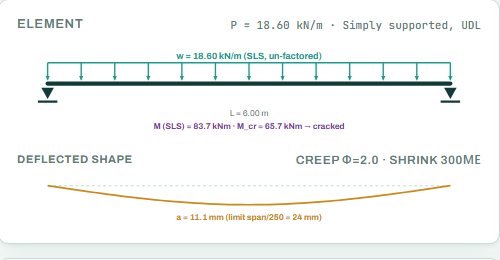
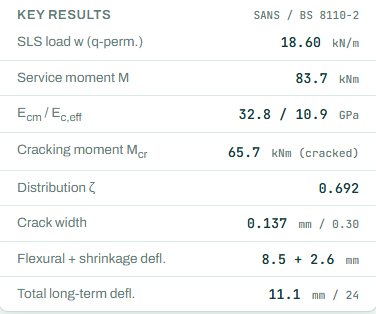
The key results give the SLS load, the service moment, the concrete stiffness short and long term, the cracking moment (the section is cracked when M exceeds it), the crack width against its limit and the long-term deflection split into the flexural part and the shrinkage part.
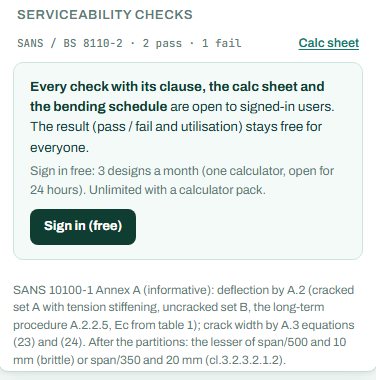
The badge names the governing check. This beam passes the crack width and the total deflection but fails the deflection after the partitions: the limit that protects brittle partitions and finishes is the strictest. Anything the engine could not run shows as NOT CHECKED.
4. Calc sheet
The result (pass / fail and utilisation) stays free for everyone. Every check with its clause, the calc sheet and the bending schedule are open to signed-in users. Sign in free: 3 designs a month (one calculator, open for 24 hours). Unlimited with a calculator pack.
The full detail drawings are part of the paid plan.
5. A 2-minute walk-through
- Open the calculator: a 6 m simply supported beam, 300 × 600, 3Y20, Gk 15 and Qk 12 kN/m.
- Read the banner: the deflection after the partitions fails at 106 %.
- Add a fourth Y20 bar, or make the beam deeper (650 mm), and watch the banner clear.
- Under More inputs, look at the limit after partitions (span/500 by default) and the total limit (span/250).
- Set the exposure to a tighter crack limit and see the crack check move.
6. Common mistakes
- Ultimate loads. Serviceability uses characteristic loads; the page builds the SLS and quasi-permanent loads.
- Ignoring the deflection after partitions. It is the strictest limit for most floors with brick or block walls.
- Effective depth from the wrong bar layer. d is to the centre of the tension steel.
- Taking span/depth as enough. The span/depth rule is a shortcut; this calculator checks the real numbers when the rule is close.
8. Learn more
- RC Design 2, lesson 6: crack width and deflection and RC Design 1, lesson 4: deflection and cracking
- Worked example: crack width and deflection to SANS 10100
- Guide: the RC beam calculator
Open the crack and deflection calculator
A guide to using the calculator, not a design. Check every value against the current code and your own project, and have the design checked and signed by a registered professional engineer.
Be first to use STATIX 3D and STATIX 2D.
Leave your email and we will tell you when each part is ready for testing. One confirmation now, one message then. A short monthly update only if you tick the box.