
RC beam calculator: the full tutorial
Every input explained with a typical value, the five tabs, a failing beam fixed with Find, and the tools on the page: Reset, the bending schedule, the PDF and the project board.
1. What the calculator does
The RC beam calculator designs one reinforced concrete beam, from the loads to the bars. You give the spans, supports, loads and section. The STATIX engine then runs the analysis (shear force, bending moment and deflection for every load pattern), chooses the main bars and the links, and checks every clause it can. It handles single and continuous spans, overhangs, point loads, and rectangular, T-, L-, inverted and I-sections.
Four code routes are on the page: SANS 10100, BS 8110, Eurocode 2 (EN 1992-1-1) and SANS 51992-1-1 (the South African Eurocode with the 2023 draft annex). The route changes the load factors, the material factors, the cover tables and every clause reference in the result.
The calculator designs one beam at a time. A whole floor or building, with the loads passed from member to member, is the job of the STATIX 3D app.
2. The page at a glance
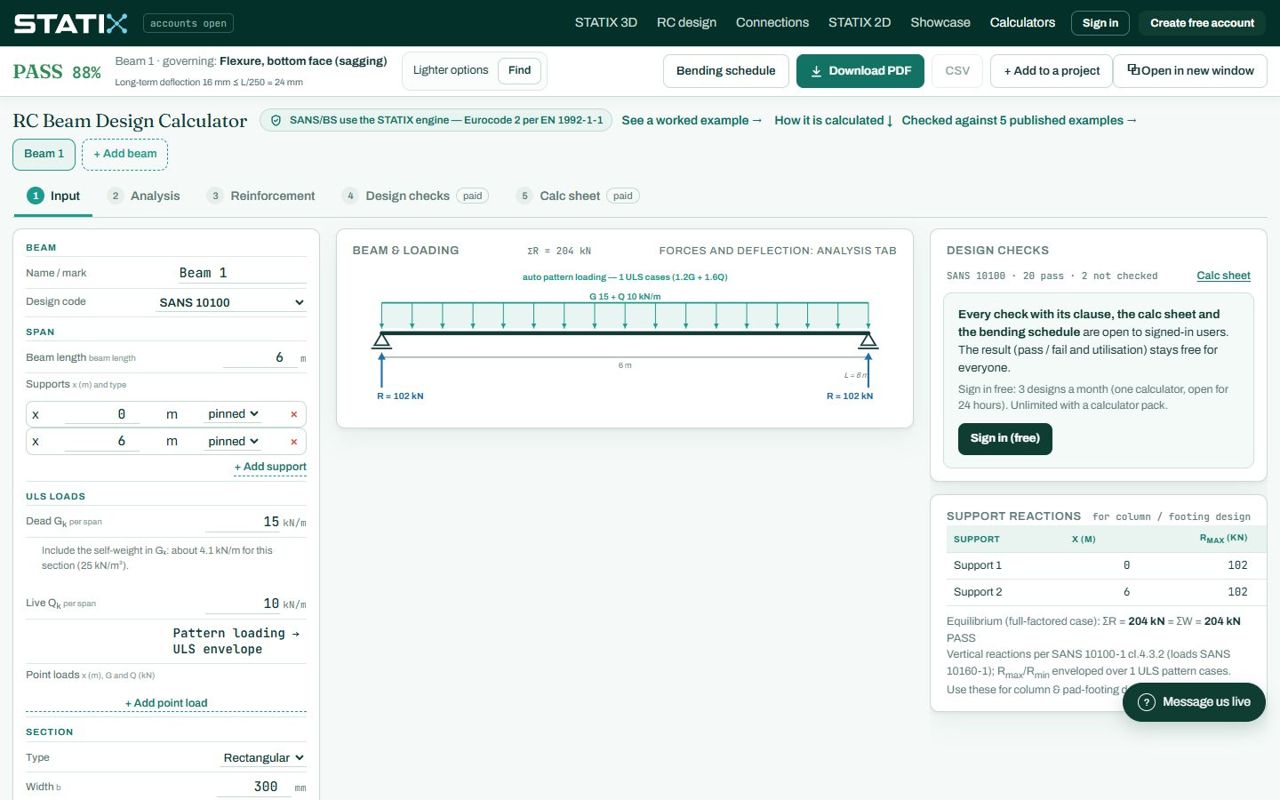
| Part | What it shows |
|---|---|
| Result bar (top) | PASS or FAIL, the highest utilisation and the governing check, plus the long-term deflection. It stays on screen while you scroll. The middle slot offers Lighter options on a pass or Find fixes on a fail. On the right: Bending schedule, Download PDF, CSV, Add to a project and Open in new window. |
| Beam tabs | Beam 1 and + Add beam: keep several beams of one job on the same page. Each beam keeps its own inputs. |
| Page tabs | 1 Input, 2 Analysis, 3 Reinforcement, 4 Design checks, 5 Calc sheet. The inputs (left) and the design checks (right) stay on every tab; the middle shows the tab. Reset inputs at the right end of the tab bar puts every input back to its default (and offers Undo reset for 20 seconds). |
| Left column | All inputs, in groups. A box the page cannot read turns red. |
| Right column | The design checks with their clauses, the fix options, and the support reactions you need for the column or footing below. |
3. Every input, one by one
Typical values are what an ordinary office or residential beam uses. They are a starting point, not a design value for your job.
Beam
| Input | What it means | Typical value |
|---|---|---|
| Name / mark | The mark on your drawings and in the bending schedule (B1, B2…). The bar marks in the schedule start with it. | B1 |
| Design code | The code route: SANS 10100, BS 8110, EN 1992-1-1 or SANS 51992-1-1. Changing it changes fcu to fck, the load factors, the cover table and the exposure list. | SANS 10100 |
Span
| Input | What it means | Typical value |
|---|---|---|
| Beam ends (SANS Table 10) | Only for a single simply supported span: truly simply supported (span/d 16) or ends nominally restrained (span/d 20). It sets the basic span/depth ratio for the deflection check. | Truly simply supported |
| Beam length | The total length of the beam in metres, including any overhang. A support at the end of the beam moves with the end when you change the length. | 6 m |
| Supports | One row per support: its position x from the left end (m) and its type, pinned or fixed. Two supports make a single span; more make a continuous beam. A beam that runs on past its last support has an overhang (cantilever). The × removes a support. | x 0 and x 6, pinned |
| + Add support | Adds a support one span further on and makes the beam longer to reach it. For an extra support inside the beam, type its x in the new row. | – |
ULS loads
| Input | What it means | Typical value |
|---|---|---|
| Dead Gk per span | The characteristic dead load in kN/m, one value or one per span (15, 15, 20). It must include the self-weight of the beam: the note under the box gives it for your section (25 kN/m³). Text that is not a number turns the box red. | 15 kN/m |
| Live Qk per span | The characteristic imposed load in kN/m, one value or one per span. | 10 kN/m |
| Pattern loading | The engine applies the code load factors and puts the live load on the spans that give the worst moment and shear (the ULS envelope). You do not set the patterns yourself. | automatic |
| Point loads | One row per load: position x (m), dead G and live Q (kN), for a beam or column landing on this beam. A load outside the beam is refused with the reason, in red. | none |
Section
| Input | What it means | Typical value |
|---|---|---|
| Type | Rectangular, T-section, L-section, inverted-T, inverted-L or I-section. A flange adds the boxes below. | Rectangular |
| Width b, depth h | The web width and the overall depth in mm. A depth of about span / 12 is a first guess for a simply supported beam. | 300 × 550 mm |
| Flange width bf, thickness hf | The effective flange of a T- or L-beam (usually the slab acting with the beam). | 1000 × 125 mm |
| Bottom flange bf2, hf2 | Only for an I-section. | – |
| Cover to links | The nominal cover to the links in mm. The durability and fire checks compare it with the code tables when you give the exposure and the fire rating. | 40 mm (25–50) |
Materials
| Input | What it means | Typical value |
|---|---|---|
| Concrete fcu (fck on the Eurocode routes) | The concrete grade in MPa: cube strength on SANS / BS, cylinder strength on the Eurocodes. | 30 MPa (25 for fck) |
| Rebar fy | The steel grade: 250 (mild steel, R bars) or 450 (high yield, Y bars). 500 is offered on the Eurocode routes only. The bar letter in the results and the schedule follows it. | 450 MPa |
Durability
| Input | What it means | Typical value |
|---|---|---|
| Exposure | The exposure condition (SANS / BS: mild to extreme; Eurocode: X0, XC1…). Not given leaves the cover check NOT CHECKED. | Moderate / XC3 |
| Cement, design life | SANS 51992 only: the cement type and the working life for the cover table. | CEM II-B-V, 50 years |
| Fire rating | The required fire resistance (R30 to R240). It checks the cover and the width against the fire tables. Not given leaves it NOT CHECKED. | 1 h (R60) |
Bars
| Input | What it means | Typical value |
|---|---|---|
| Bar layout | Optimised uses the least steel; Practical uses a buildable layout (fewer bar sizes, continuous top bars, simple curtailment). When the optimised layout fails more checks, the practical one is shown. | Practical for drawings |
| Smallest / largest main bar | The range of bar sizes the engine may pick. Auto starts at Y10. | Auto to Y32 |
| Laps | Where needed laps long bars at the stock length; None keeps every bar full length. | Where needed |
More inputs (open with + more in each group)
| Input | What it means | Typical value |
|---|---|---|
| Support width and type, end 1 / end 2 | The bearing width in mm and what the beam sits on (brickwork, or a concrete wall / column). They set the anchorage length at the ends and the support check. | 230 mm, brickwork |
| Redistribution | Moment redistribution in % for a continuous beam (not for a single span). | 0 % |
| Supports are a subframe | Pinned knife edges, or columns below (and above) that restrain the beam: then give the column size, storey heights and the far-end fixity. | Pinned |
| Load factors γG / γQ | Blank uses the code values. Only for a special case. | blank |
| Load extent a → b | A distributed load over part of the beam. 0 / 0 is the whole beam. | 0 / 0 |
| Points P2–P4 | More point loads in the simple (factored) loading mode. | 0 |
| Imposed share % | The share of the characteristic load that is imposed, for the serviceability checks. Blank uses M / 1,2 for span/d and M / 1,4 for cracking. | blank |
| Axial force N, torsion T | An axial force (+ compression, − tension) and an applied torque. Both are checked where the route covers them. | 0 |
| End depth h2 (taper) | A tapered beam: the depth at the right-hand end. Blank keeps the depth constant. | blank |
| Steel layers max | 1, 2 or 3 layers of main bars. More layers let a narrow beam carry more steel, at a smaller lever arm. | 1 |
| Serviceability: ψ2, environment, age at loading, creep, shrinkage, deflection limit | The inputs of the long-term deflection: the quasi-permanent share of the live load, the humidity class, the age of the concrete when it is loaded, optional creep and shrinkage values (blank = from the environment), and the limit (L/250 total, L/360, or L/500 after the partitions). | 0,3, inland, 28 days, L/250 |
A box with text that is not a number (or an emptied box that needs a value) turns red. The result bar then names the box, the results grey out and nothing is calculated until you fix it. A value the engine refuses (a negative load, a point load outside the beam) is named the same way, with the reason.
4. The five tabs
Analysis
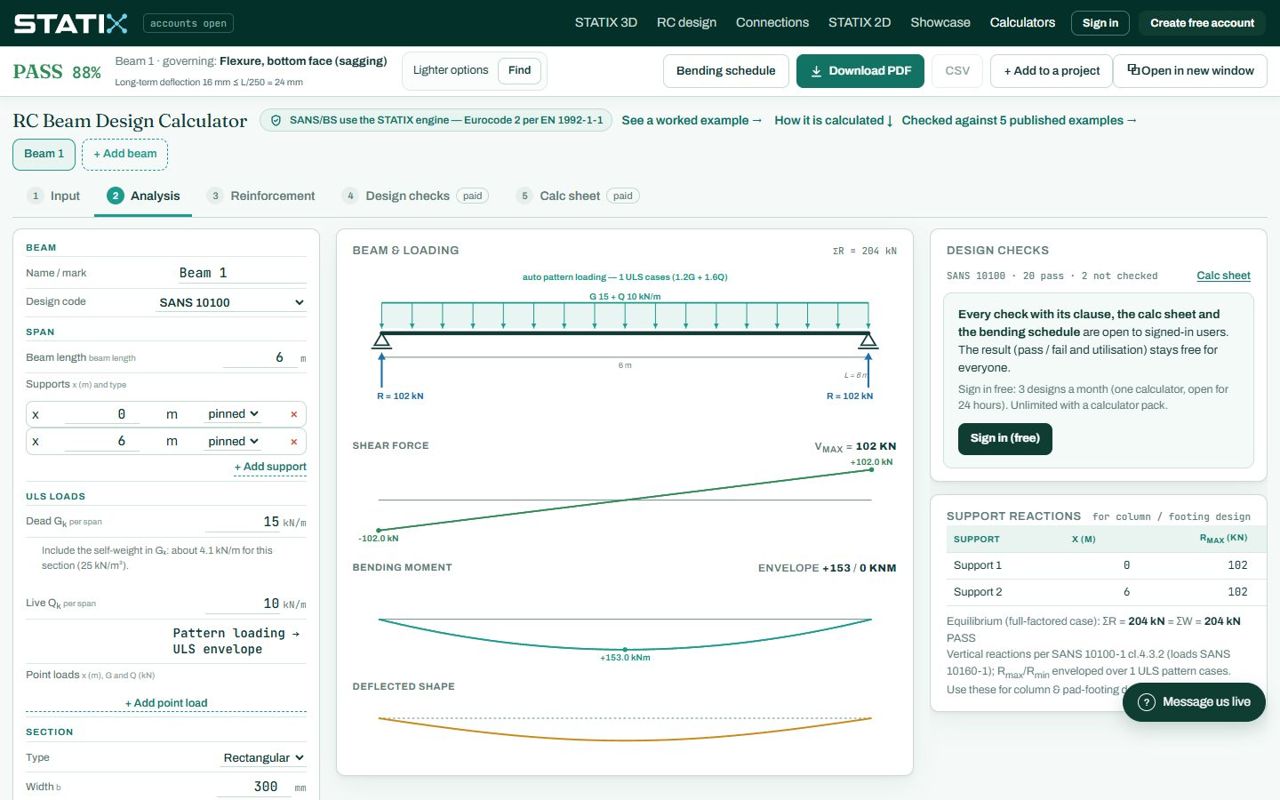
Read the peak moments and shears here and compare them with a hand check (w L² / 8 for a simple span). The support reactions on the right are the loads for the column or footing below; Rmax / Rmin are enveloped over the load patterns.
Reinforcement
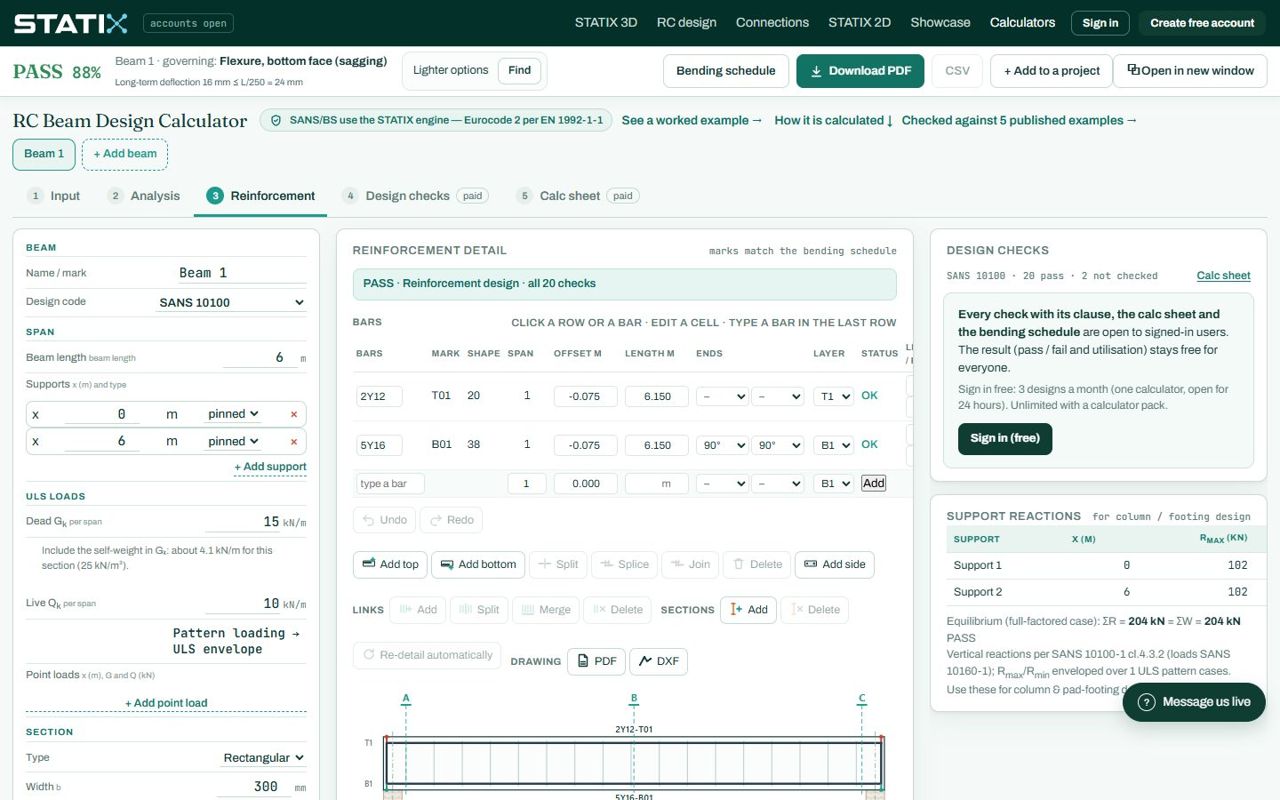
Every bar has a mark that matches the bending schedule (T01 top, B01 bottom). The shape code follows SANS 282 (20 straight, 37 one bend, 38 both ends bent). On the paid plan you can edit the bars here: click a row or a bar, change the size, length, ends or layer, add or delete a bar (the × on its row), and set the leg length of each bend. Every edit is checked again by the engine; Undo and Redo step back.
Design checks
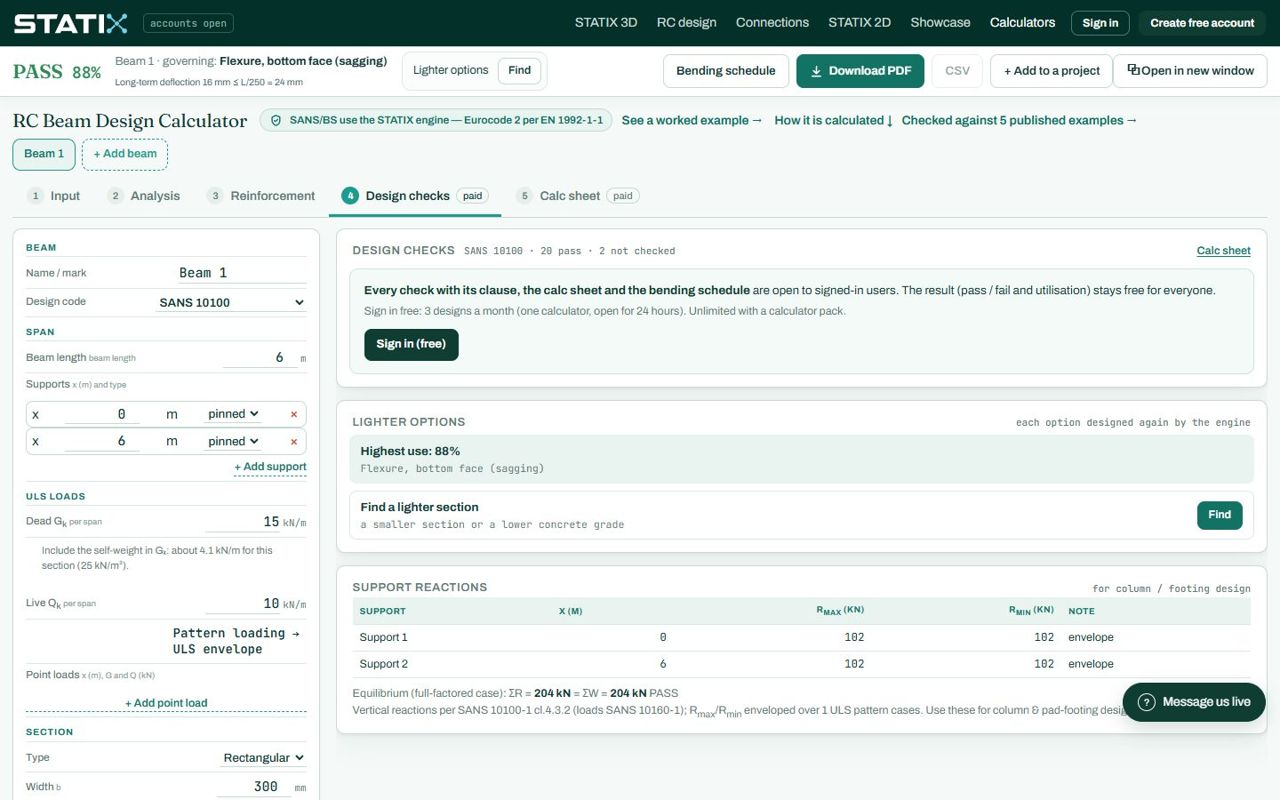
The header counts the checks: 20 pass · 2 not checked. NOT CHECKED is never a pass: it means an input is missing (the Give input button takes you to it) or the route does not cover the case. The governing check is the one in the result bar.
Calc sheet and verification
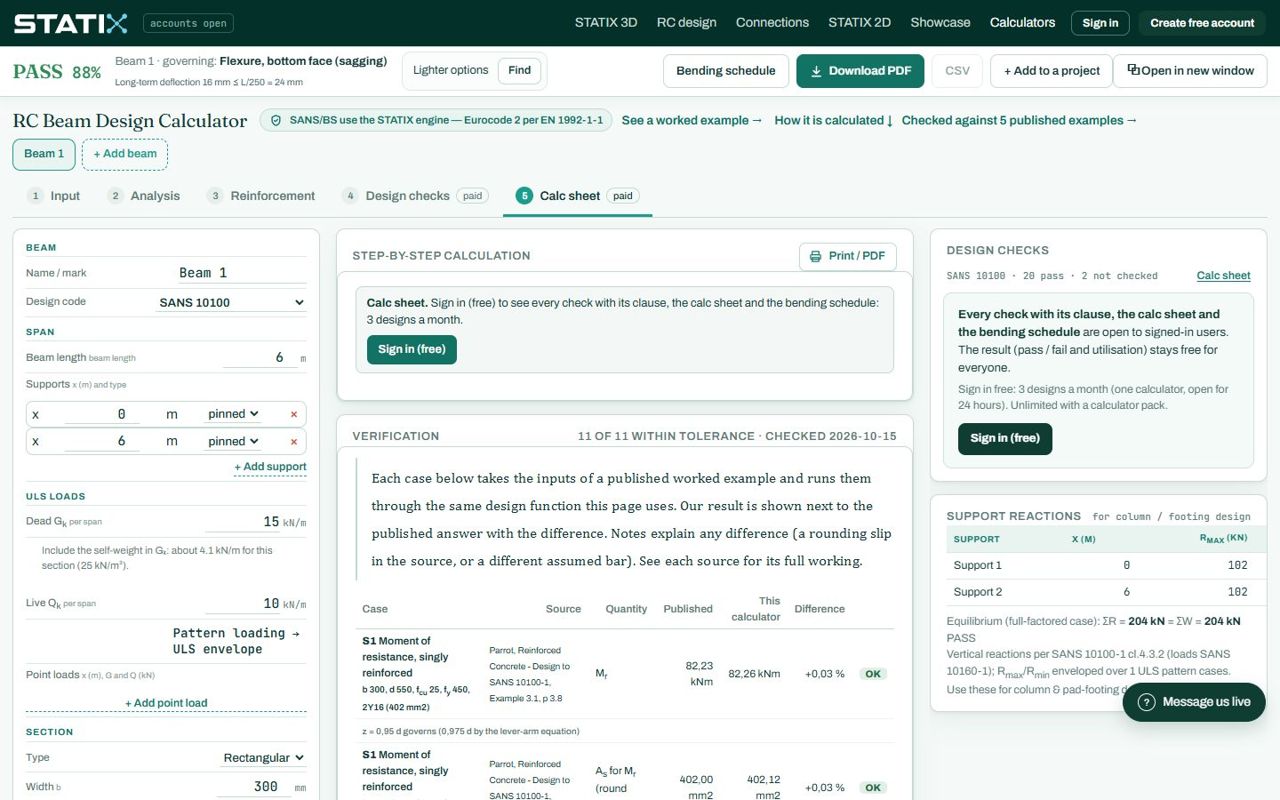
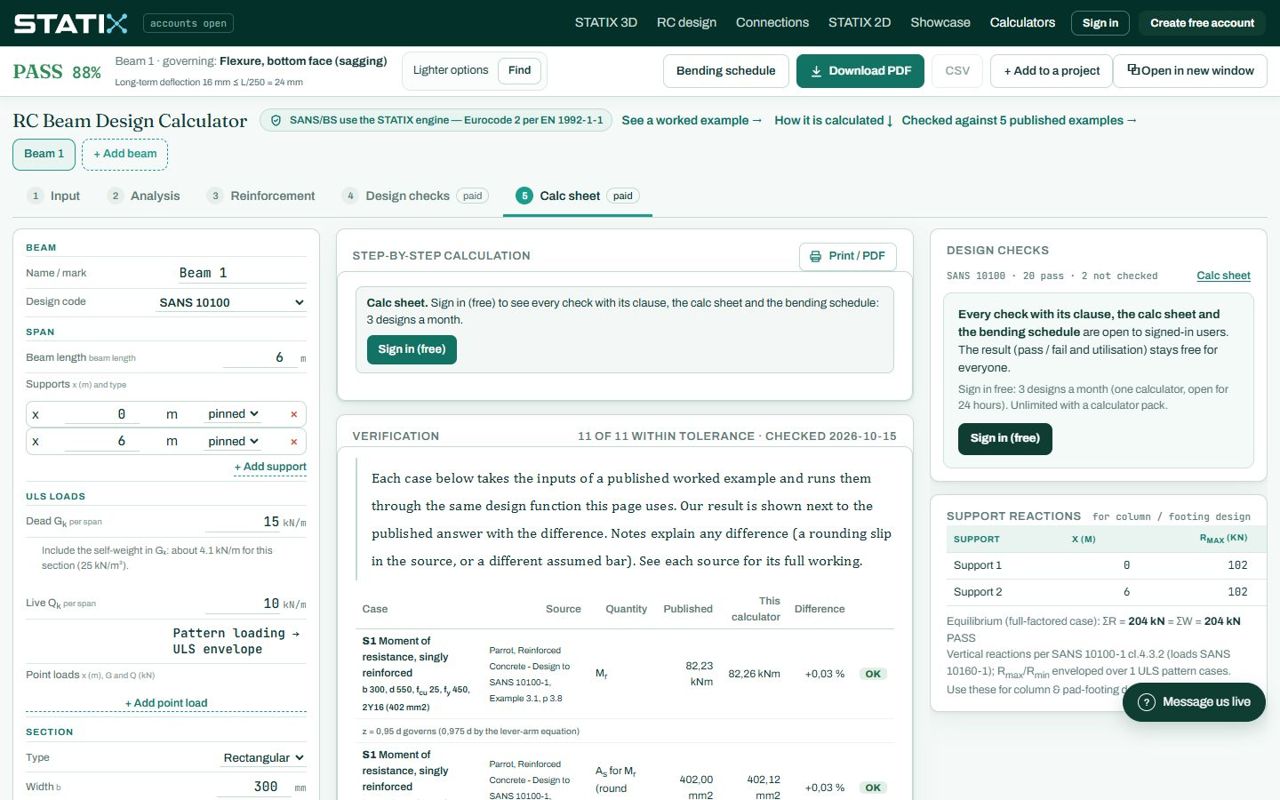
The verification card shows how the engine compares with published worked examples. Found a result that does not match? The Report it link sends us the inputs.
5. Example: a beam that fails, and the fix
Take the default beam and make it shallower: depth h 400 mm.
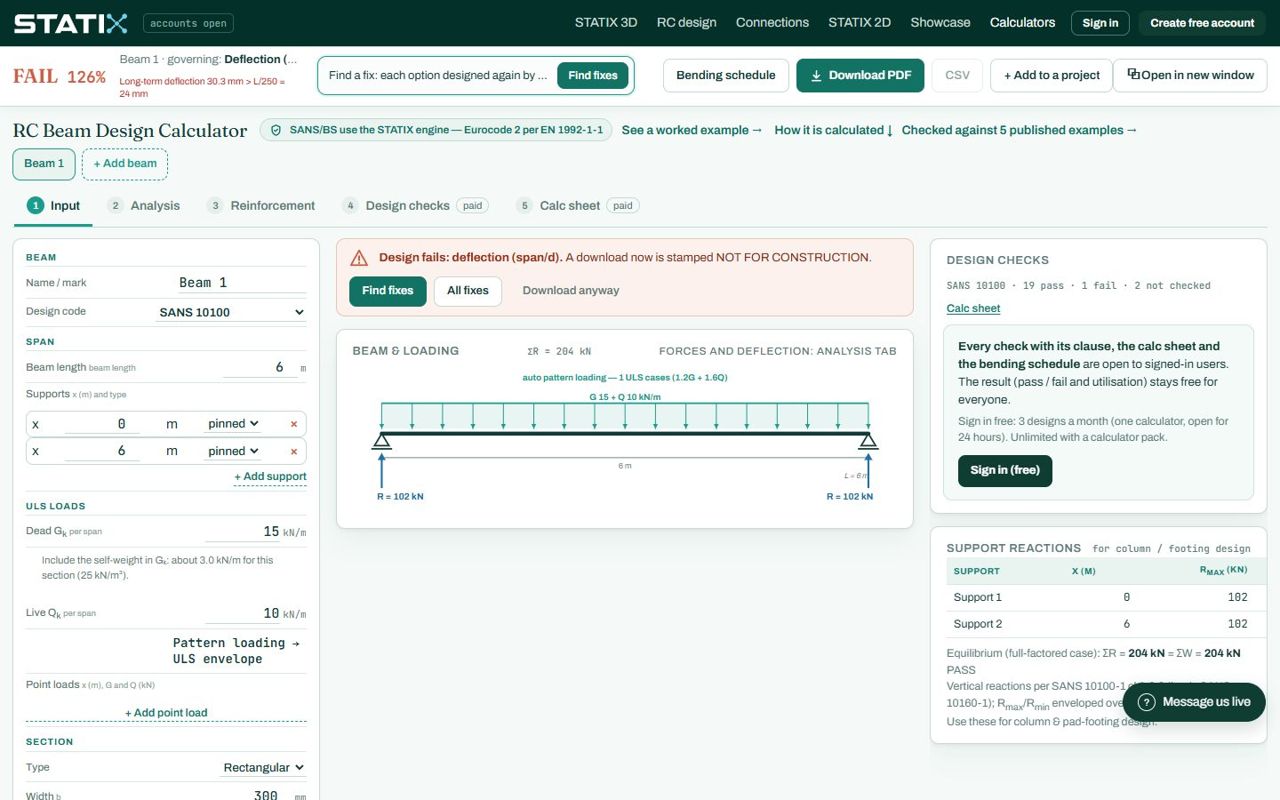
Press Find fixes (in the result bar, the banner or the Design checks tab). The engine designs about ten single changes again — a bar size, more layers, a higher concrete grade, a deeper or a wider section, a smaller cover — and lists the ones that pass, the lightest first. This takes up to a minute.
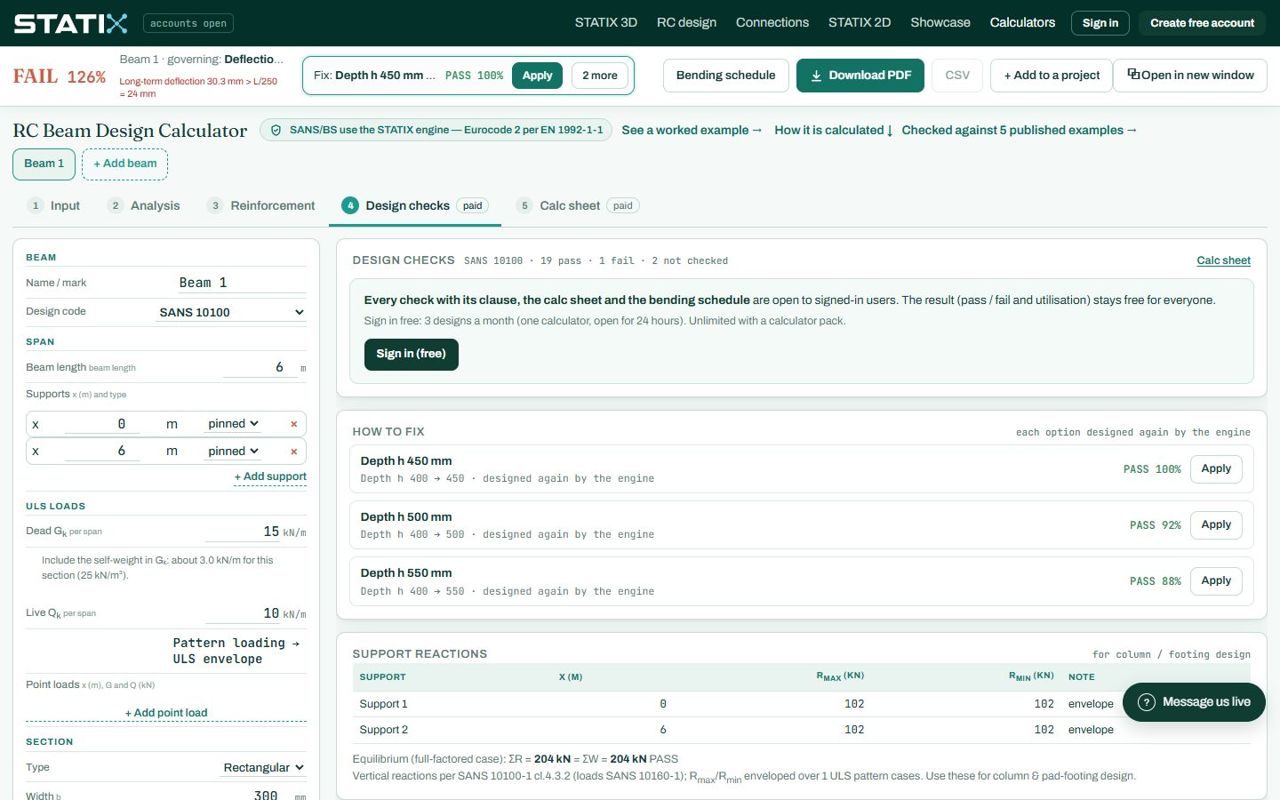
Press Apply on the option you want. The inputs change and the beam is designed again.
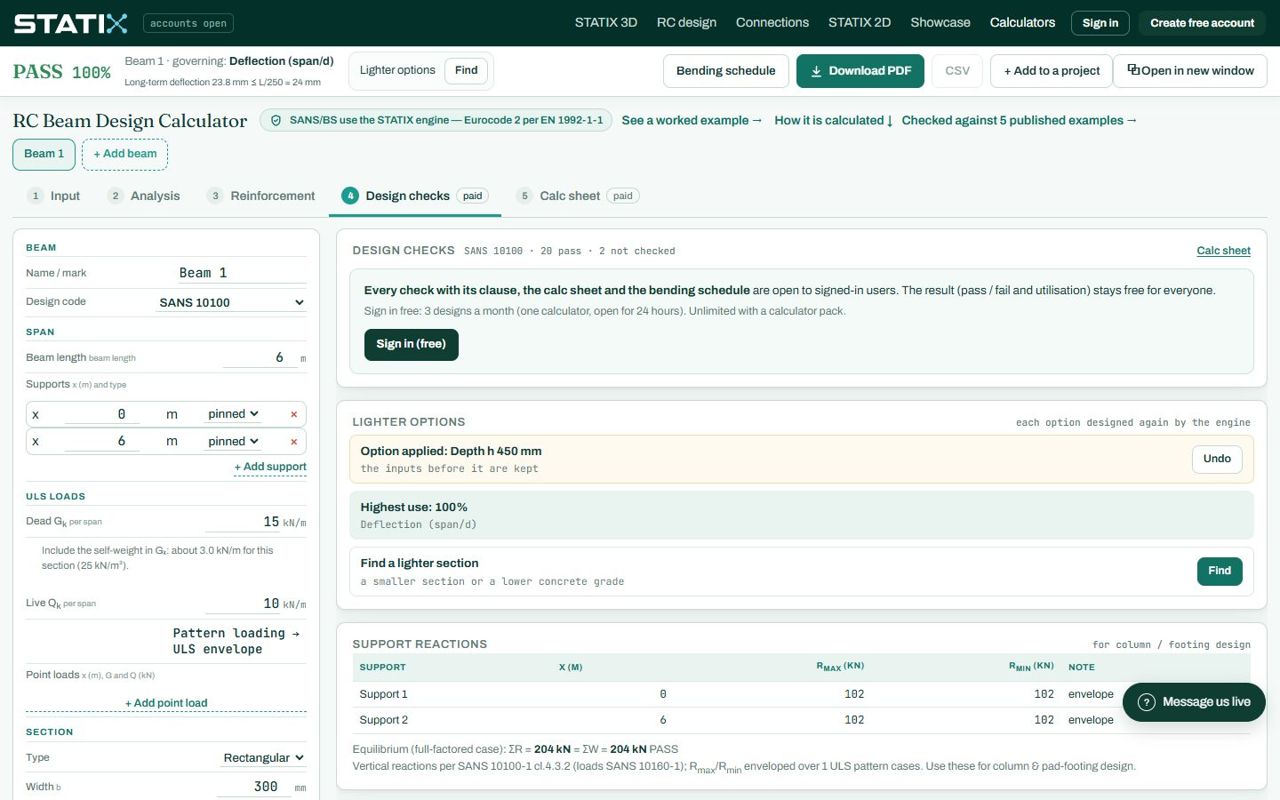
On a passing beam the same slot offers Lighter options: a smaller section or a lower concrete grade that still passes.
6. Tools on the page
| Tool | What it does |
|---|---|
| Find fixes / Lighter options | Designs single changes again and lists the ones that pass, with Apply and Undo (above). |
| Bending schedule | Opens the SANS 282 schedule of every beam on the page: marks, shape codes, dimensions, cut lengths and mass. The last leg of a shape 37 or 38 is the run-off and prints as “-”: the bender takes it from the cut length. |
| Download PDF | The calc sheet as a PDF. A failing design is stamped NOT FOR CONSTRUCTION. |
| CSV | The schedule as a spreadsheet file. |
| + Add to a project | Puts the beam on your project board, with the other elements of the job. |
| Open in new window | The calculator on its own, next to your drawing. |
| Reset inputs | Every input back to its default; Undo reset for 20 seconds. |
| + Add beam | Another beam on the same page; the schedule collects all of them. |
| Red boxes | An input the page cannot read, or the engine refuses, is red and named; nothing is calculated until it is fixed. |
7. What is free, what needs a sign-in
| Who | What you get |
|---|---|
| Everyone | The result (pass / fail, utilisation, governing check), the diagrams, the support reactions, Find fixes and the verification card. |
| Signed in (free account) | Every check with its clause, the full calc sheet and the bending schedule: 3 designs a month (one calculator, open for 24 hours). |
| Calculator pack | Unlimited designs, the editable reinforcement detail and the drawing sheet. |
8. Common mistakes
No self-weight in Gk. The page does not add it. Read the note under the box and add it.
Factored loads typed as Gk and Qk. These boxes take characteristic loads; the engine applies the factors.
Exposure and fire rating left on Not given. The cover and fire checks stay NOT CHECKED, so the design is not complete.
A point load outside the beam. It is refused in red: check its x against the beam length.
A wide end bearing on brickwork treated as a column. Set the support type, or the anchorage at the ends is wrong.
Old inputs from an earlier visit. The page remembers your last beam. Start again with Reset inputs (or a new beam tab).
9. Learn more
- Worked example: RC beam design to SANS 10100 (the theory behind each check)
- RC Design 1, lesson 1: beam bending and lesson 3: shear links
- Guide: the project board and schedule
Open the RC beam calculator
A guide to using the calculator, not a design. Check every value against the current code and your own project, and have the design checked and signed by a registered professional engineer.
Be first to use STATIX 3D and STATIX 2D.
Leave your email and we will tell you when each part is ready for testing. One confirmation now, one message then. A short monthly update only if you tick the box.