
How to use the strip footing calculator
A wall footing per metre run: what each input means, how to read the bearing pressure, and why the page opens as NOT CHECKED until you give the exposure.
1. What the calculator does
The strip footing calculator designs a continuous footing under a wall, per metre run. It checks the bearing pressure under the footing for the wall loads (with a moment and a horizontal load if there are any), then designs the footing as reinforced concrete: bending at the face of the wall, shear, the main bars across the footing and the distribution bars along it.
The code routes are SANS 10100-1, BS 8110-1, Eurocode 2 (EN 1992-1-1) and SANS 51992-1-1 (SA Eurocode, 2023 draft annex). The page badge names the clauses: SANS 10100-1 cl. 4.10 for bases, cl. 4.3 for bending and shear and cl. 4.11 for detailing; on EN 1992-1-1, 6.1, 6.2 and 9.3; loads to SANS 10160-1.

2. The inputs, group by group
| Input | What it means | Typical value |
|---|---|---|
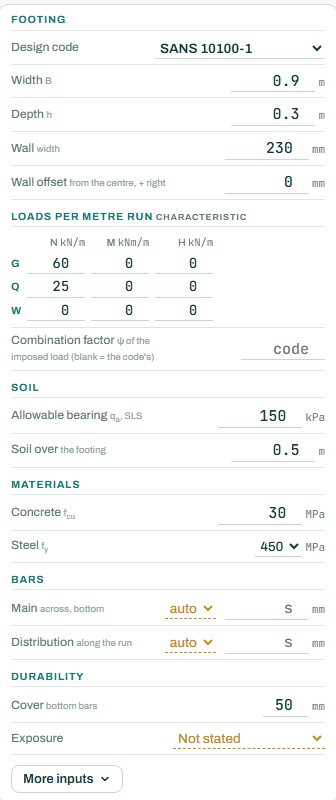
| Footing | Design code, width B, depth h, wall width and the wall offset from the centre (for an eccentric wall). | B 0.9 m, h 0.3 m, wall 230 mm |
| Loads per metre run | Characteristic N, M and H per metre for dead G, imposed Q and wind W. The combination factor ψ for Q is the code value unless you type one. | G 60, Q 25 kN/m |
| Soil | Allowable bearing pressure qa (SLS) and the depth of soil over the footing. | 150 kPa, 0.5 m |
| Materials | Concrete fcu and steel fy. | 30 MPa, 450 MPa |
| Bars | Main bars across the footing at the bottom, and distribution bars along the run: auto, or a size and spacing. | auto |
| Durability | Cover to the bottom bars and the exposure. “Not stated” leaves durability NOT CHECKED. | 50 mm, cast against soil |
3. How to read the result
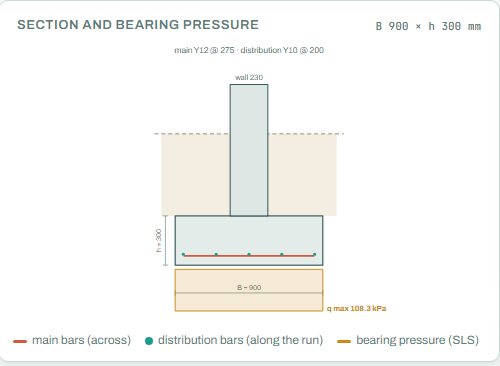
The section draws the wall on the footing with the soil over it, the main bars across the bottom, the distribution bars and the bearing pressure under the footing at SLS. Here qmax is 108.3 kPa against an allowable 150 kPa.
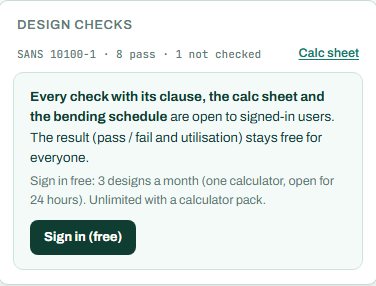
The badge shows the highest utilisation and names the governing check. As the page opens it reads NOT CHECKED: the exposure is “Not stated”, so the durability check cannot run, and a design with any NOT CHECKED item is not shown as a pass. Set the exposure and the badge changes to PASS or FAIL.
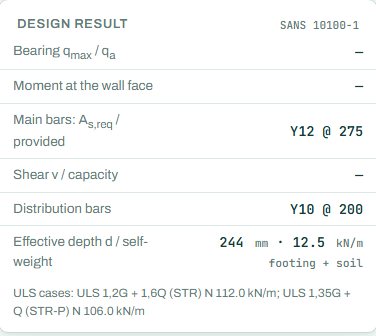
Signed out, some rows of the design result card show a dash (“—”): the values behind each check, with their clauses, open when you sign in. The badge, the drawings and the bars are there for everyone. The results keep their numbers too (here q_max in the section); only the check rows hide their clauses and values. This is intended.
4. Calc sheet and schedule
The result (pass / fail and utilisation) stays free for everyone. Every check with its clause, the calc sheet and the bending schedule are open to signed-in users. Sign in free: 3 designs a month (one calculator, open for 24 hours). Unlimited with a calculator pack.
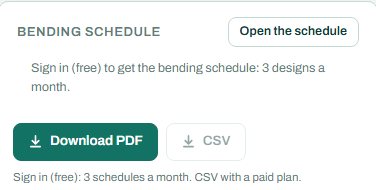
The bending schedule card reads: “Sign in (free): 3 schedules a month. CSV with a paid plan.” On the project board a strip footing follows the wall lines of the setting-out plan, with the corner and tee bars scheduled.
5. A 2-minute walk-through
- Open the calculator: a 230 mm wall on a 0.9 × 0.3 m strip, G 60 and Q 25 kN/m, 150 kPa soil.
- The badge reads NOT CHECKED. Press Go next to “Give input” and set the exposure to cast against soil (or against soil, blinded).
- Read the badge again: now PASS or FAIL, with the governing check named.
- Raise Q to 60 kN/m and watch the bearing pressure; widen B until it passes.
- Move the wall 150 mm off centre and see the pressure go uneven.
- Sign in for the check values, the calc sheet and the schedule.
6. Common mistakes
- Loads per wall instead of per metre. Divide the wall load by its length.
- Ultimate loads in the load table. It takes characteristic G, Q and W; the engine builds the ULS and SLS combinations.
- Reading NOT CHECKED as a fail, or ignoring it. It means an input is missing; give it.
- Allowable bearing from a guess. Take qa from the geotechnical report, and check the founding depth it applies to.
- Too little cover. A footing cast straight against the soil needs more cover than one on blinding.
7. Where it fits
The wall loads come from a load take-down or the masonry wall calculator. For two columns on one base, use the combined footing calculator.
8. Learn more
- Foundations 1, lesson 3: strip and combined footings and lesson 1: soils and bearing
- Worked example: strip footing to SANS 10100
Open the strip footing calculator
A guide to using the calculator, not a design. Check every value against the current code and your own project, and have the design checked and signed by a registered professional engineer.
Be first to use STATIX 3D and STATIX 2D.
Leave your email and we will tell you when each part is ready for testing. One confirmation now, one message then. A short monthly update only if you tick the box.