
How to use the raft foundation calculator
A raft under many columns as a plate on springs: what each input means, how to read the soil pressure, the settlement and the punching use per column.
1. What the calculator does
The raft calculator designs a rectangular raft foundation under a set of columns. It models the raft as a plate on Winkler springs (the soil as a bed of springs with a subgrade modulus k), solves it, and from the results checks the soil pressure, the settlement, the bending steel in both directions top and bottom, and punching at every column.
The code routes are SANS 10100-1, BS 8110-1, Eurocode 2 (EN 1992-1-1) and SANS 51992-1-1 (SA Eurocode, 2023 draft annex). The badge names the clauses: SANS 10100-1 cl. 4.4 for slabs and cl. 4.6 for punching; EN 1992-1-1 6.1, 6.4 and 9.3; loads to SANS 10160-1.

2. The inputs, group by group
| Input | What it means | Typical value |
|---|---|---|
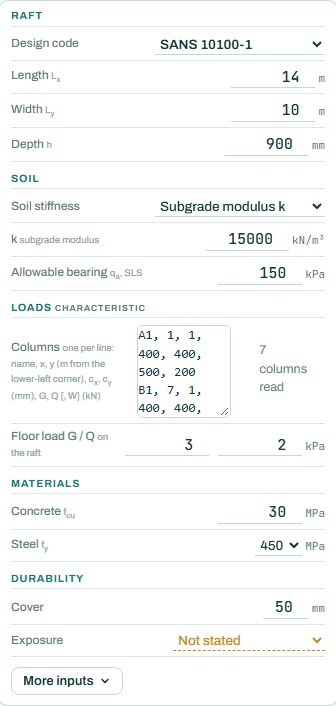
| Raft | Design code, length Lx, width Ly and depth h. | 14 × 10 m, h 900 mm |
| Soil | Soil stiffness: a subgrade modulus k, or worked out from qa and its settlement; and the allowable bearing qa (SLS). | k 15 000 kN/m³, qa 150 kPa |
| Columns | One line per column: name, x and y from the lower-left corner (m), cx and cy (mm), and G, Q (and W) in kN, characteristic. | A1, 1, 1, 400, 400, 500, 200 |
| Floor load | Characteristic G and Q spread over the raft. | 3 / 2 kPa |
| Materials | Concrete fcu and steel fy. | 30 MPa, 450 MPa |
| Durability | Cover and exposure. “Not stated” leaves durability NOT CHECKED. | 50 mm, cast against soil |
3. How to read the result
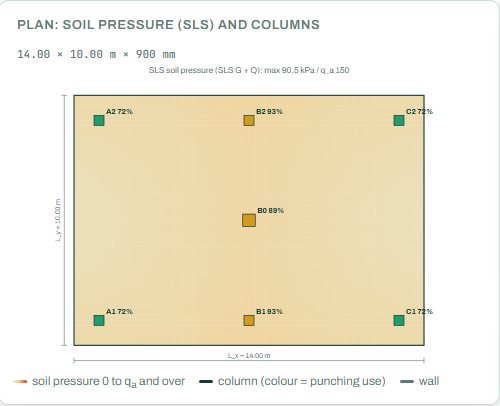
The plan colours the SLS soil pressure from zero up to qa, with each column coloured by how much of its punching capacity it uses. Here the pressure peaks at 90.5 kPa against 150 kPa, and the most used column is B1 at 93 %.
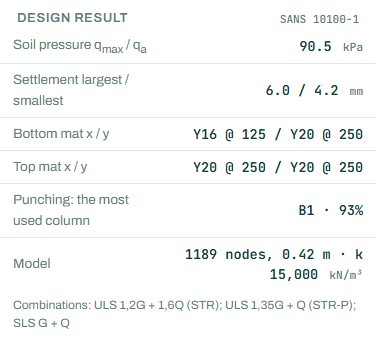
The design result gives the soil pressure, the largest and smallest settlement (the difference is what cracks finishes), the bottom and top mats each way, the most used column for punching and the size of the model. The badge names the governing check. As the page opens it shows NOT CHECKED: give the exposure, and it reads PASS or FAIL.
4. Calc sheet and schedule
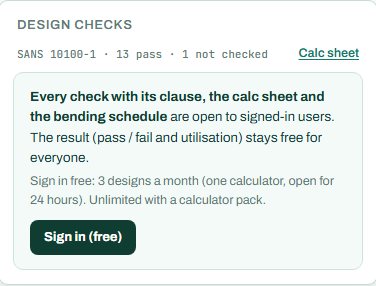
The result (pass / fail and utilisation) stays free for everyone. Every check with its clause, the calc sheet and the bending schedule are open to signed-in users. Sign in free: 3 designs a month (one calculator, open for 24 hours). Unlimited with a calculator pack.
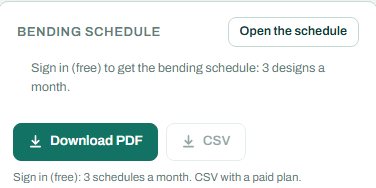
The bending schedule card reads: “Sign in (free): 3 schedules a month. CSV with a paid plan.” On the project board the columns bring their loads down to the raft.
5. A 2-minute walk-through
- Open the calculator: a 14 × 10 m raft, 900 mm deep, seven columns, k 15 000 kN/m³.
- Press Go and set the exposure; the badge now reads PASS or FAIL.
- Read the punching use per column on the plan: B1 and B2 at 93 %.
- Halve k to 7 500 and see the settlement grow and the moments shift.
- Make the raft 750 mm deep and see which column fails punching first.
6. Common mistakes
- k as a soil property. The subgrade modulus depends on the loaded area and the soil; take it from the geotechnical engineer, or let the page work it out from qa and its settlement, and try a range.
- Column positions from the wrong corner. x and y are from the lower-left corner of the raft.
- Ultimate loads in the column list. G and Q are characteristic.
- Only the total settlement. The difference between the largest and smallest settlement matters more for the building.
- A thin raft to save concrete. Punching at the heaviest column usually sets the depth.
8. Learn more
- Foundations 1, lesson 4: rafts and RC Design 1, lesson 7: footings and punching
- Worked example: raft foundation to SANS 10100
- Guide: the punching shear calculator
Open the raft calculator
A guide to using the calculator, not a design. Check every value against the current code and your own project, and have the design checked and signed by a registered professional engineer.
Be first to use STATIX 3D and STATIX 2D.
Leave your email and we will tell you when each part is ready for testing. One confirmation now, one message then. A short monthly update only if you tick the box.