
How to use the flat slab calculator
A beamless slab on a grid of columns: what each input means, how to read the strips and the punching at each column, and why punching sets the depth.
1. What the calculator does
The flat slab calculator designs a flat slab on a regular grid of columns, without beams. It analyses the slab by the equivalent frame method, with the imposed load on all, odd, even and adjacent spans, splits the moments into column strips and middle strips, designs the top and bottom steel, checks punching at interior, edge and corner columns (and designs the links), and checks deflection by span/depth.
The code routes are SANS 10100-1, BS 8110-1, Eurocode 2 (EN 1992-1-1) and SANS 51992-1-1 (SA Eurocode, 2023 draft annex). The badge names the clauses: SANS 10100-1 4.6.5, BS 8110-1 3.7, EN 1992-1-1 Annex I, 6.4 and 7.4.2, loads to SANS 10160-1.

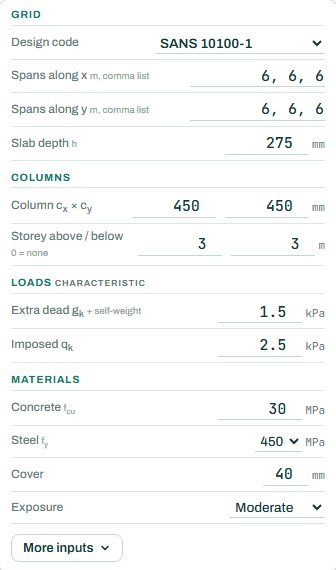
2. The inputs, group by group
| Input | What it means | Typical value |
|---|---|---|
| Grid | Design code; the spans along x and along y as comma lists; the slab depth. | 6, 6, 6 each way; h 275 |
| Columns | Column size, and the storey height above and below (0 = none); the columns take part in the frame. | 450 × 450; 3 m / 3 m |
| Loads | Characteristic extra dead load (on top of the self-weight) and imposed load. | 1.5 and 2.5 kPa |
| Materials | Concrete fcu, steel fy, cover and exposure. | 30 MPa, 450 MPa, 40 mm, moderate |
3. How to read the result
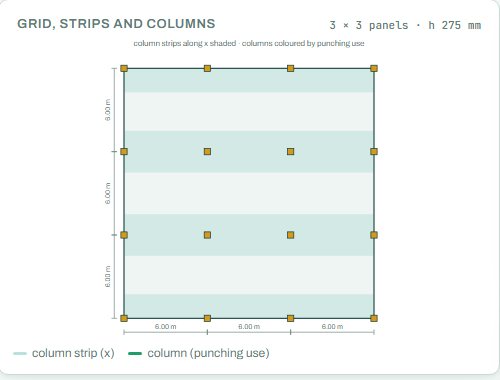
The plan shows the grid with the column strips shaded and each column coloured by how much of its punching capacity it uses. The design result gives the top and bottom steel in the column strips each way, the column loads (interior, edge, corner), whether each column type needs punching links, and the span/depth check.
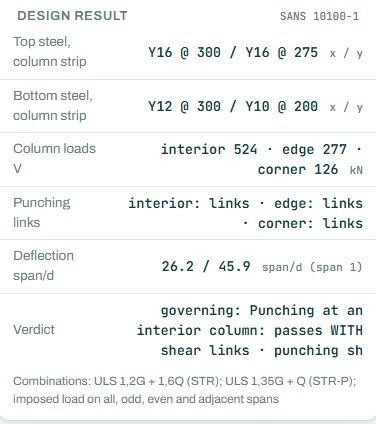
The badge names the governing check; here punching at an interior column, which passes with shear links. In a flat slab punching almost always governs: the slab depth is set by the columns, not by bending. If you would rather have no links, deepen the slab, enlarge the column or add a drop panel (in the punching shear calculator). Anything the engine could not run shows as NOT CHECKED.
4. Calc sheet and schedule
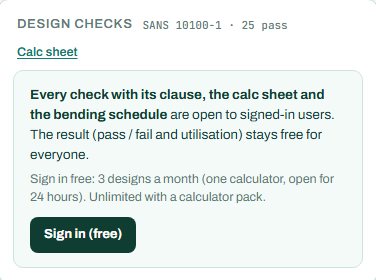
The result (pass / fail and utilisation) stays free for everyone. Every check with its clause, the calc sheet and the bending schedule are open to signed-in users. Sign in free: 3 designs a month (one calculator, open for 24 hours). Unlimited with a calculator pack.
The bending schedule card reads: “Sign in (free): 3 schedules a month. CSV with a paid plan.” On the project board the slab sits on the setting-out plan with its strips and columns.
5. A 2-minute walk-through
- Open the calculator: a 3 × 3 bay grid of 6 m spans, 275 mm slab, 450 × 450 columns, 1.5 kPa extra dead and 2.5 kPa imposed.
- Read the badge: PASS, punching at an interior column with links.
- Make the slab 300 mm and see whether the interior links go away.
- Change the spans along x to 6, 7.5, 6 and see the end-span steel and the span/depth change.
- Sign in for the calc sheet and schedule, or add the slab to a project.
6. Common mistakes
- Self-weight in the extra dead load. The engine adds the self-weight from h; type the finishes, ceiling and services only.
- Edge and corner columns forgotten. They have less perimeter and a larger moment transfer; read their punching result too.
- Very unequal spans. The equivalent frame method works best on a regular grid; for very irregular layouts check with a finite element model.
- Openings near columns. Check them in the punching shear calculator; they cut the perimeter.
7. Where it fits
The column loads in the result go to the RC column calculator and down to the footings. For long spans or thin slabs, compare with the post-tensioned slab calculator.
8. Learn more
- RC Design 2, lesson 1: flat slabs
- Worked example: flat slab to SANS 10100
- Guide: the punching shear calculator
Open the flat slab calculator
A guide to using the calculator, not a design. Check every value against the current code and your own project, and have the design checked and signed by a registered professional engineer.
Be first to use STATIX 3D and STATIX 2D.
Leave your email and we will tell you when each part is ready for testing. One confirmation now, one message then. A short monthly update only if you tick the box.