
How to use the combined footing calculator
Two columns on one base: what each input means, how the engine sizes the base, and why the top steel between the columns matters.
1. What the calculator does
The combined and strap footing calculator designs one footing for two columns. Use it when two columns are too close for separate pads, or when a column sits on a boundary and cannot have a pad centred under it. It sizes the base so the soil pressure stays under the allowable value, then designs it as a beam on the soil: the bending moments along the base, shear, punching at each column and the top and bottom steel. The strap option uses two pads tied by a beam instead of one base.
The code routes are SANS 10100-1, BS 8110-1, Eurocode 2 (EN 1992-1-1) and SANS 51992-1-1 (SA Eurocode, 2023 draft annex). The page badge names the model: a rigid base with linear soil pressure.

2. The inputs, group by group
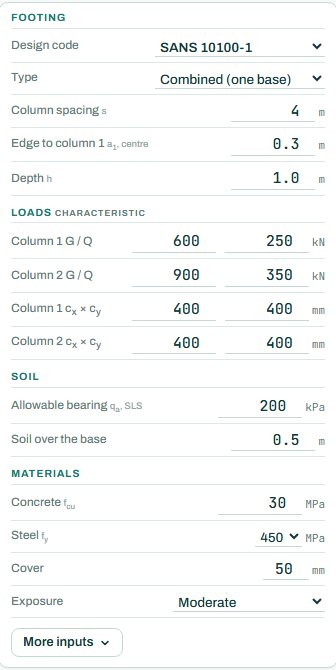
| Input | What it means | Typical value |
|---|---|---|
| Footing | Design code; type combined (one base) or strap (two pads and a beam); column spacing; the distance from the edge to column 1; depth. | combined, s 4 m, edge 0.3 m, h 1.0 m |
| Loads | Characteristic G and Q for each column, and the column sizes. | C1 600 / 250, C2 900 / 350 kN, 400 × 400 |
| Soil | Allowable bearing pressure qa (SLS) and the soil over the base. | 200 kPa, 0.5 m |
| Materials | Concrete fcu, steel fy, cover and exposure. | 30 MPa, 450 MPa, cover 50, moderate |
3. How to read the result
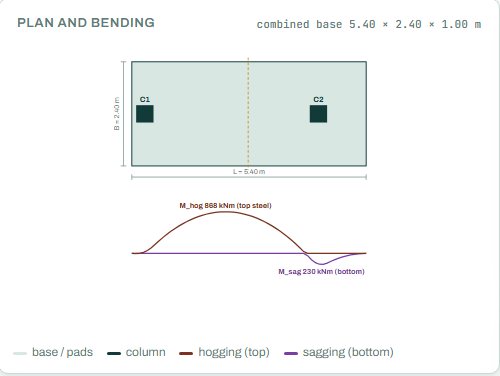
The plan shows the base the engine sized, with both columns, and under it the bending moment along the base: hogging (top steel) between the columns and sagging (bottom steel) under and beyond them. The base is sized so that its centre falls close to the resultant of the two column loads; then the soil pressure is near uniform.
The design result gives the base size, the bottom and top steel, the moments and the verdict. Here the governing check is the bearing pressure at 99 %: the base is just big enough. Anything the engine could not run shows as NOT CHECKED.
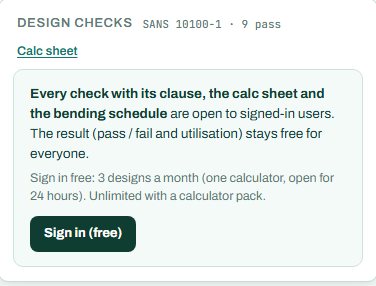
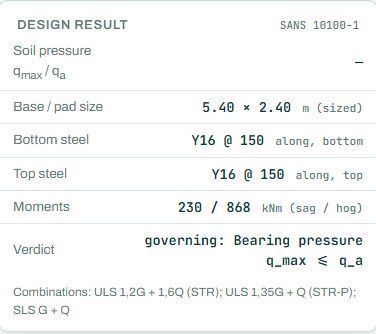
Signed out, some rows of the design result card show a dash (“—”): the values behind each check, with their clauses, open when you sign in. The badge, the drawings and the bars are there for everyone. The results keep their numbers too (here the soil pressure under the footing); only the check rows hide their clauses and values. This is intended.
4. Calc sheet and schedule
The result (pass / fail and utilisation) stays free for everyone. Every check with its clause, the calc sheet and the bending schedule are open to signed-in users. Sign in free: 3 designs a month (one calculator, open for 24 hours). Unlimited with a calculator pack.
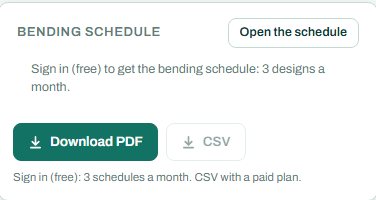
The bending schedule card reads: “Sign in (free): 3 schedules a month. CSV with a paid plan.” On the project board the columns bring their loads down to the footing.
5. A 2-minute walk-through
- Open the calculator: two 400 × 400 columns 4 m apart, C1 600 / 250 kN and C2 900 / 350 kN, column 1 at 0.3 m from the edge, 200 kPa soil.
- Read the badge: PASS 99 %, bearing pressure. The engine sized the base at 5.40 × 2.40 m.
- Look at the moment diagram: the large hogging moment between the columns needs the top steel.
- Switch the type to strap and compare.
- Raise the allowable bearing to 300 kPa and see the base shrink.
6. Common mistakes
- No top steel between the columns. A combined footing hogs between the columns, the opposite way to a pad; the top steel is the main steel there.
- Ultimate loads in the load boxes. They take characteristic G and Q.
- Ignoring the boundary. The edge distance to column 1 is fixed by the site; do not let the base run past the boundary.
- Very different column loads on a short base. The pressure becomes uneven; check that the resultant stays inside the middle of the base.
7. Where it fits
The column loads come from the RC column calculator or the load take-down. For more than two columns, or a whole building, use the raft calculator.
8. Learn more
- Foundations 1, lesson 3: strip and combined footings
- Worked example: combined footing to SANS 10100
- Guide: the pad footing calculator
Open the combined footing calculator
A guide to using the calculator, not a design. Check every value against the current code and your own project, and have the design checked and signed by a registered professional engineer.
Be first to use STATIX 3D and STATIX 2D.
Leave your email and we will tell you when each part is ready for testing. One confirmation now, one message then. A short monthly update only if you tick the box.