
How to use the cold-formed purlin calculator
A light-gauge roof purlin: what each input means, why wind uplift often governs, and how bridging and the sheeting restrain the purlin.
1. What the calculator does
The cold-formed purlin calculator designs a light-gauge roof purlin (or wall girt): a lipped channel, a lipped Zed or a top hat. It takes the roof loads per square metre, turns them into a line load from the spacing, and checks the purlin for bending under downward load and under wind uplift, for shear and for deflection, with local, distortional and lateral buckling. Simple spans, continuous spans and lapped Zeds are covered.
The code route is SANS 10162-2, which is the same text as AS/NZS 4600. The engine uses the Direct Strength Method, with the distortional stress from the closed form in Appendix D (Lau and Hancock), as the page badge says.

2. The inputs, group by group
| Input | What it means | Typical value |
|---|---|---|
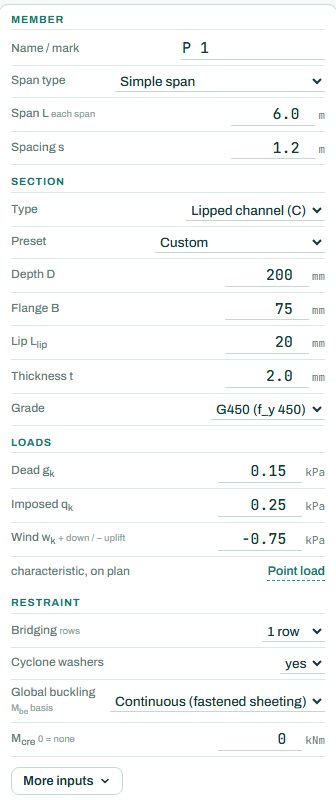
| Member | Span type (simple, continuous, lapped Z, or place the supports yourself), the span and the purlin spacing. | simple span 6 m, spacing 1.2 m |
| Section | Type (C, Z or top hat), a preset or your own depth, flange, lip and thickness, and the grade. | C 200 × 75 × 20 × 2.0, G450 |
| Loads | Characteristic dead, imposed and wind on plan, in kPa; wind positive down, negative for uplift. Point loads are possible. | dead 0.15, imposed 0.25, wind −0.75 |
| Restraint | Rows of bridging, cyclone washers, and the global buckling basis: continuous (fastened sheeting) or a rational Mcre you enter. | 1 row, washers yes, fastened sheeting |
3. How to read the result
The section and loading panel draws the span with the governing line load and the reactions. Here the governing case is uplift: w* = 1.28 kN/m upward, M* = 5.8 kNm against φMb = 12.1 kNm. The reactions show both the downward value and the uplift value (−3.83 kN): the cleats and fixings must carry the uplift.
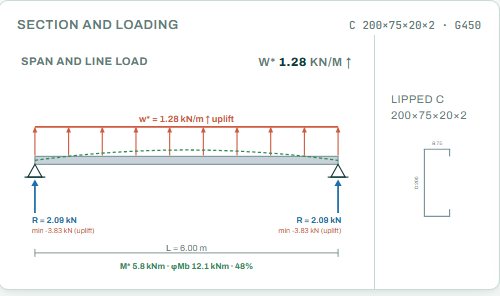
Under uplift the bottom flange, which is not held by the sheeting, goes into compression; that is why uplift often governs a light roof even when the downward load is larger on paper. Bridging restrains that free flange. The badge names the governing check; anything the engine could not check shows as NOT CHECKED.
4. Calc sheet and schedule
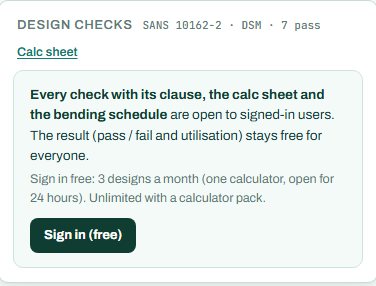
The result (pass / fail and utilisation) stays free for everyone. Every check with its clause, the calc sheet and the bending schedule are open to signed-in users. Sign in free: 3 designs a month (one calculator, open for 24 hours). Unlimited with a calculator pack.
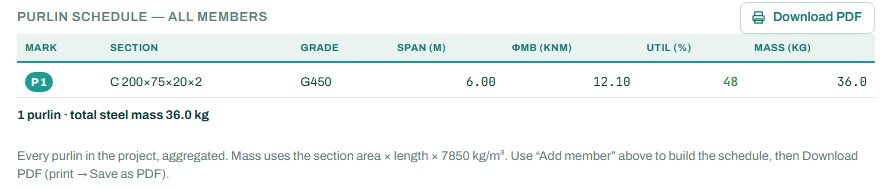
The purlin layout and section detail drawings are part of the paid plan. The purlin schedule collects every member in the project with its section, grade, span, φMb, utilisation and mass.

5. A 2-minute walk-through
- Open the calculator: a simply supported C 200 × 75 × 20 × 2.0 in G450, 6 m span at 1.2 m spacing, with 0.75 kPa wind uplift.
- Read the badge: PASS 48 %, moment under uplift.
- Set bridging to none and see the uplift check rise.
- Change the span type to continuous (equal spans) and compare the moments over the supports.
- Try a thinner section (1.6 mm) to find the lightest that passes.
6. Common mistakes
- Wind uplift typed as positive. Uplift is negative on this page; a positive value is treated as downward load.
- Loads along the slope instead of on plan. The page asks for loads on plan.
- “Fastened sheeting” for sheeting that does not restrain. Some concealed-fix roofs do not hold the flange; then enter a rational Mcre.
- Forgetting the uplift at the cleats. The negative reaction goes to the cleat bolts and the rafter.
7. Where it fits
The roof pressures come from the wind load calculator: use the zone pressures for the purlins in each roof zone, and the higher edge-zone values for the purlins near the eaves, ridge and gables. The purlin reactions go to the rafter in the portal frame design. Girts follow the same steps with the wall pressures.
8. Learn more
- Steel Design 2, lesson 2: purlins and girts and lesson 3: cold-formed sections
- Guide: the wind load calculator, for the roof pressures
Open the cold-formed purlin calculator
A guide to using the calculator, not a design. Check every value against the current code and your own project, and have the design checked and signed by a registered professional engineer.
Be first to use STATIX 3D and STATIX 2D.
Leave your email and we will tell you when each part is ready for testing. One confirmation now, one message then. A short monthly update only if you tick the box.