
How to use the base plate calculator
A steel column base from plate to anchors: what each input means, how to read the regime and the governing check, and the sign of the axial load.
1. What the calculator does
The base plate calculator checks a steel column base: the plate, the weld from the column to the plate, the anchors and the concrete under it. It finds how the plate works (all in compression, or anchors in tension on one side), checks the plate in bending, the concrete and grout in bearing, the anchors in tension and shear, the concrete cone and the other anchor failure modes, and gives a take-off of plate, anchors and weld.
The code routes are SANS 10162-1 cl. 25 (with EN rows where SANS has no clause) and EN 1993-1-8 + EN 1992-4. The anchor concrete cone is checked against a published example (InFaSo Example 9.2), as the page badge says.

2. The inputs, group by group
| Input | What it means | Typical value |
|---|---|---|
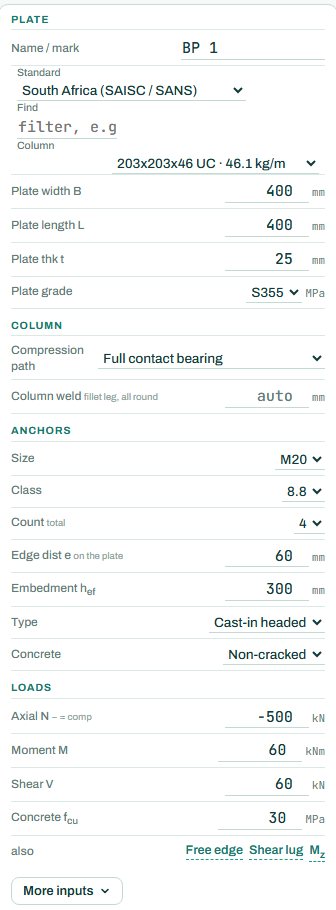
| Plate | The column section, plate width B, length L, thickness t and grade. | 203×203×46 UC, 400 × 400 × 25, S355 |
| Column | How compression reaches the plate: full contact bearing (sawn or machined end) or no contact, when the welds carry N, M and V. The weld size is auto or your own. | full contact bearing |
| Anchors | Size, class, number, edge distance on the plate, embedment hef, cast-in headed or post-installed, and cracked or non-cracked concrete. | 4 × M20 8.8, hef 300 |
| Loads | Factored axial N (negative = compression), moment M and shear V, and the concrete fcu under the plate. | N −500 kN, M 60 kNm, V 60 kN |
| Also | A free edge near the anchors, a shear lug, and the minor-axis moment Mz. | none |
3. How to read the result
The drawings show the elevation and the plan to scale, with the loads, the anchors and the regime the engine found. “Anchors in tension” means the moment is large enough to lift one side of the plate, so the anchors on that side carry tension (25.4 kN each here) and the other side bears on the grout.
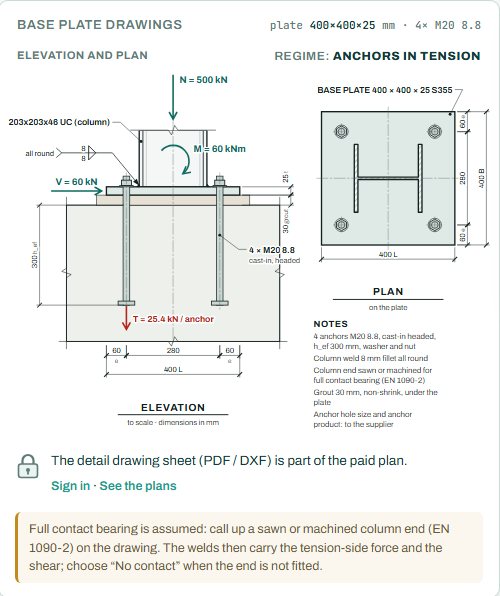
The note under the drawings matters: with full contact bearing the column end must be sawn or machined, and that goes on the drawing. Choose “No contact” if the end is not fitted; the welds then carry all of N, M and V.
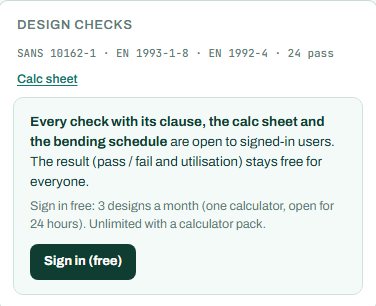
The badge names the governing check; here the concrete and grout in bearing at 80 %. The checks card shows the count (24 pass). Anything the engine could not run shows as NOT CHECKED.
4. Calc sheet and take-off
The result (pass / fail and utilisation) stays free for everyone. Every check with its clause, the calc sheet and the bending schedule are open to signed-in users. Sign in free: 3 designs a month (one calculator, open for 24 hours). Unlimited with a calculator pack.
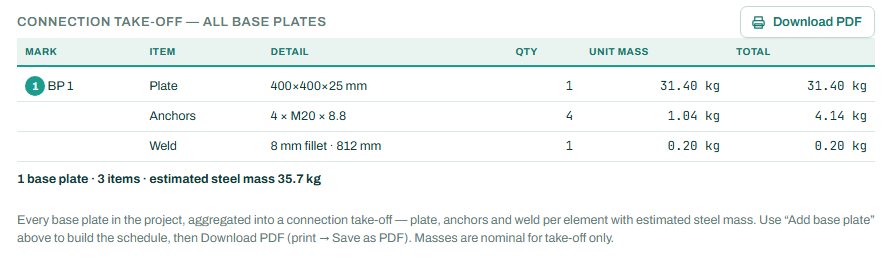
The detail drawing sheet (PDF / DXF) is part of the paid plan. The connection take-off adds every base plate in the project to one list of plate, anchors and weld with the steel mass.

5. A 2-minute walk-through
- Open the calculator: a 203×203×46 UC on a 400 × 400 × 25 plate with 4 × M20 8.8 anchors, N −500 kN (compression), M 60 kNm, V 60 kN.
- Read the badge: PASS 80 %, concrete and grout in bearing; the regime is anchors in tension.
- Raise M to 100 kNm and watch the anchor tension and the plate bending grow.
- Set a free edge near the anchors and see the concrete cone check drop.
- Add a shear lug for a large shear, or change the anchors to M24.
- Sign in for the calc sheet.
6. Common mistakes
- The wrong sign on N. On this page compression is negative. A compression load typed as positive is checked as uplift.
- Full contact bearing without saying so on the drawing. If the column end is not sawn or machined, choose no contact.
- Edge distances on the plate only. The concrete cone depends on the distance to the edge of the pedestal or footing; declare a free edge if there is one.
- Non-cracked concrete by default. A footing or pedestal that may crack (tension from moment or shrinkage) needs “cracked”.
- Characteristic loads. The loads are factored design values.
8. Learn more
- Steel Design 1, lesson 7: base plates and Steel Design 2, lesson 6: the apex and the base
- Worked example: base plate to SANS 10162-1
- Guide: the steel member calculator
Open the base plate calculator
A guide to using the calculator, not a design. Check every value against the current code and your own project, and have the design checked and signed by a registered professional engineer.
Be first to use STATIX 3D and STATIX 2D.
Leave your email and we will tell you when each part is ready for testing. One confirmation now, one message then. A short monthly update only if you tick the box.