
How to use the apex haunch calculator
The portal frame ridge connection: what each input means, where the bolts work under gravity and under uplift, and how to read the joint resistance.
1. What the calculator does
The apex haunch calculator checks the ridge connection of a portal frame: two rafters meet at the apex, each with a haunch and an end plate, bolted to each other. Under gravity the bottom of the apex is in tension, so the bolt rows are at the bottom, in the haunch. The engine uses the same component method as the eaves haunch, with the apex geometry: the roof pitch, the two plates and the bolts through both.
The code route is the EN 1993-1-8 component method (clause 6.2) with the STATIX apex-haunch check, as the page badge says, with published-example checks.

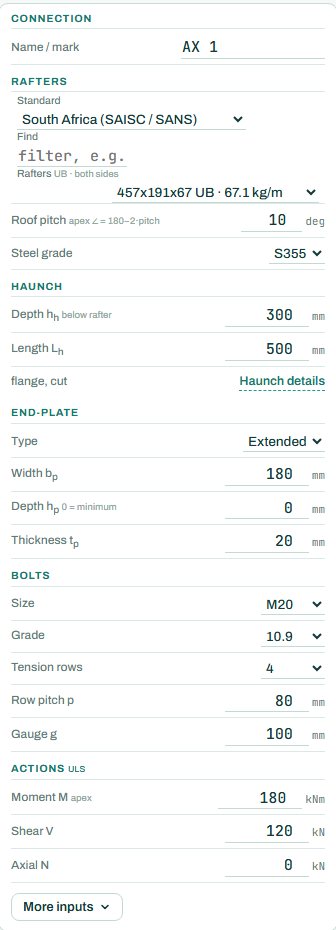
2. The inputs, group by group
| Input | What it means | Typical value |
|---|---|---|
| Rafters | The rafter section (both sides), the roof pitch and the steel grade. | 457×191×67 UB, 10°, S355 |
| Haunch | Depth below the rafter and length; “Haunch details” for the flange and how it is cut. | 300 deep, 500 long |
| End plate | Extended or flush, width, depth (0 = the minimum) and thickness. | extended, 180 wide, 20 thick |
| Bolts | Size, grade, tension rows, row pitch and gauge. | M20 10.9, 4 tension rows, pitch 80, gauge 100 |
| Actions (ULS) | Factored apex moment, shear and axial force. | M 180 kNm, V 120 kN |
3. How to read the result
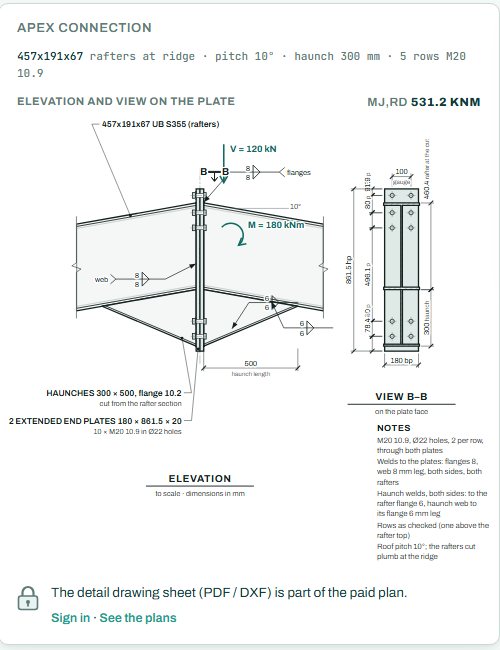
The drawings show the apex to scale: both rafters at the pitch, the two haunches, the two end plates and the bolts through them.
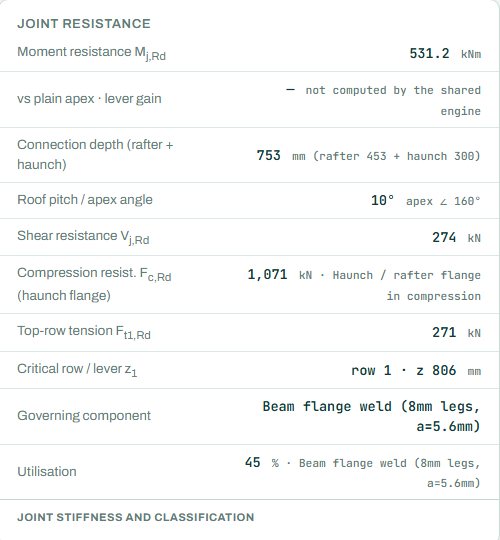
The joint resistance card gives the moment resistance, the connection depth, the roof pitch and apex angle, the shear resistance, the compression at the haunch and rafter flange, the top-row tension, the critical row and the governing component.
The badge names the governing component; here the beam flange weld at 45 %. As on the eaves page, the “vs plain apex” row shows a dash because the shared engine does not compute it. Anything the engine could not run shows as NOT CHECKED.
4. Calc sheet and take-off
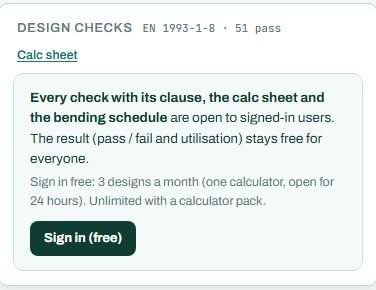
The result (pass / fail and utilisation) stays free for everyone. Every check with its clause, the calc sheet and the bending schedule are open to signed-in users. Sign in free: 3 designs a month (one calculator, open for 24 hours). Unlimited with a calculator pack.
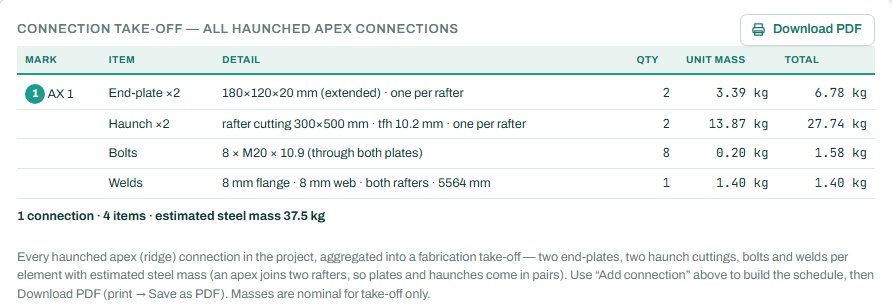
The detail drawing sheet (PDF / DXF) is part of the paid plan. The connection take-off collects every connection of this type in the project, with the plate, bolts, welds and steel mass.
5. A 2-minute walk-through
- Open the calculator: 457 UB rafters at 10°, 300 mm haunches, 4 tension rows of M20 10.9, M 180 kNm.
- Read the badge: PASS 45 %, beam flange weld.
- Enter an uplift case with a negative moment and see the top of the apex go into tension.
- Steepen the pitch to 15° and see the apex angle change.
- Try a flush plate and compare Mj,Rd.
6. Common mistakes
- Only gravity. Under uplift the apex moment reverses; the top bolts then carry the tension.
- Shear at the apex taken as zero. Unequal loading, such as drift or wind on one side, gives shear at the ridge.
- Pitch from the drawing in the wrong unit. The pitch is in degrees from the horizontal.
- Bolt rows in the wrong place. Under gravity the tension is at the bottom of the apex, in the haunch; the rows near the haunch flange do the work.
- Forgetting the second plate in the take-off. An apex has two end plates and two haunches; the take-off counts both.
7. Where it fits
The apex moment and shear come from the portal frame analysis. The apex moment is usually smaller than the eaves moment, so the apex haunch can often be shorter or the plate flush; check every combination, including wind uplift, before you make it lighter. The eaves connection and the column base have their own calculators.
8. Learn more
- Steel Design 2, lesson 6: the apex and the base
- Worked example: end plate connection to EN 1993-1-8
- Guide: the eaves haunch calculator
Open the apex haunch calculator
A guide to using the calculator, not a design. Check every value against the current code and your own project, and have the design checked and signed by a registered professional engineer.
Be first to use STATIX 3D and STATIX 2D.
Leave your email and we will tell you when each part is ready for testing. One confirmation now, one message then. A short monthly update only if you tick the box.