
How to use the timber beam calculator
A solid, glulam or LVL beam: what each input means, how kmod follows each load combination, and why lateral-torsional buckling and creep matter.
1. What the calculator does
The timber beam calculator designs a solid timber, glulam or LVL beam: simply supported, a cantilever or continuous. It builds the load combinations, takes the modification factor kmod for each combination from its shortest-duration action, and checks bending with lateral-torsional buckling, shear, bearing and the instantaneous and final deflection with creep. Notches, connections and fire are options.
Two codes are chosen separately: the load combinations (SANS 10160-1, 1.2G + 1.6Q, or EN 1990, 1.35G + 1.5Q) and the resistance (EN 1995-1-1 with kmod and γM, or SANS 10163-1:2003). The badge says it plainly: the characteristic grade stresses are inputs to check against SANS 10163-1, SANS 1783-2 or EN 338.

2. The inputs, group by group
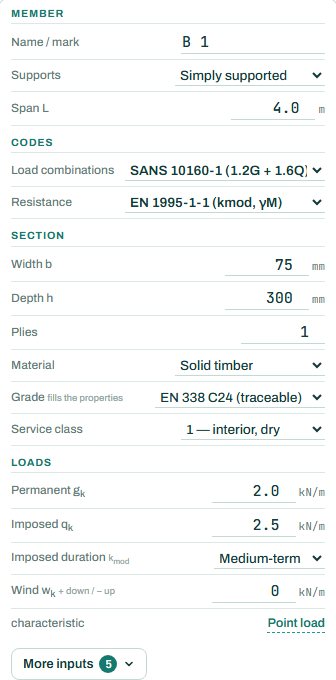
| Input | What it means | Typical value |
|---|---|---|
| Member | Supports (simply supported, cantilever, continuous, or place them yourself) and the span. | simply supported, 4.0 m |
| Codes | Load combinations and resistance code. | SANS 10160-1, EN 1995-1-1 |
| Section | Width, depth, plies, material (solid, glulam, LVL), grade and service class. | 75 × 300, solid, C24, class 1 |
| Loads | Characteristic permanent and imposed line loads, the duration of the imposed load, and wind (+ down, − up). Point loads under the link. | gk 2.0, qk 2.5 kN/m, medium-term |
| More inputs | Self-weight, load sharing, bearing, notches, connections, fire and floor vibration. | as needed |
3. How to read the result
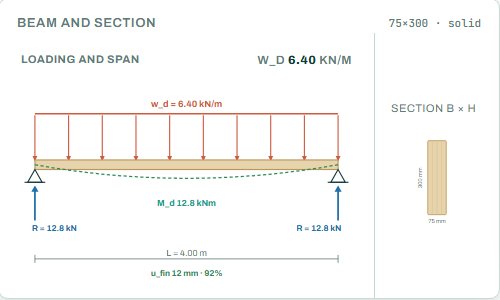
The loading and span sketch shows the design load, the moment and the reactions, with the final deflection under it.
The load combination table is the heart of the page: each combination with its kmod, the shortest action, the load, the moment, the compression edge, the LTB length and kcrit, and the utilisation in bending, shear and bearing. Under it are the deflection combinations: instantaneous, final with creep, and net final.
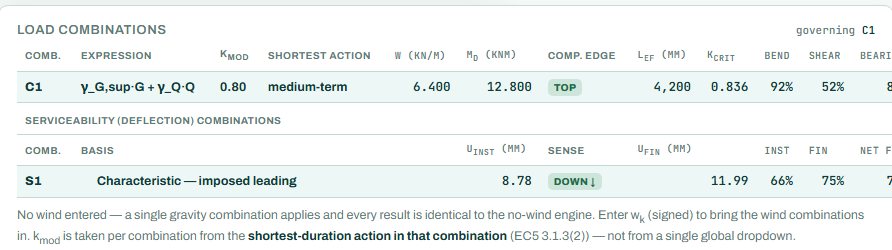
The badge names the governing check; here bending with lateral-torsional buckling at 92 %. A deep, narrow timber beam that is not restrained along its top edge loses strength to LTB (kcrit below 1). With no wind entered, one gravity combination applies, as the note under the table says. Anything the engine could not run shows as NOT CHECKED.
4. Calc sheet and take-off
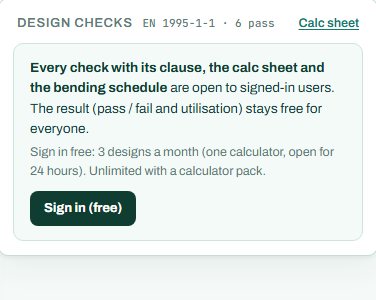
The result (pass / fail and utilisation) stays free for everyone. Every check with its clause, the calc sheet and the bending schedule are open to signed-in users. Sign in free: 3 designs a month (one calculator, open for 24 hours). Unlimited with a calculator pack.
The detail drawings are part of the paid plan. The timber take-off collects every member in the project with its section, material, length, volume and mass.
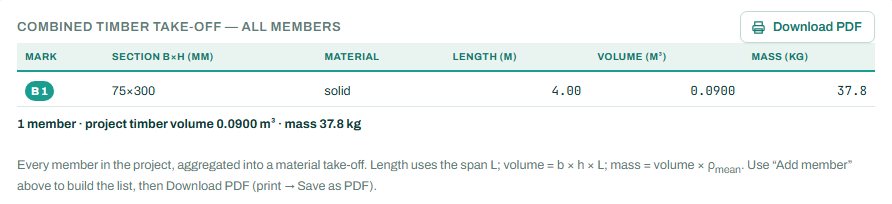
5. A 2-minute walk-through
- Open the calculator: a 75 × 300 C24 beam on a 4 m span, gk 2.0 and qk 2.5 kN/m, service class 1.
- Read the badge: PASS 92 %, bending with LTB.
- Enter a lateral restraint spacing under More inputs (joists or noggins at 0.6 m, say) and see kcrit rise.
- Change the service class to 2 and see kmod and the creep change.
- Enter a wind uplift and see the extra combinations appear.
- Switch the grade to SA pine S5 and compare.
6. Common mistakes
- One kmod for everything. Each combination takes kmod from its shortest-duration action; let the engine do it.
- Grade stresses that do not match the timber on site. Check the stamp on the timber against the grade you chose.
- Service class 1 for a beam outside. Covered but humid is class 2; exposed is class 3, with lower strength and more creep.
- No restraint to the compression edge. Under uplift the bottom edge is in compression, often with nothing holding it.
- Instantaneous deflection only. Timber creeps; the final deflection is what the finishes see.
8. Learn more
- Timber and Masonry 1, lesson 1: timber beams and lesson 2: timber in practice
- Worked example: timber beam to EN 1995
Open the timber beam calculator
A guide to using the calculator, not a design. Check every value against the current code and your own project, and have the design checked and signed by a registered professional engineer.
Be first to use STATIX 3D and STATIX 2D.
Leave your email and we will tell you when each part is ready for testing. One confirmation now, one message then. A short monthly update only if you tick the box.