
How to use the staircase calculator
A concrete stair from steps to bars: what each input means, how the flight load is worked out on plan, and why the landings can govern.
1. What the calculator does
The staircase calculator designs a reinforced concrete stair: a dog-leg stair onto landings, a straight flight, a stair cantilevered from a wall or one spanning between stringers. It works out the pitch and the effective span, the load on plan from the steps, the waist and the finishes, and checks bending, shear and span/depth for the flight and the landings, with the detailing rules.
The code routes are SANS 10100-1, Eurocode 2 (EN 1992-1-1) and SANS 51992-1-1 (SA Eurocode, 2023 draft annex). The badge names the clauses: SANS 10100-1 cl. 4.9 staircases, cl. 4.3 bending, shear and span/depth, cl. 4.11 detailing; EN 1992-1-1 6.1, 6.2.2, 7.4.2 and 9.3.

2. The inputs, group by group
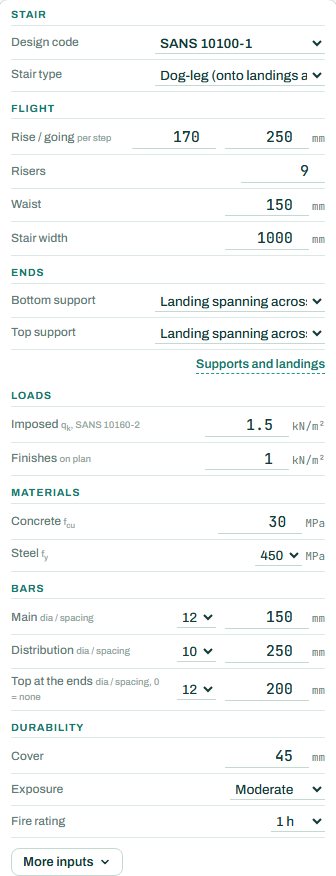
| Input | What it means | Typical value |
|---|---|---|
| Stair | Design code and the stair type: dog-leg, straight, cantilever from a wall, or between stringers. | dog-leg onto landings |
| Flight | Rise and going per step, number of risers, waist thickness and stair width. | 170 / 250, 9 risers, waist 150, 1000 wide |
| Ends | The support at the bottom and top: a landing spanning across, a beam or wall (monolithic), a simple bearing, or bolted to an existing slab. “Supports and landings” sets them in detail. | landing spanning across, both ends |
| Loads | Imposed load from SANS 10160-2 for the occupancy, and the finishes on plan. | 1.5 and 1.0 kN/m² |
| Materials | Concrete fcu and steel fy. | 30 MPa, 450 MPa |
| Bars | Main bars, distribution bars and top bars at the ends. | Y12 @ 150, Y10 @ 250, Y12 @ 200 |
| Durability | Cover, exposure and fire rating. | 45 mm, moderate, 1 h |
3. How to read the result
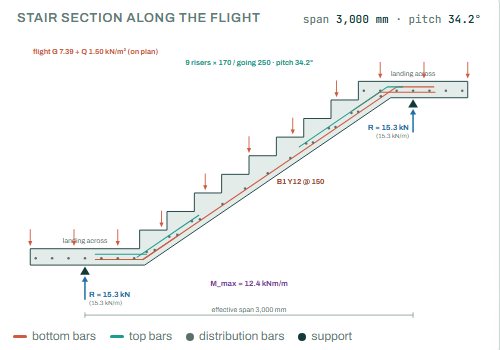
The section along the flight draws the steps, the waist, the landings, the bottom, top and distribution bars, the loads and the reactions to scale.
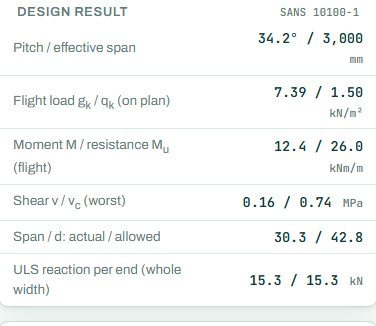
The design result gives the pitch and the effective span, the flight load on plan (the steps and the sloping waist weigh more than a flat slab), the moment against the resistance, shear, span/depth and the reaction per end, which goes to the landing, beam or wall below.
The badge names the governing check; here the top steel of the landing at end 1 at 96 %, not the flight. Where the landings carry the flight, they are often what governs. Anything the engine could not run shows as NOT CHECKED.
4. Calc sheet, drawing and schedule
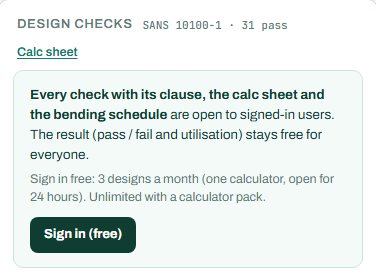
The result (pass / fail and utilisation) stays free for everyone. Every check with its clause, the calc sheet and the bending schedule are open to signed-in users. Sign in free: 3 designs a month (one calculator, open for 24 hours). Unlimited with a calculator pack.
The bending schedule card reads: “Sign in (free): 3 schedules a month. CSV with a paid plan.” The full reinforcement detail drawing is part of the paid plan.
5. A 2-minute walk-through
- Open the calculator: a dog-leg stair of 9 risers, 170 / 250, waist 150, onto landings spanning across at both ends.
- Read the badge: PASS 96 %, the landing top steel at end 1.
- Raise the imposed load for a public stair and see what governs.
- Change the type to cantilever from a wall and see the design change.
- Change the bottom support to a beam or wall and compare the moments.
6. Common mistakes
- The flight load as a flat slab. The waist is sloping and the steps add weight; the engine works this out on plan, so give the waist, not an average thickness.
- Landings forgotten. A landing spanning across carries the flight reaction; it can govern, as here.
- Imposed load for a home on a public stair. Use the SANS 10160-2 value for the occupancy.
- Bars that cannot turn the corner. At the kink between flight and landing the bars must cross, not follow the inside corner.
8. Learn more
Open the staircase calculator
A guide to using the calculator, not a design. Check every value against the current code and your own project, and have the design checked and signed by a registered professional engineer.
Be first to use STATIX 3D and STATIX 2D.
Leave your email and we will tell you when each part is ready for testing. One confirmation now, one message then. A short monthly update only if you tick the box.