
How to use the slab on grade calculator
A ground-bearing floor under rack legs and storage: what each input means, how to read the point and uniform load checks, and why joint spacing matters.
1. What the calculator does
The slab on grade calculator designs a ground-bearing concrete floor: a slab cast on prepared ground, such as a warehouse or factory floor. It checks the slab under a point load (a rack leg or a wheel) and a uniform storage load, using yield-line theory for the point load and beam-on-elastic-foundation theory for the uniform load, and lays out the sawn joints and the mesh.
The code routes are SANS 51992-1-1 (SA Eurocode, 2023 draft annex) and Eurocode 2 (EN 1992-1-1), with loads to SANS 10160-1. The page badge names the clauses (3.1.8 and 6.4) and the two theories.

2. The inputs, group by group
| Input | What it means | Typical value |
|---|---|---|
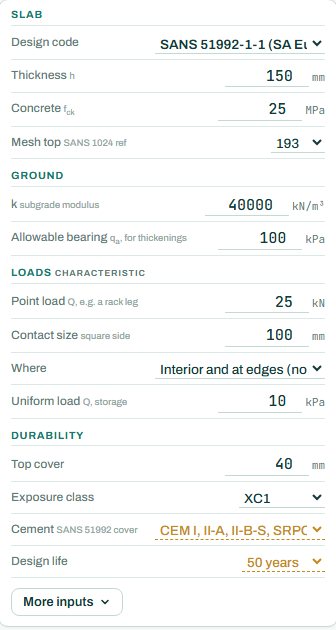
| Slab | Design code, thickness h, concrete fck and the top mesh (SANS 1024 reference). The floor size is under More inputs. | h 150, fck 25, mesh 193 |
| Ground | Subgrade modulus k and the allowable bearing for thickenings. | k 40 000 kN/m³, 100 kPa |
| Loads | Characteristic point load Q and its contact size, where it can stand (interior and edges, anywhere including corners, or interior only), and the uniform storage load. | 25 kN on 100 mm, 10 kPa |
| Durability | Top cover, exposure class, cement and design life. | 40 mm, XC1, 50 years |
3. How to read the result
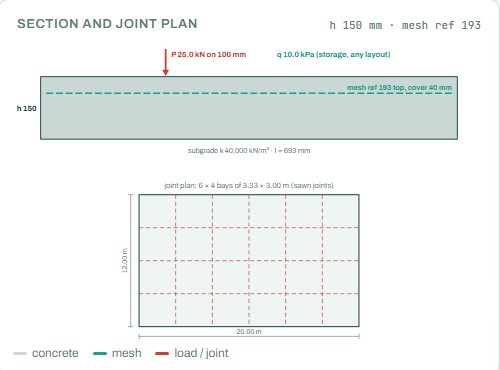
The section shows the slab with the mesh, the point load and the uniform load on the subgrade. The joint plan shows the bays between the sawn joints. The radius of relative stiffness l (693 mm here) says how far the slab spreads a point load into the ground.
The design result lists the point load against the worst capacity, the uniform load against the allowed value (41.2 kPa), the moments Mun / Mn, the radius of relative stiffness, the joints and the quantities of concrete and mesh. The badge names the governing check; here the joint spacing at 89 %. Anything the engine could not run shows as NOT CHECKED.
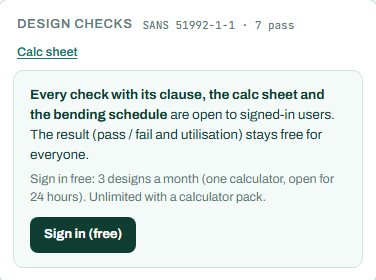
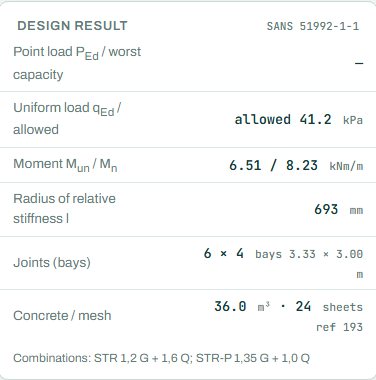
Signed out, some rows of the design result card show a dash (“—”): the values behind each check, with their clauses, open when you sign in. The badge, the drawings and the bars are there for everyone. The results keep their numbers too (here the point load result); only the check rows hide their clauses and values. This is intended.
4. Calc sheet
The result (pass / fail and utilisation) stays free for everyone. Every check with its clause, the calc sheet and the bending schedule are open to signed-in users. Sign in free: 3 designs a month (one calculator, open for 24 hours). Unlimited with a calculator pack.
On the project board the floor sits on the setting-out plan with its joints and mesh.

5. A 2-minute walk-through
- Open the calculator: a 150 mm slab in 25 MPa concrete with mesh 193, k 40 000 kN/m³, a 25 kN rack leg on 100 mm and 10 kPa storage.
- Read the badge: PASS 89 %, joint spacing.
- Set “Where” to anywhere, corners too, and see the point load check get harder.
- Raise the rack leg to 50 kN and find the thickness that passes.
- Lower k to 20 000 for a poor subgrade and see the radius of relative stiffness grow.
6. Common mistakes
- “Interior only” for racking that can stand at a joint. Racks and forklifts go everywhere; choose the case that covers the real layout.
- The contact area of the whole base plate when the leg bears on a small pad. Use the real contact size.
- k for the subgrade alone when there is a compacted sub-base; use the combined value from the geotechnical report.
- Joints too far apart. Long bays crack between the joints from shrinkage; the joint spacing governs here for that reason.
- Mesh as strength. In a jointed floor the mesh mainly controls cracks; the concrete carries the load.
8. Learn more
Open the slab on grade calculator
A guide to using the calculator, not a design. Check every value against the current code and your own project, and have the design checked and signed by a registered professional engineer.
Be first to use STATIX 3D and STATIX 2D.
Leave your email and we will tell you when each part is ready for testing. One confirmation now, one message then. A short monthly update only if you tick the box.