
How to use the RC shear wall calculator
A reinforced concrete wall under axial load, in-plane moment and shear: what each input means, short or slender, and how to read the end strip and the tension end.
1. What the calculator does
The RC shear wall calculator designs a reinforced concrete wall for axial load, in-plane bending and shear, and bending across the wall. It checks whether the wall is short or slender, works out the in-plane capacity by strain compatibility, checks the most loaded end strip, the tension end and the in-plane shear, and the reinforcement limits. Seismic detailing (boundary elements) is an option.
The code routes are SANS 10100-1, Eurocode 2 (EN 1992-1-1) and SANS 51992-1-1 (SA Eurocode, 2023 draft annex). The badge names the clauses: SANS 10100-1 cl. 4.8 walls, cl. 4.3.3 strain compatibility, cl. 4.11 reinforcement limits; EN 1992-1-1 9.6, 5.8 and 6.2.

2. The inputs, group by group
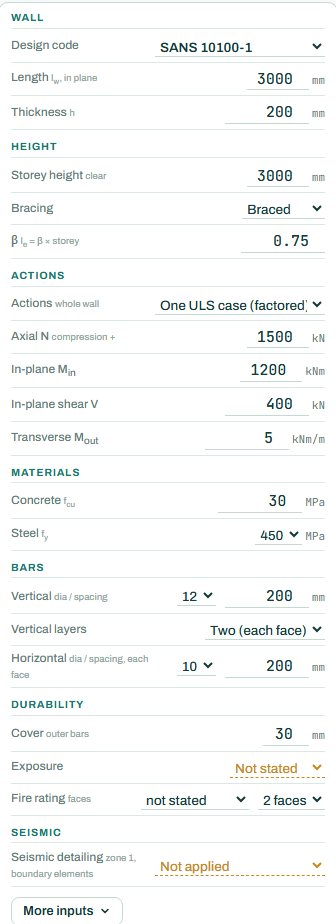
| Input | What it means | Typical value |
|---|---|---|
| Wall | Design code, length lw in plane and thickness h. | 3000 × 200 mm |
| Height | Clear storey height, braced or unbraced, and β (le = β × storey). | 3000 mm, braced, β 0.75 |
| Actions | One factored ULS case, or characteristic G, Q and wind. Axial N (compression +), in-plane moment and shear, and the moment across the wall per metre. | N 1500 kN, M 1200 kNm, V 400 kN |
| Materials | Concrete fcu and steel fy. | 30 MPa, 450 MPa |
| Bars | Vertical bars and spacing, one central layer or two (each face), horizontal bars and spacing. | Y12 @ 200 two faces, Y10 @ 200 |
| Durability | Cover, exposure and fire rating with the faces exposed. | 30 mm, moderate, 1 h |
| Seismic | Seismic detailing and boundary elements: not applied, or applied by one of two criteria. | not applied |
3. How to read the result
The elevation shows the wall with its bars, the loads and the force along the wall: compression at one end, tension at the other, with the neutral axis between. Under it is the plan with the bars in the thickness.
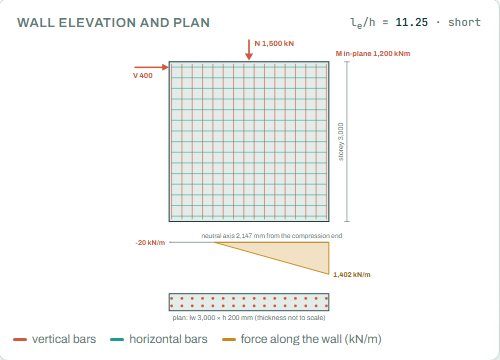
The design result first says whether the wall is short or slender (here le/h 11.25, short and braced); a slender wall picks up extra moments. Then the steel ratios, the in-plane capacity at this axial load (1200 against 3169 kNm), the end strip (the most loaded part of the wall, checked like a column), and the tension end.
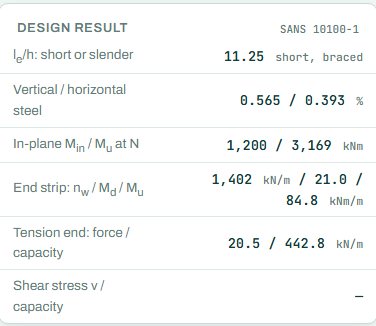
The badge names the governing check; here in-plane shear (the concrete plus the horizontal bars) at 46 %. With exposure and fire rating not stated, the summary shows 2 NOT CHECKED: they are not passes.
4. Calc sheet, drawing and schedule
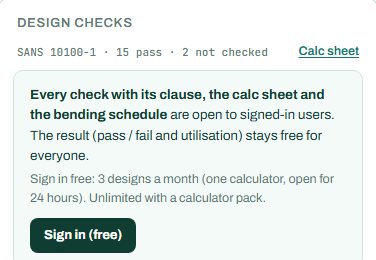
The result (pass / fail and utilisation) stays free for everyone. Every check with its clause, the calc sheet and the bending schedule are open to signed-in users. Sign in free: 3 designs a month (one calculator, open for 24 hours). Unlimited with a calculator pack.
The bending schedule card reads: “Sign in (free): 3 schedules a month. CSV with a paid plan.” The full reinforcement detail drawing is part of the paid plan.

5. A 2-minute walk-through
- Open the calculator: a 3 m long, 200 mm wall, 3 m storey, braced, with N 1500 kN, M 1200 kNm and V 400 kN.
- Set exposure and fire rating so every check runs.
- Switch to unbraced and see le/h and the slenderness change.
- Raise the in-plane moment to 2500 kNm and watch the tension end and the end strip.
- Switch actions to G, Q and wind and let the engine build the combinations.
6. Common mistakes
- Characteristic loads in the one ULS case. In “One ULS case” the actions are factored; use the G, Q and wind mode for characteristic loads.
- Braced when the wall is the bracing. A shear wall that carries the sway of the building is often itself unbraced in its own plane.
- Only the whole-wall moment. The end strip and the tension end usually decide the bars, not the overall capacity.
- One central layer in a thick wall. Two layers are needed for crack control and for the moment across the wall.
8. Learn more
Open the RC wall calculator
A guide to using the calculator, not a design. Check every value against the current code and your own project, and have the design checked and signed by a registered professional engineer.
Be first to use STATIX 3D and STATIX 2D.
Leave your email and we will tell you when each part is ready for testing. One confirmation now, one message then. A short monthly update only if you tick the box.