
How to use the fin plate calculator
A simple beam-to-column shear connection: what each input means, why the bolt group carries more than V / n, and how to read the governing check.
1. What the calculator does
The fin plate calculator checks a simple shear connection: a plate welded to the supporting column or beam and bolted to the web of the supported beam. It checks the bolt group with the eccentricity, bearing on the plate and on the beam web, the plate and the beam web in shear, bending and block tearing, the weld, and the notched beam if there is one. It also gives the take-off.
The code routes are SANS 10162-1 (with EN / SCI rows where SANS has no clause) and EN 1993-1-8 + SCI simple connections. The page badge names it: bolt group, bearing and block failure to SANS 10162-1 or EN 1993-1-8 / SCI P358.

2. The inputs, group by group
| Input | What it means | Typical value |
|---|---|---|
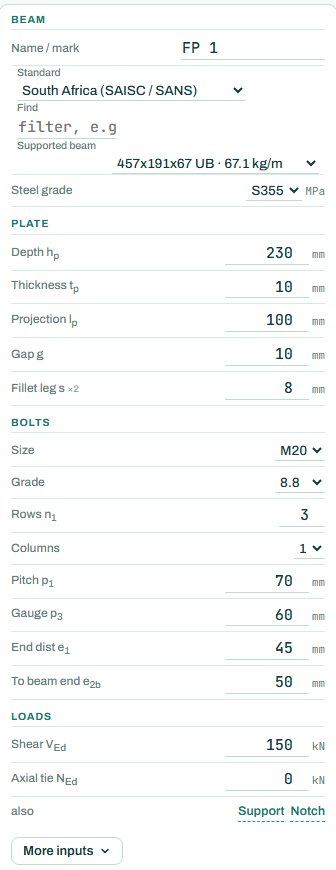
| Beam | The supported beam section and steel grade. | 457×191×67 UB, S355 |
| Plate | Depth, thickness, projection from the support, gap to the support, and the fillet weld leg (both sides). | 230 × 10, projection 100, gap 10, s 8 |
| Bolts | Size, grade, rows and columns, pitch, gauge, end distance and the distance to the beam end. | 3 × M20 8.8, pitch 70, end 45 |
| Loads | Factored shear VEd and an axial tie force, if the connection must tie the frame. | V 150 kN, tie 0 |
| Also | The support (column flange, column web or primary beam web) and a notch in the top or both flanges. | column flange, no notch |
3. How to read the result
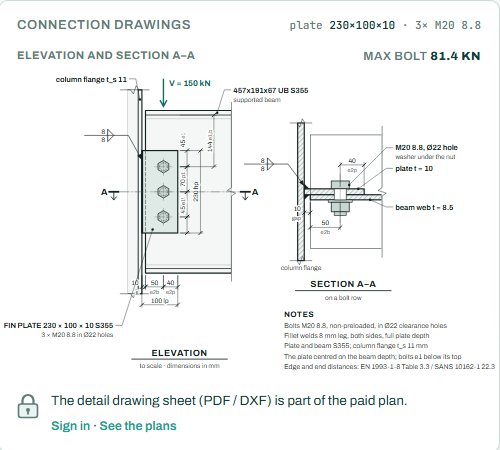
The connection drawing shows the elevation and section A–A to scale, with the bolts, the weld and the dimensions. “Max bolt” is the force on the most loaded bolt: the shear plus the effect of the eccentricity from the support face to the bolt line.
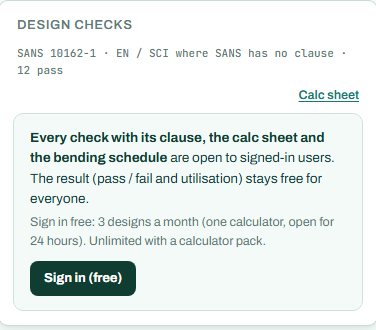
The badge names the governing check; here the bolt group resultant at 93 %. If the bolts govern, a fourth row or a bigger bolt helps; if bearing or block tearing on a thin beam web governs, more rows spread the load. Anything the engine could not check shows as NOT CHECKED.
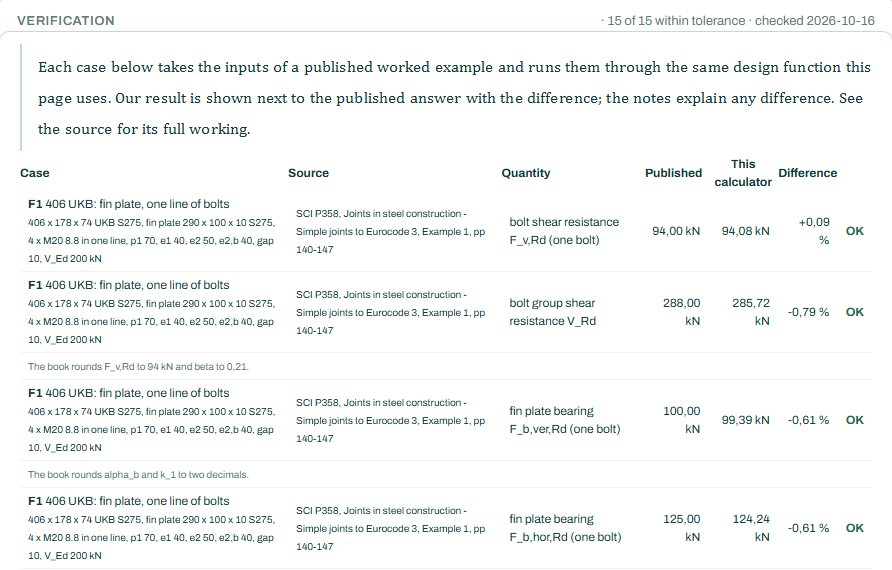
The verification table runs the published SCI P358 fin plate examples through the same engine, row by row, with the published value, the calculator value and the difference.
4. Calc sheet and take-off
The result (pass / fail and utilisation) stays free for everyone. Every check with its clause, the calc sheet and the bending schedule are open to signed-in users. Sign in free: 3 designs a month (one calculator, open for 24 hours). Unlimited with a calculator pack.
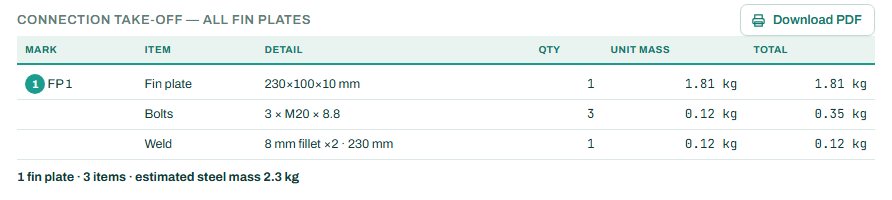
The detail drawing sheet (PDF / DXF) is part of the paid plan. The connection take-off collects every fin plate in the project.
5. A 2-minute walk-through
- Open the calculator: a 457×191×67 UB on a column flange, 230 × 100 × 10 plate, 3 × M20 8.8 bolts, VEd 150 kN.
- Read the badge: PASS 93 %, bolt group resultant. Max bolt force 81.4 kN.
- Raise VEd to 200 kN and see it fail; add a fourth row (plate depth 300) and see it pass.
- Notch the top flange for a beam-to-beam connection and see the notch checks appear.
- Add a tie force for a frame that needs tying.
6. Common mistakes
- Ignoring the eccentricity. The bolts carry more than V / n because the load acts at the support face; that is why the bolt group governs here.
- A thick fin plate. Fin plates rely on the plate yielding before the bolts fail; a thick plate is not safer. Keep it thin, as the published rules do.
- No notch where there is one. A beam-to-beam connection usually needs a notched top flange; the notched section is often what governs.
- Forgetting the tie force for robustness.
7. Where it fits
The shear VEd is the factored end reaction of the beam, from the RC or steel beam design. For a moment connection, use the end plate calculator instead.
8. Learn more
- Steel Design 1, lesson 5: bolted connections and lesson 6: welded connections
- Worked example: fin plate to SANS 10162-1
Open the fin plate calculator
A guide to using the calculator, not a design. Check every value against the current code and your own project, and have the design checked and signed by a registered professional engineer.
Be first to use STATIX 3D and STATIX 2D.
Leave your email and we will tell you when each part is ready for testing. One confirmation now, one message then. A short monthly update only if you tick the box.